- sales/support
Google Chat:---
- sales
+86-0755-88291180
- sales01
sales@spotpear.com
- sales02
dragon_manager@163.com
- support
tech-support@spotpear.com
- CEO-Complaints
zhoujie@spotpear.com
- Only Tech-Support
WhatsApp:13246739196
- Purchase/Shipping/Refund
WhatsApp:13424403025
UPS HAT (C) User Guide
Introduction
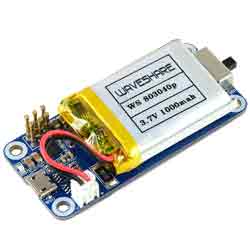
UPS HAT (C) For Raspberry Pi Zero, 5V Uninterruptible Power Supply, Multi Battery Protection Circuits
Features
- Onboard spring pogo pins for connecting with Raspberry Pi Zero series boards.
- Li-po battery recharge chip, with dynamic path management, more stable power supply.
- Voltage boost chip, providing regulated 5V power output.
- I2C bus communication, monitoring the battery voltage, current, power, and remaining capacity in real time.
- Multi battery protection circuits: over charge/discharge protection, over current protection, and short circuit protection, more safe and stable.
- Recharging indicator for monitoring the battery operating status.
- Comes with development resources and manual.
Specifications
- Output voltage:5V
- Charger:5V
- Control bus:I2C
- Battery supported:803040 Li-po battery 1000mAh 3.7V
- Dimensions:65 × 30mm
- Mounting hole:3.0mm
Hardware
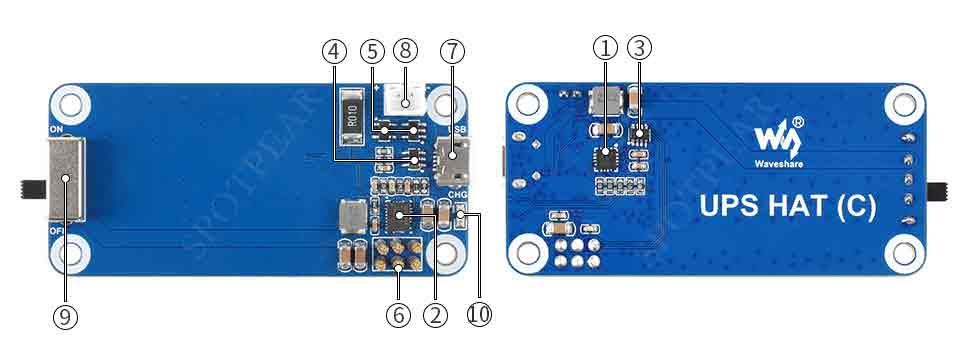
- ETA6003: recharge manager
- TPS61088: voltage boost chip
- INA219: voltage/current monitor
- S8261: Li-po battery protection chip
- FS8205: Li-po battery protection MOS
- Pogo pins: for connecting with Raspberry Pi Zero
- USB recharge port: 5V charger input
- Battery header: for connecting 803040 Li-po battery
- Power indicator
- Recharging indicator
Note 1: Please turn the power switch to OFF before you connect the battery, or the board may be damaged because of shorting.
Note 2: The board may not work when you mount the batteries for the first time, you need to charge batteries on board for a while to activate them.
Note 3: The discharge current is about 1.8A if the battery was fully charged, and it gets smaller as the battery voltage. If the working current required by Raspberry Pi is too big, it may cause over-current and low-voltage problem and the Pi may keep rebooting.
SAFETY CAUTIONS
- Li-ion and Li-po batteries are quite unstable. They may cause fire, personal injury, or property damage, if they're not properly recharged or used.
- Do not reversely connect the polarities when recharging or discharging the battery. Do not use inferior charger/charging panel to recharge the battery.
- Do not mix use old batteries with new ones, avoid using batteries of different brands.
- When buying Lithium battery, should always make sure the battery specification is compatible with the expansion board. Choose batteries from formal manufacturer, and ensure the batteries will work stably and safely by aging test.
- Lithium batteries have limited cycle life, they will also deteriorate as time goes by. Should be replaced with new ones when the batteries reaching their max cycle life, or working over two years, whichever comes first.
- Should be placed carefully and properly, keep it away from inflammables and explosives articles, away from children, avoid any safety accident caused by careless storage.
How to use
Enable I2C interface
Open the terminal:
sudo raspi-config
Choose Interfacing Options -> I2C ->yes
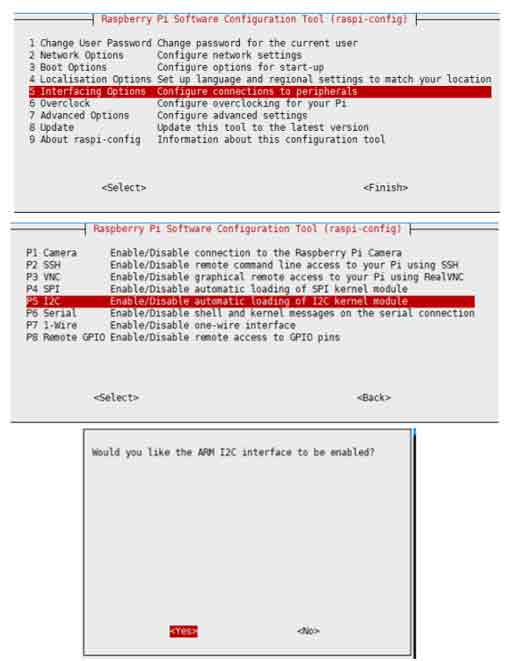
Then reboot the Pi:
sudo reboot
Run the example
Fix the UPS HAT (C) with Raspberry Pi.
Open a terminal and run the following commands:
sudo apt-get install p7zip
wget https://www.waveshare.com/w/upload/4/40/UPS_HAT_C.7z
7zr x UPS_HAT_C.7z -r -o./
cd UPS_HAT_C
python3 INA219.py
The terminal will print the IP address, battery voltage, current, and the percentage of battery quantity, as well as the CPU, GPU and memory information after starting the server.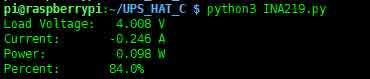
Note: if the current value is negative, it means that the batteries are feeding the Raspberry Pi. If the current value is positive, it means that the batteries are charging.
Resources
Demo codes
Document
FAQ
Question: Why the HAT doesn't work after re-connect the battery?
- You need to connect and charge the battery with the HAT for a while to activate the protective circuit, and then set the switch to ON.
Question:What is the battery life?
- Without other devices and in standby mode, the battery can feed the Pi zero for about 7 hours after fully charging.
Question:What is the output current?
- The output current is about 1.8A if the battery was fully charged, and goes smaller as the voltage. It will automatically cut off the power if the current is too small.
- If the power of the load is too big, the Pi zero may keep rebooting.
Question:Why are the capacity value changing all the time and it is not accurate?
- The capacity is measured by the battery voltage, it is higher than the actual value if you connect the power adapter for charging.
- The expected voltage when fully charging is 4.2V, however, the actual voltage will be smaller than it.
Question: What kind of battery is supported?
- 803040 is a polymer lithium battery, the dimension is 40mm*30mm*8mm, standard voltage is 3.7V and the full voltage is 4.2V.。
Question: How does the Charge indicator work?
- It turns on when charging and turns off when fully charging.
Question: Why is the current value is negative?
- Negative value means that the battery is discharging and powering the Pi.
Question:How to charge the battery?
To charge the battery, you should connect a 5V Micro USB power adapter to the micro USB port of the HAT.