




- sales/support
Google Chat:---
- sales
+86-0755-88291180
- sales01
sales@spotpear.com
- sales02
dragon_manager@163.com
- support
tech-support@spotpear.com
- CEO-Complaints
zhoujie@spotpear.com
- Only Tech-Support
WhatsApp:13246739196
- Purchase/Shipping/Refund
WhatsApp:13424403025
Raspberry Pi Li-polymer Battery HAT User Guide
Instruction
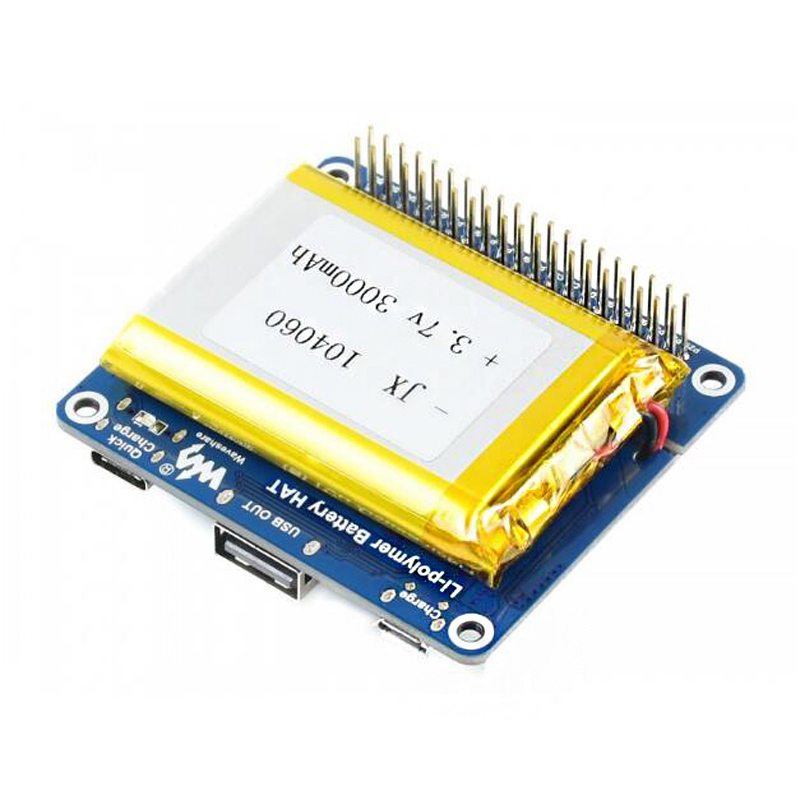
The Li-polymer Battery HAT integrates SW6106 power bank management chip, allows providing 5V regulated power supply to your Raspberry Pi or other 5V devices, from a high capacity Li-polymer battery. It will charge the battery as well, supports bi-directional quick charge.
Features
- Onboard SW6106 chip, supports bi-directional quick charge, supports multi quick charge protocols like PD/QC/FCP/PE/SFCP
- Lithium battery protection circuitry, provides reverse protection, overcharge protection, and short circuit protection
- Onboard indicators: quick charge, power capacity
- PH 2.0 battery connector, for connecting the 3.7V 3000mA high capacity Li-polymer battery (MSDS certified)
Specifications
- Output voltage: 5V
- Charge voltage: 5V
- Applicable battery: 3.7V Li-polymer battery (4.2V when full charged)
- Dimension: 65.0mm × 56.5mm
- Mounting hole size: 3.0mm
Interfaces and Indicators
- Interfaces
| Interface | Description |
| Micro USB | Charge |
| USB Type-A | Power output |
| USB Type_C | Suports chrage, quick charge and power output |
- There are five battery indicators.
| Capacity | LED1 | LED2 | LED3 | LED4 | LED5 |
| 80%~100% | ON | ON | ON | ON | ON |
| 60%~80% | ON | ON | ON | ON | Blink |
| 40%~60% | ON | ON | ON | Blink | OFF |
| 20%~40% | ON | ON | Blink | OFF | OFF |
| 5%~20% | ON | Blink | OFF | OFF | OFF |
| 1%~5% | Blink | OFF | OFF | OFF | PFF |
| 0% | OFF | OFF | OFF | OFF | OFF |
- Quick start indicator
- When you connect power adapter to Type_C interface for quick charging, the Quick Charge indocator will turn on. If it keeps on, maybe that your adapter doesn't support quick charge.
- Standby button
- Single-press it to output 5V, and double-press it to set it to sleep mode.
How to use
Discharge
- Connect it to Raspberry Pi
- Step1: Insert the Li-polymer battery to 2.0mm battery socket.
- Step2: Single-press Standby button, set it to discharge mode
- Step3: Attach it on Raspberry Pi for powering.
- For other devices.
- Step1: Insert the Li-polymer battery to 2.0mm battery socket.
- Step2: Single-press Standby button, set it to discharge mode
- Step3: Connect it to other devices by USB cable or wires.
Charge
- Charge
- Step1: Insert the Li-polymer battery to 2.0mm battery socket.
- Step2: Connect power adapter to micro USB or Type-C interface by USB cable
- Quick charge
- Step1: Insert the Li-polymer battery to 2.0mm battery socket.
- Step2: Connect power adapter (support quick charge) to type_C interface by USB cable
- Step3: Check if the Quick charge indicator turns on.
Notices
- Module enter sleep mode when the working current is less than 40mA and stop to discharge.
- The Quick charge mode only works when you connect a power adapter that supports quick charge.
- To power Raspberry Pi, you can attach it on the GPIO or connect Type_A interface to Pi by USB cable.
- This module cannot work as UPS. It will turn off Raspberry Pi when low-voltage.
- The battery is about 4.2v when fully charged. Note that you should discharge the battery to 3.0, otherwise it is damaged.
- Please disconnect any devices when you replace battery.
- DO NOT change the battery provided with other battery without protective panel.
- Please check the poles of the battery interface carefully when you connect batteries.
TAG:
ESP32 C3 1.44inch LCD
Raspberry Pi 60GHz mmWave Radar Sensor High-Precision Human Body PCR For Arduino ESP32
Raspberry Pi 24.5 inch Type C/HDMI 2K Display 24.5inch Screen 2560x1440 Computer PC Phone For Xbox/PS4/Switch
Raspberry Pi Pico
Raspberry Pi 5 Box Case Ki-A PCIe to RJ45 Gigabit Ethernet All Ports To Pi's USB Side
Milk V
DeepSeek AI Voice Chat Robot ESP32 S3 Development Board 2.8 inch Display 2.8inch Screen
Sipeed SLogic 4IN1 USB Logic Analyzer 80M / DAPLink / CKLink Debugger Tool / UART Module
Mobile Robot
X1007 Raspberry Pi 5 PCIe to Dual 2.5" SATA HDD/SSD Double-SATA (NOT BOOT From SATA/SSD
JETSON-IO-BASE-A user Guid
Core3566102032
ESP32 C6 AI 0.85inch Development Board 0.85 inch DeepSeek RGB surround light Dual mike
Raspberry Pi Display Driver Board
PI5 Case
ESP32 ST7789 configuration
Spotpear
Raspberry Pi Pico DVI
NVIDIA-acess User Guide
ESP32-S3 1.28inch LCD
TAG:
NVIDIA
Raspberry Pi 5inch DSI LCD B Display MIPI IPS 800x480 Capacitive TouchScreen
Raspber Pi 5 Original Power
LuckFox
Raspberry Pi 5 PD Induction
SpotPear
Robots Car 360° Omnidirectional 2-Axis Pan-Tilt Camera Serial Bus Servos General Driver Board
ESP32 S3 2.8 inch LCD Display 480x640
Raspberry Pi 21.5 inch Type C/HDMI Display Screen 1920x1080 Computer PC Phone Xbox/PS4/Switch
Raspberry Pi 5 - 4GB RAM
CSI-to-HDMI
ESP32
ESP32-C5 Mini Development Board based on ESP32-C5-HF4 dual-core processor
Raspberry Pi 4 Model B
Jetson Orin NX Case
Mini TOF Time-of-Flight Laser Ranging Radar Sensor Compatible with Arduino Raspberry Pi ESP32 and Pico
RV1106
Spotpear
MPS2280 POE Raspberry Pi 5 PCIe M.2 NVMe SSD Pi5 2280 2242 2230
EyeLink-RC-S1 Industrial Edition FPV Drone ground station image transmission remote control