- sales/support
Google Chat:---
- sales
+86-0755-88291180
- sales01
sales@spotpear.com
- sales02
dragon_manager@163.com
- support
tech-support@spotpear.com
- CEO-Complaints
zhoujie@spotpear.com
- Only Tech-Support
WhatsApp:13246739196
- Purchase/Shipping/Refund
WhatsApp:13424403025
Raspberry Pi Current/Power Monitor HAT User Guide
Instruction
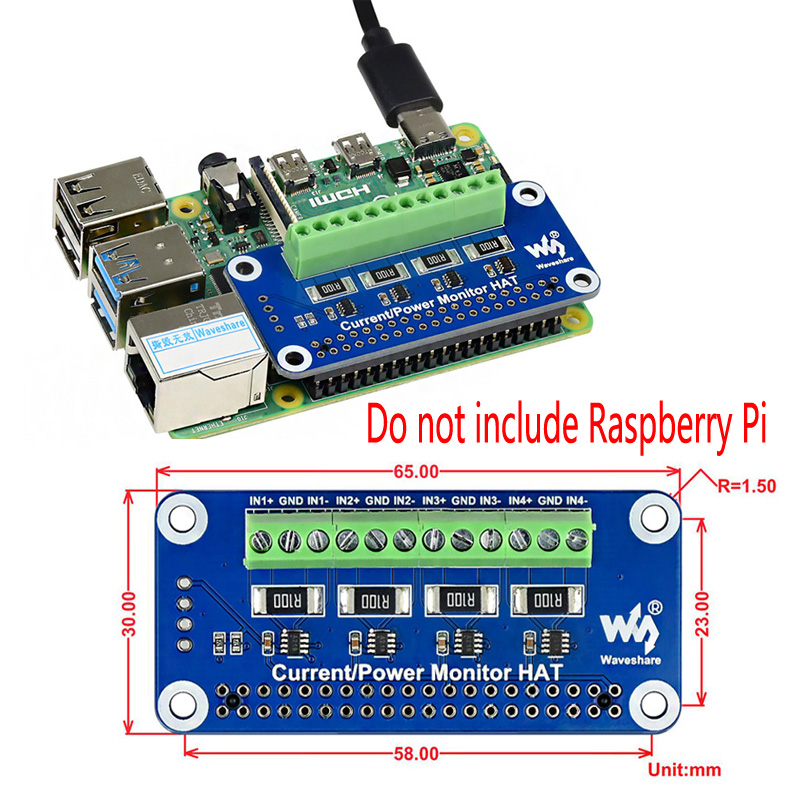
This is a 4-ch current and power monitor HAT designed for Raspberry Pi. Via the I2C or SMBus interface, it is easy to monitor each channel's current, voltage, and power consumption, as well as the voltage between both sides of the sampling resistor.
Features
- Standard Raspberry Pi 40PIN GPIO extension header, supports Raspberry Pi series boards
- 4-ch monitoring, via I2C/SMBus interface
- Onboard 0.1Ω 1% sampling resistor, allows measuring bi-directional current up to 3.2A
- Embedded 12-bit ADC, supports multiple successive converting, 0~26V voltage measuring range
- Directly calculate and output measured power value through additional multiply register
- I2C control pins for connecting with other host boards
- Comes with development resources and manual (examples for Raspberry Pi/Arduino/STM32)
Specification
- Operating voltage: 3.3V/5V
- Control interface: I2C/SMBus
- Sampling resistor: 0.1Ω 1%
- Voltage range: 0~26V
- Current range: ±3.2A
- Resolution: 0.8mA (±3.2A range) OR 0.1mA (±400mA range)
- Dimensions: 65mm × 30mm
- Mounting hole size: 3.0mm
Hardware
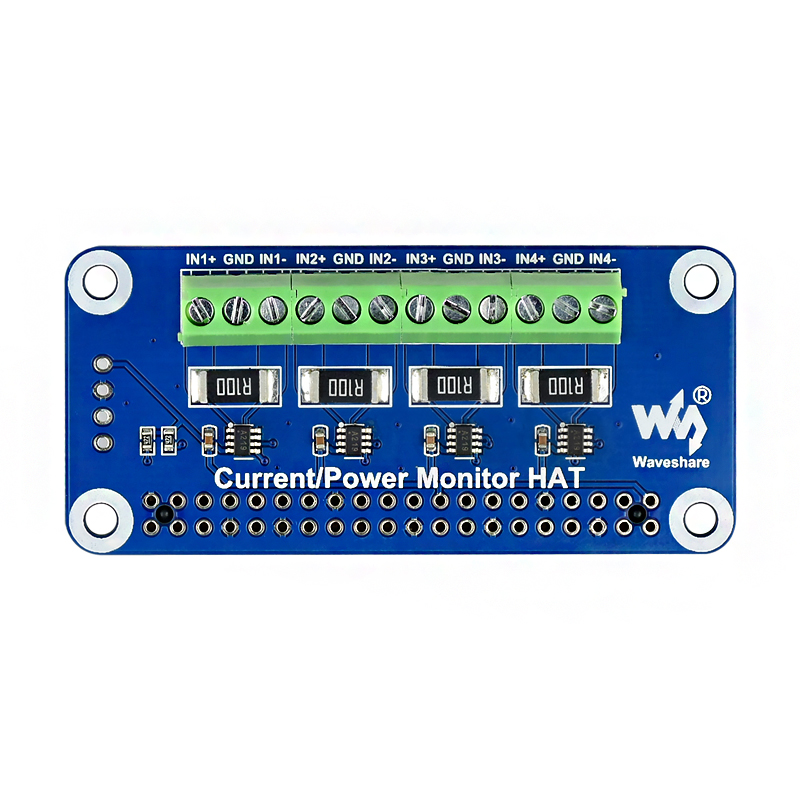
This module can be used to test currents and voltages of four channels, they are (IN1+ IN1-), (IN2+ IN2-), (IN3+ IN3-) and (IN4+ IN4-).
INx+ is the current input, and INx- is the current output. Module measure the differential voltage of the sample resistor connected between INx+ and INx-, with the voltage we can measure the working current.
The module supports measuring bidirectional current, so users can invert the input and output.
Note that you must connect GND when testing different power adpter, otherwise, the VBus voltage cannot be measured.
Raspberry Pi examples
To test the example, you should first attach the monitor HAT on Raspberry Pi, or you can connect the monitor HAT to I2C interface of Raspberry Pi by wires.
Open the terminal of Raspberry Pi and following the commands
sudo pip3 install adafruit-circuitpython-ina219
sudo apt-get install p7zip
wget http://www.waveshare.net/w/upload/6/69/Current-Power_Monitor_HAT_Code.7z
7zr x Current-Power_Monitor_HAT_Code.7z -r -o./Current-Power_Monitor_HAT
cd Current-Power_Monitor_HAT/RaspberryPi
python3 ina219.py
You can get data of the VBus voltage, differential voltage of sample resistor, voltage input, power, and current.
STM32 examples
The examples provide is based on NUCLEO-F103RB, you can connect it as the table
| PIN | NUCLEO | ||
|---|---|---|---|
| VCC | 3.3V | ||
| GND | GND | ||
| SDA | SDA/D14/PB9 | ||
| SCL | SCL | D15 | PB8 |
Download the demo code from #Resource, unzip and go to the directory of the STM32 project. Open the project by Keil5.
Program the demo codes to your NUCLEO board and test
The data of the VBus voltage, differential voltage of sample resistor, voltage input, power, and current will be printed to serial port.
Arduino
The example provided is based on Waveshare UNO Plus.
| PIN | UNO Plus |
|---|---|
| VCC | 3.3V |
| GND | GND |
| SDA | SDA/D14 |
| SCL | SCL/D15 |
If you use other Arduino board, please check the working voltage of your Arduino board, and change the VCC to 5V/3.3V according to it.
Download the demo codes from #Resouces. unzip and go to the directory of Arduino codes. Open it by Arduino IDE and program it to your board.
The data of the VBus voltage, differential voltage of sample resistor, voltage input, power, and current will be printed to serial port.