




- sales/support
Google Chat:---
- sales
+86-0755-88291180
- sales01
sales@spotpear.com
- sales02
dragon_manager@163.com
- support
tech-support@spotpear.com
- CEO-Complaints
zhoujie@spotpear.com
- Only Tech-Support
WhatsApp:13246739196
- Purchase/Shipping/Refund
WhatsApp:13424403025
- HOME
- >
- ARTICLES
- >
- Common Moudle
- >
- Camera
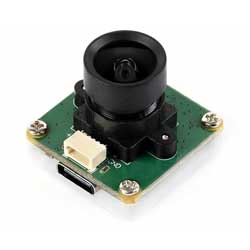
OS05A10 5MP USB Camera (A) User Guide
Specifications
- Pixels: 5MP
- Sensor chip: OS05A10
- DSP: Auto gain/exposure/white balance
- Camera:
- CCD size: 1/2.7inch
- Aperture (F): 2.7
- Focal length (EFL): 2.88mm
- Field of View (FOV): 96° (D)
- Distortion: < -0.2%
- Focus mode: Fixed focus
- Interface type: USB2.0/SH1.0 4P
- Image:
- Supported image formats: MJPG, YUY2
- Static image resolution: 2592 × 1944
- Video recording (MJPG):
- 30 FPS 2592 × 1944
- 30 FPS 1920 × 1080
- 30 FPS 1280 × 720
- Operating voltage: 5V ± 5%
- Operating temperature: 0°C ~ 50°C
- Dimensions: 25.00 × 25.00 × 22.1 (mm)
- Supported systems: Windows, Linux, macOS
Working with Windows PC
Test Software
Currently, a camera app is generally pre-installed on most Windows 10 systems. You can simply open this built-in Windows camera app to perform testing.
If you are using Windows 7 or cannot find the camera app in the system, you can download and install the AMCAP test software provided by us from Resources->Software.
Test Steps
- Window camera software
- Search for "Camera" to open the software
- Click the gear icon in the upper left corner to open the settings interface, where you can set the resolution for taking pictures or videos

- Click the video or capture icon on the right to switch between recording and shooting
- AMCap software
- Download and install AMCap software
- You can click on the Option option and select Video Capture Pin... or Still Capture Pin... to set the parameters of the image and video

Working with Raspberry Pi
Preview with Plugins
- Open the Raspberry Pi terminal, enter the command to install the luvcview software
- sudo apt-get install luvcview -y
- After installation, enter the command on the terminal to open the software for USB camera testing
- sudo luvcview -s 1920x1080

Preview with Scripts
- Install opencv
sudo apt-get install python3-opencv
- Download the demo and test
wget https://files.waveshare.com/wiki/common/Usb_camera_examples.zip
unzip Usb_camera_examples.zip
cd Usb_camera_examples
sudo python3 Usb_camera_examples.py
Working with Jetson Nano Developer Kit
Preview with Commands
- Open the Jetson Nano Developer Kit terminal (open with Ctrl+Alt+T or mouse click)
- Input the following command to preview:
- nvgstcapture-1.0 --camsrc=0
- After inputting, a preview window will open

Preview with Scripts
- Install opencv
sudo apt-get install python3-opencv
- Download the demo and test
wget https://files.waveshare.com/wiki/common/Usb_camera_examples.zip
unzip Usb_camera_examples.zip
cd Usb_camera_examples
sudo python3 Usb_camera_examples.py
Note: In practical application, you may need to call with a program, and you can refer to Opencv and other related image processing library materials by yourself
Resources
Documents
Software
FAQ
Question: If the hand touches the back of the PCB, will the camera display abnormalities?
Answer:
- Avoid touching the components on the PCB backside to prevent affecting electrical performance
Question: Does the module get hot during use?
Answer:
- During use, the module heats up significantly and may feel hot, which is normal.
Question: Why can't I control parameters like brightness, contrast, etc.?
Answer:
- If you are using Mac and Opencv, some parameter settings cannot be used, it is recommended to use Linux and V4L2 drivers.
Support
Monday-Friday (9:30-6:30) Saturday (9:30-5:30)
Email: services01@spotpear.com
TAG:
X1008 Raspberry Pi 5 PCIe to 2.5" 3.5" SATA HDD/SSD Dual Double-SATA (NOT BOOT From SATA/SSD
Raspberry Pi RTC WatchDog HAT (B) Real time clock Onboard DS3231SN High Precision RTC Chip
ESP32 H2 ESP32-H2-Zero MINI Development Board For BLE/Zigbee/Thread
Retail electronic Labe
ESP32 S3 Development Board 1.85 inch Round LCD Display 360&amp;amp;times;360 QMI8658 Sensor / MIC / SD /MP3 Audio /Battery Port LVGL/HMI For Arduino
ESP32-C6
ESP32 ST7789
Jetson Nano Development
Raspberry Pi 5/4B easy Adapter Micro HDMI to HDMI 4K All Ports To Pi's USB Side
Autofocus Camera
ESP32-AI Series User Guide
0.85inch Display
AURORA AI Laser Radar And Dual Eye Camera IMU Integrated Positioning Map For Android/ROS+RoboStudio
Raspberry Pi Zero 4G Cat1 With USB Hub Expansion Board LTE/GPS/EA/EU also For Zero 2W
R7FA4 PLUS B Development Board Based on R7FA4M1AB3CFM Compatible with Arduino UNO For R4 WiFi
Core3566102032
Raspberry Pi Pico
Raspberry Pi 9inch DSI MIPI LCD TouchScreen Display 9inch 720x1280 For Luckfox Lyra RK3506/ESP32-P4/Luckfox Omni3576
Raspberry Pi Camera
Magnetic Encoder Servo Motor 45KG.CM 24V 360° RS485 High Precision And Large Torque
[Tutorial Navigation]
- Specifications
- Working with Windows PC
- Working with Raspberry Pi
- Working with Jetson Nano Developer Kit
- Resources
- FAQ
- Question: If the hand touches the back of the PCB, will the camera display abnormalities?
- Question: Does the module get hot during use?
- Question: Why can't I control parameters like brightness, contrast, etc.?
- Support