- sales/support
Google Chat:---
- sales
+86-0755-88291180
- sales01
sales@spotpear.com
- sales02
dragon_manager@163.com
- support
tech-support@spotpear.com
- CEO-Complaints
zhoujie@spotpear.com
- Only Tech-Support
WhatsApp:13246739196
- Purchase/Shipping/Refund
WhatsApp:13424403025
Pi ALL GPIO TEST BOARD (B) User Guide
PCF8591
Test image version: 2022-04-04-raspios-bullseye-armhf.img Raspberry pi 4B
Prepare
Enable I2C
sudo nano /boot/config.txt
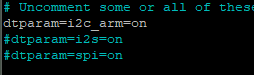
Ensure that I2C is on, and then restart the system.
sudo reboot
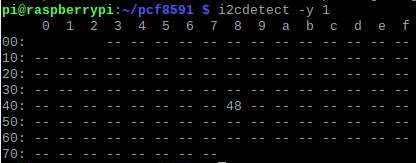
After restart, address 48 can be detected by I2C address detection command.
i2cdetect -y 1
connection
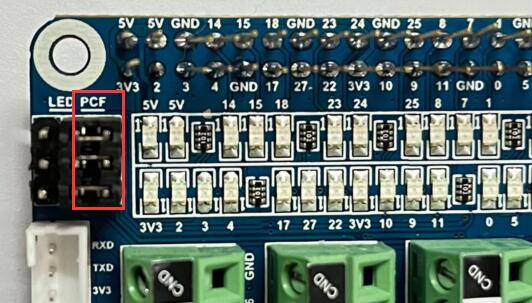
Ensure that jumper caps are connected to PCF.
Running code
Download sample code pcf8591
cd pcf8591/
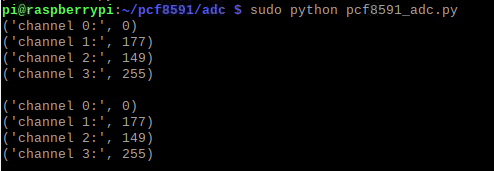
sudo python pcf8591_adc.py
Phenomenon
4-channel print AD value
DAC
Running code
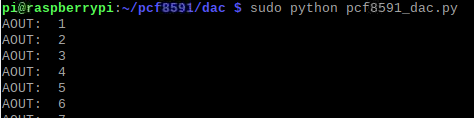
sudo python pcf8591_dac.py
Phenomenon
The LED lamp changes with the output value of DAC, and the brightness changes.
LED
Prepare
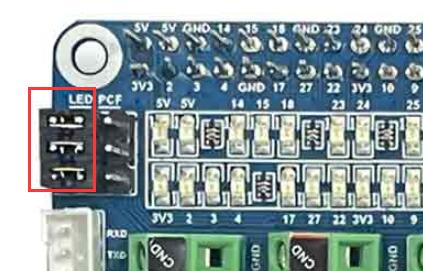
connection
Make sure that the jumper caps are connected to the LED.
Running code
Download GPIO_Test.py to raspberry pi.
sudo python GPIO_Test.py
Phenomenon
The power indicator LED is always on, and the GPIO connection LED is turned on in turn, and then turned off in turn, continuously circulating.