- sales/support
Google Chat:---
- sales
+86-0755-88291180
- sales01
sales@spotpear.com
- sales02
dragon_manager@163.com
- support
tech-support@spotpear.com
- CEO-Complaints
zhoujie@spotpear.com
- Only Tech-Support
WhatsApp:13246739196
- Purchase/Shipping/Refund
WhatsApp:13424403025
5G-for-Jetson-Nano Guide
Resource
Document
Demo codes
Software
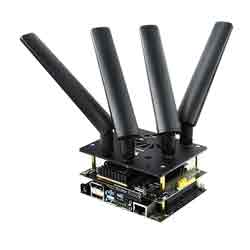
(Redirected from SIM8202G-M2 5G for Jetson Nano)SIM8200EA-M2: 6 Antennas version, Dimension is 30×52mm
SIM8202G-M2: 4 Antenna version, dimension is: 30×42mm
The software for the two version are the same
SIM8202G-M2: 4 Antenna version, dimension is: 30×42mm
The software for the two version are the same
Overview
This 5G/4G/3G Jetson Nano communication module adopts SIMCom 5G module SIM8202G-M2, supports 5G NSA and SA networking, providing data rate up to 2.4 Gbps (DL) / 500 Mbps (UL).
The baseboard features a standard M2 connector, which allows connecting with different 4G or 5G communication modules in the M2 package. There are also onboard interfaces like USB3.1 port, audio jack, SIM card slot, etc. Combined with our configuration script and development resources, it is easy to enable 5G high-speed communication for the Jetson Nano or computer. This 5G module is ideal for fast evaluating 5G modules, as well as being integrated into sorts of applications where a 5G connection is required.
This 5G/4G/3G Jetson Nano communication module adopts SIMCom 5G module SIM8202G-M2, supports 5G NSA and SA networking, providing data rate up to 2.4 Gbps (DL) / 500 Mbps (UL).
The baseboard features a standard M2 connector, which allows connecting with different 4G or 5G communication modules in the M2 package. There are also onboard interfaces like USB3.1 port, audio jack, SIM card slot, etc. Combined with our configuration script and development resources, it is easy to enable 5G high-speed communication for the Jetson Nano or computer. This 5G module is ideal for fast evaluating 5G modules, as well as being integrated into sorts of applications where a 5G connection is required.
Features
- Standard 40PIN GPIO extension header supports direct attaching to Jetson Nano.
- Comes with the SIM8202G-M2 core module, based on Qualcomm Snapdragon X55 platform, with multi-mode multi-band support.
- 5G/4G/3G communication, supports functions like a phone calls, SMS, cloud communication, etc.
- USB3.1 port for testing AT commands, sending messages, cloud communication, making phone calls, getting GNSS positioning data, etc.
- SIM card slot supports 1.8V / 3V SIM card.
- 2 x LED indicators, easy to monitor the working status.
- AT command support, based on 3GPP TS 27.007, 27.005, and V.25TER command set.
- Onboard audio jack and audio decoder, allows audio operation like making phone calls.
- Multi-constellation dual-band positioning: GPS, GLONASS, Beidou, Galileo, and QZSS.
- Standard 40PIN GPIO extension header supports direct attaching to Jetson Nano.
- Comes with the SIM8202G-M2 core module, based on Qualcomm Snapdragon X55 platform, with multi-mode multi-band support.
- 5G/4G/3G communication, supports functions like a phone calls, SMS, cloud communication, etc.
- USB3.1 port for testing AT commands, sending messages, cloud communication, making phone calls, getting GNSS positioning data, etc.
- SIM card slot supports 1.8V / 3V SIM card.
- 2 x LED indicators, easy to monitor the working status.
- AT command support, based on 3GPP TS 27.007, 27.005, and V.25TER command set.
- Onboard audio jack and audio decoder, allows audio operation like making phone calls.
- Multi-constellation dual-band positioning: GPS, GLONASS, Beidou, Galileo, and QZSS.
Specification
SIM8200EA-M2 SIM8202G-M2 Frequency band Sub-6G(SA) n1, n2, n3, n5, n7, n8, n12, n20, n28, n38, n40, n41, n48, n66, n71, n77, n78, n79 (n79 is only available for SIM8202G-M2) Sub-6G(NSA) n41, n77, n78, n79 (n79 is only available for SIM8202G-M2) LTE-FDD B1/B2/B3/B4/B5/B7/B8/B12/B13/B14/B17/B18/B19/B20/B25/B26/B28/B29/B30/B66/B71 LTE-TDD B34/B38/B39/B40/B41/B42/B48 WCDMA B1/B2/B3/B4/B5/B8 GNSS GPS, GLONASS, Beidou, Galileo and QZSS Data rate Sub-6G 4 Gbps (DL) / 500 Mbps (UL) LTE 2 Gbps (DL) / 200 Mbps (UL) HSPA 42 Mbps (DL) / 5.76 Mbps (UL) Software functions Operating systems Windows/Linux/Android Communication protocols TCP/IP/IPV4/IPV6/Multi-PDP/FTP/FTPS/HTTP/HTTPS/MQTTS/DNS/SSL3.0 SMS Supports MT、MO、CB、Text、PDU Firmware upgrade Supports firmware upgrade via USB port Hardware info SIM card 1.8V/3.0V Antenna connector 6x IPEX-4 connector 4x IPEX-4 connector Module dimensions 52.0×30.0×2.3mm 42.0×30.0×2.3mm Application Applicable regions Regions with 5G Sub-6G signal coverage including China, US, Japan, South Korea, Europe, the Middle East, Latin America, etc. Application examples CPE, Smart gateway, Drone, Live streaming, Remote medical treatment, Intelligent security
| SIM8200EA-M2 | SIM8202G-M2 | |
| Frequency band | ||
| Sub-6G(SA) | n1, n2, n3, n5, n7, n8, n12, n20, n28, n38, n40, n41, n48, n66, n71, n77, n78, n79 (n79 is only available for SIM8202G-M2) | |
| Sub-6G(NSA) | n41, n77, n78, n79 (n79 is only available for SIM8202G-M2) | |
| LTE-FDD | B1/B2/B3/B4/B5/B7/B8/B12/B13/B14/B17/B18/B19/B20/B25/B26/B28/B29/B30/B66/B71 | |
| LTE-TDD | B34/B38/B39/B40/B41/B42/B48 | |
| WCDMA | B1/B2/B3/B4/B5/B8 | |
| GNSS | GPS, GLONASS, Beidou, Galileo and QZSS | |
| Data rate | ||
| Sub-6G | 4 Gbps (DL) / 500 Mbps (UL) | |
| LTE | 2 Gbps (DL) / 200 Mbps (UL) | |
| HSPA | 42 Mbps (DL) / 5.76 Mbps (UL) | |
| Software functions | ||
| Operating systems | Windows/Linux/Android | |
| Communication protocols | TCP/IP/IPV4/IPV6/Multi-PDP/FTP/FTPS/HTTP/HTTPS/MQTTS/DNS/SSL3.0 | |
| SMS | Supports MT、MO、CB、Text、PDU | |
| Firmware upgrade | Supports firmware upgrade via USB port | |
| Hardware info | ||
| SIM card | 1.8V/3.0V | |
| Antenna connector | 6x IPEX-4 connector | 4x IPEX-4 connector |
| Module dimensions | 52.0×30.0×2.3mm | 42.0×30.0×2.3mm |
| Application | ||
| Applicable regions | Regions with 5G Sub-6G signal coverage including China, US, Japan, South Korea, Europe, the Middle East, Latin America, etc. | |
| Application examples | CPE, Smart gateway, Drone, Live streaming, Remote medical treatment, Intelligent security | |
Working With Window PC
Install driver
Download the driver from (Resources->Software) to your PC and unzip it.
Go into the SIM8200_OS_Driver\Windows directory.
Go into the 1_install directory, and run the setup.exe file to install the driver.
Download the driver from (Resources->Software) to your PC and unzip it.
Go into the SIM8200_OS_Driver\Windows directory.
Go into the 1_install directory, and run the setup.exe file to install the driver.
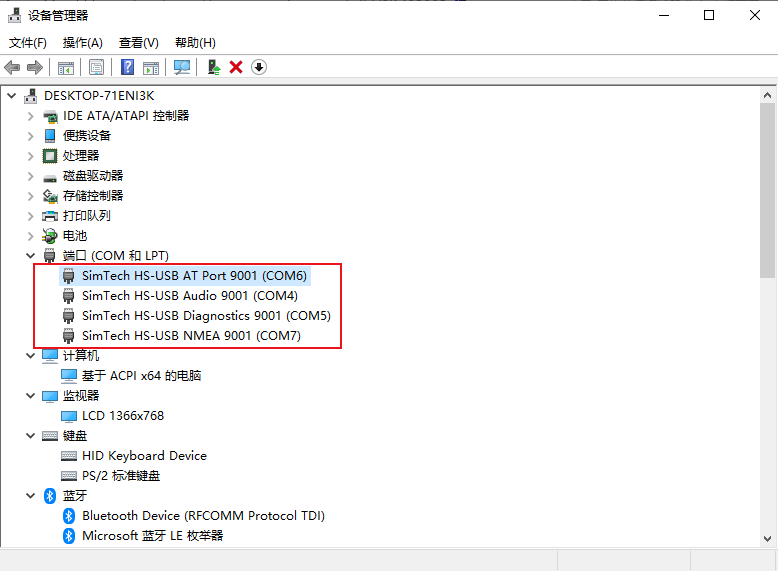
After installing, a mobile network is generated and you get to use it to connect to the mobile network directly.
Install Driver Manually
For some of the PC, the mobile network is not generated after installing the driver above, In this case, you need to add it manually with the 2_AddManully file. Fin the Unknown device and right-click to update the driver as figure below:
Power on the 5G module and set the switch to ON. Your PC will recognize several unknown devices.
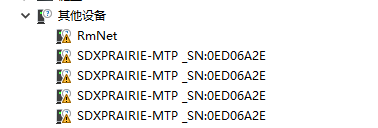
Right-click the unknown device and update the drive, browser the path manually: SIM8200_OS_Driver\Windows. note that you need to update the driver for all the unknown devices.
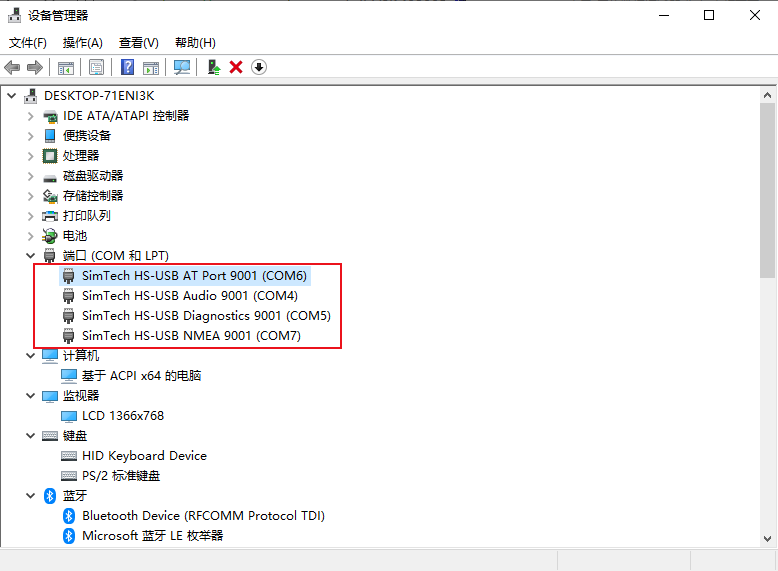
There will be four ports: AT is used for AT commands. Audio for dialing, Diagnostics for debugging, and the NMEA forGPS;
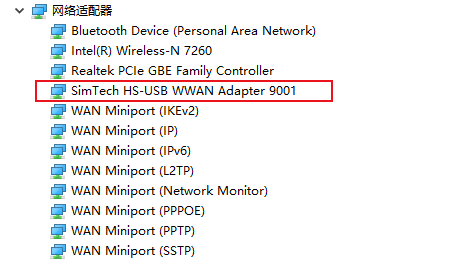
Please check if the mobile network icon generated this time.
Power on the 5G module and set the switch to ON. Your PC will recognize several unknown devices.
Set up NDIS Dialing
If you have installed the driver manually, the PC cannot connect to the mobile network either, you need to set up NDIS dialing manually.
Open the sim8200 AT port with SCCOM software and send the following command.
AT$QCRMCALL=1,1
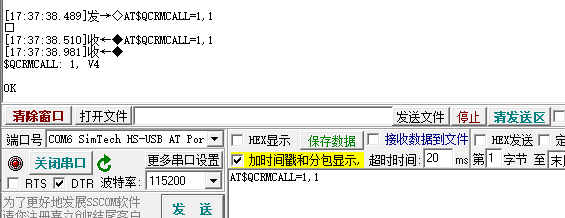
Now you can check the network again.
Open the sim8200 AT port with SCCOM software and send the following command.
Now you can check the network again.
Get GPS
Connect the passive GPS antenna to ANT5 port of 5G module, set the receiver to outdoor and keep the sticker side downward.
Open the AT port and send the following command to test:
AT+CGPS=1+
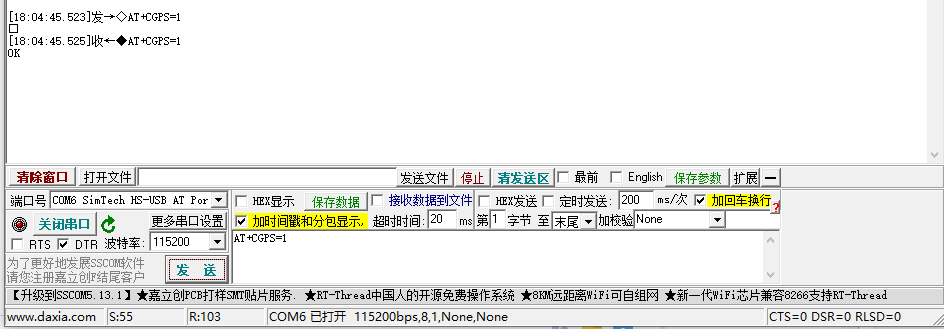 Open the NEMA port and you can receive the position data.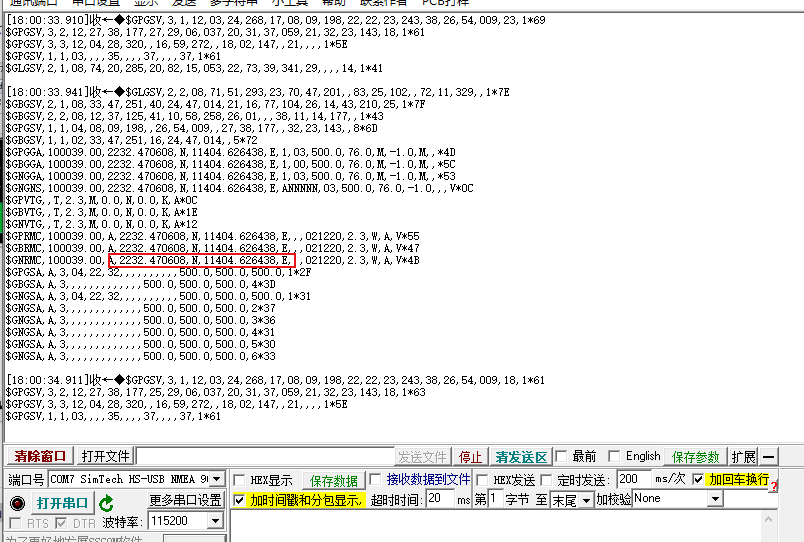
Connect the passive GPS antenna to ANT5 port of 5G module, set the receiver to outdoor and keep the sticker side downward.
Open the AT port and send the following command to test:
AT+CGPS=1+
Working with Jetson Nano
We recommend you use the new jetson-nano-sd-card-image, whose kernel version is higher than 4.9.140-tegra.
If you run with other Linux systems, please download the driver which is located in the SIM8200_OS_Driver\linux folder, and porting it according to the attached document.
If you run with other Linux systems, please download the driver which is located in the SIM8200_OS_Driver\linux folder, and porting it according to the attached document.
Setup software
Open a terminal and run the following command.
sudo apt-get install p7zip-full
wget https://files.waveshare.com/upload/0/07/Sim8200_for_jetsonnano.7z
7z x Sim8200_for_jetsonnano.7z -r -o./Sim8200_for_jetsonnano
sudo chmod 777 -R Sim8200_for_jetsonnano
cd Sim8200_for_jetsonnano
sudo ./install.sh
Please do not modify or delete the option,qmi_wwan_simcom, default.script, and install.sh folders, otherwise, the driver cannot be installed normally.
If the driver failed to install, please use the 4.9.140-tegra version and try it again.
Run the command ifconfig -a to check WWAN0 port.

If the driver failed to install, please use the 4.9.140-tegra version and try it again.
Test AT command
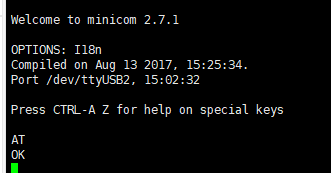
sudo apt-get install minicom
sudo minicom -D /dev/ttyUSB2
5G Networking
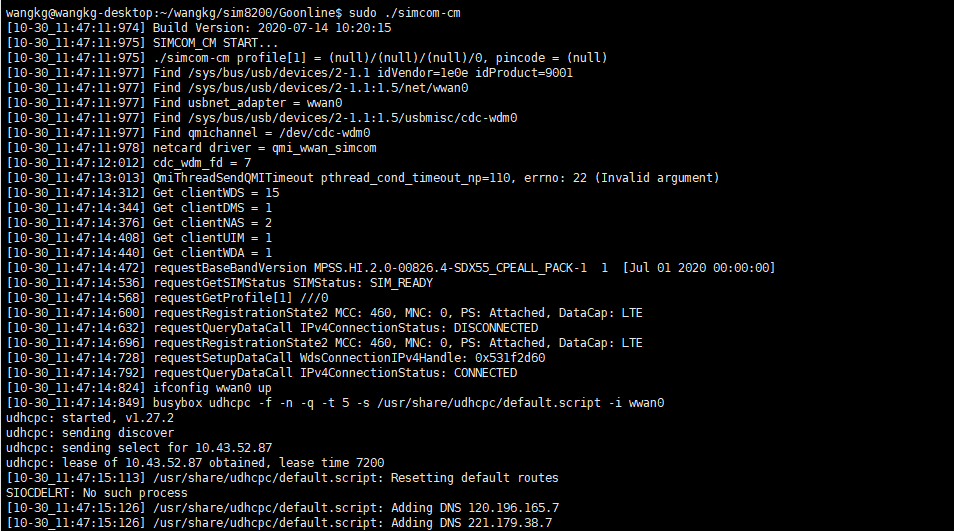
cd Goonline
make
sudo ./simcom-cm
Check if it generates the DNS.
Other Usage
If you need to use the product on other systems, please download the SIM8200_OS_Driver file and refer to the official SIMCOM documentation to add the driver.
About the Speed
- As there will be many inconsistencies between actual and laboratory conditions that will result in 5G speeds that are not ideally stable at 100MBPS, there are the following:
- Base station distance, the closer to the 5G base station the better the signal and the faster the speed;
- Base station load, the fewer people using it the faster it will be, and the slower it will be during peak commuting periods;
- Number of base stations: due to the spectrum, an equal amount of 4G coverage requires double the number of 5G base stations
- Operator: you need to confirm your 5G card, and whether the speed is limited, you can regularly ask the operator to reset your network
- Indoor is worse than outdoor: building penetration attenuation, and indoor bypass attenuation.
- PS: The current number of base stations still does not have good coverage, and the speed measurement is not quite the same in different locations.
- Base station distance, the closer to the 5G base station the better the signal and the faster the speed;
- Base station load, the fewer people using it the faster it will be, and the slower it will be during peak commuting periods;
- Number of base stations: due to the spectrum, an equal amount of 4G coverage requires double the number of 5G base stations
- Operator: you need to confirm your 5G card, and whether the speed is limited, you can regularly ask the operator to reset your network
- Indoor is worse than outdoor: building penetration attenuation, and indoor bypass attenuation.