




- sales/support
Google Chat:---
- sales
+86-0755-88291180
- sales01
sales@spotpear.com
- sales02
dragon_manager@163.com
- support
tech-support@spotpear.com
- CEO-Complaints
zhoujie@spotpear.com
- Only Tech-Support
WhatsApp:13246739196
- Purchase/Shipping/Refund
WhatsApp:13424403025
- HOME
- >
- ARTICLES
- >
- Common Moudle
- >
- ESP
ESP32C3-1.44 User Guide
【Video Tutorial】
【Install Case Video】
【IOS Give WIFI to Module】
【Android Give WIFI to Module】
【Resource】
[] Schematic:Schematic
[] Demo Code:ESP32C3_1.44inch
【Factory Firmware】
[] Download :Firmware
[] How to Restore Factory Firmware
【Compiling code 】
1】Build Compilation Environment
2】Demo Code:ESP32C3_1.44inch
3】Third party library file configuration
(Choose one of methods 1 or 2)
Method 2 (We Recommend this method)
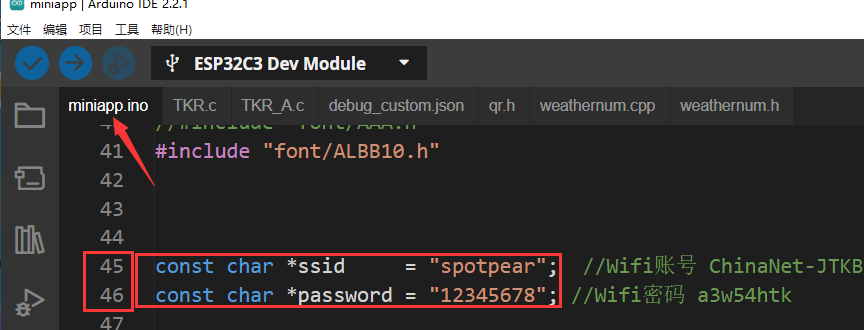
4】Change to your own WIFI
Enter the mainapp project Change to your own WIFI name and password within ''
5】Compilation environment configuration parameters

6】After the modifications are completed, you can configure parameter compilation

7】Compiled effect
8】Tutorial on Replacing Middle Rotation Symbols
8.1】Crop corresponding GIF pixels
Online website: https://ezgif.com/resize
Crop to 30 * 31 pixels

8.2】Convert GIF files to. c files
Online Image Converter Website: https://lvgl.io/tools/imageconverter
Enter the website to configure the corresponding settings

8.3】Copy the obtained xm.c file to the miniapp folder
8.4】Change the TKR_A in the miniapp. ino code to xm (change to your own name),
there are two TKR_A instances in the project

8.5】Click to upload
【Scratch】
TAG:
Industrial CAN FD ETH RJ45 bidirectional converter CAN2.0A/2.0B
USB To CAN FD
RS232 to CAN
Jetson Nano Module
Raspberry Pi 5 Active Cooler
Raspberry Pi 5 PCIe to USB3.2 Gen1 Hub 5Gbps For Raspberry Pi OS Drive free
ESP32-S3 Development Board 1.47 inch LCD Screen Display 172x320 SD-Port LVGL USB
ESP32 S3 Development Board 4 inch LCD Capacitive Touch Screen 4inch Display 480×480 N16R8
ESP32 ST7789
Raspberry Pi 5 Audio hat
Program
Retail electronic Labe
Raspberry Pi 5
ESP32 S3 Development Board 2.8 inch Round LCD Display 480x480 QMI8658 Sensor / SD /MP3 Audio /Battery Port LVGL/HMI For Arduino
SpotPear
Jetson Orin Case
ESP32-S3N8R8 7inch LCD Display TouchScreen 800×480 WiFi Bluetooth CAN RS485 Sensor
Luckfox Pico RJ45
ESP32 S3 Development Board 1.85 inch Round LCD Display 360×360 QMI8658 Sensor / MIC / SD /MP3 Audio /Battery Port LVGL/HMI For Arduino
Core3566004032
[Tutorial Navigation]
- 【Video Tutorial】
- 【Resource】
- 【Factory Firmware】
- 【Compiling code 】
- 1】Build Compilation Environment
- 2】Demo Code:ESP32C3_1.44inch
- 3】Third party library file configuration
- 4】Change to your own WIFI
- 5】Compilation environment configuration parameters
- 6】After the modifications are completed, you can configure parameter compilation
- 7】Compiled effect
- 8】Tutorial on Replacing Middle Rotation Symbols
- 【Scratch】