




- sales/support
Google Chat:---
- sales
+86-0755-88291180
- sales01
sales@spotpear.com
- sales02
dragon_manager@163.com
- support
tech-support@spotpear.com
- CEO-Complaints
zhoujie@spotpear.com
- Only Tech-Support
WhatsApp:13246739196
- Purchase/Shipping/Refund
WhatsApp:13424403025
Jetson Nano IMX219-160 Camera User Guide
Introduction
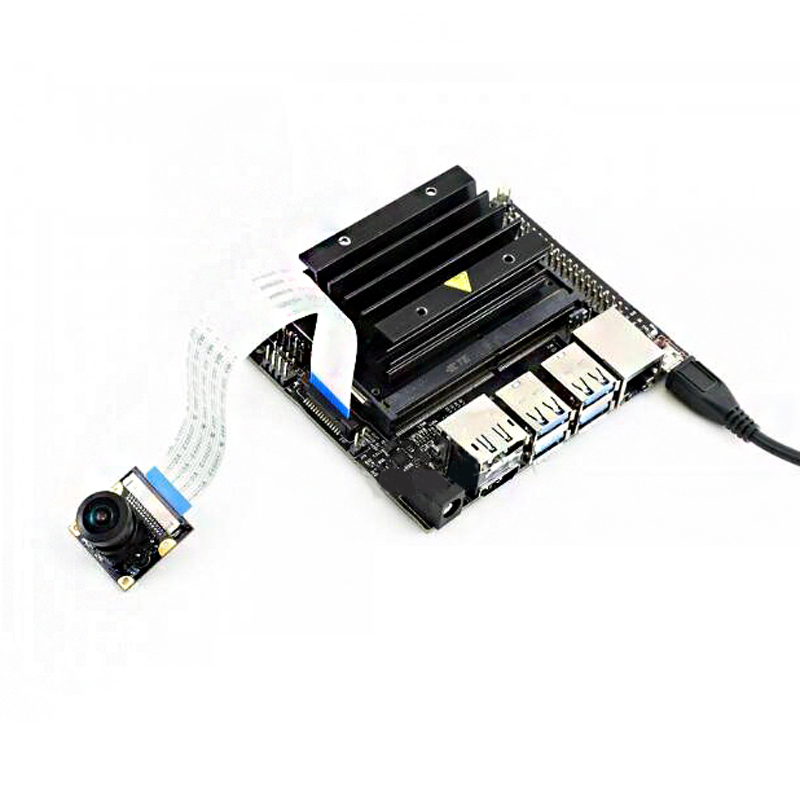
IMX219 Camera, 800 megapixels and 160 FOV. Compatible with Jetson nano. You can also use it with CM3/CM3+ expansion boards like Raspberry Pi Compute Module IO board, Compute Module IO Board Plus, Compute Module POE Board of Waveshare and the StereoPi board.
Hardware connection
- Connect the camera to CSI interface of Jetson Nano.Set the metal side of FFC into Heat-sink
- Connect a HDMI LCD to Jetson Nano
Software setting
- Power on Jetson Nano and open the Terminal (Ctrl+ALT+T)
- Test camera with command:
DISPLAY=:0.0 gst-launch-1.0 nvarguscamerasrc ! 'video/x-raw(memory:NVMM), width=3280, height=2464, format=(string)NV12, framerate=(fraction)20/1' ! nvoverlaysink -e
- If you find that the image captured is red. You can try to download .isp file and installed:
wget https://www.waveshare.com/w/upload/e/eb/Camera_overrides.tar.gz
tar zxvf Camera_overrides.tar.gz
sudo cp camera_overrides.isp /var/nvidia/nvcam/settings/
sudo chmod 664 /var/nvidia/nvcam/settings/camera_overrides.isp
sudo chown root:root /var/nvidia/nvcam/settings/camera_overrides.isp
TAG:
EyeLink-RC-S1 Industrial Edition 5.5 inch Touchscreen Camera R1M Card Recording Flight Controller FPV Drone ground station image transmission remote
STM32 1.54inch OLED
How to Use Product ROS2
TTL To CAN
Servo
RS232 to RS422
Raspberry Pi Pico 2 RP2350 3.5 inch LCD Capacitive 3.5inch TouchScreen Development Board 240x320 Display QMI8658 6-Axis /OV5640 Camera /SD
SpotPear
Raspberry Pi USB Camera 8MP IMX415 Wide Angle Dual Microphones USB 2.0 For Jeston RDK
ESP32 MLX90641
TTL UART To CAN
spotpear
Raspberry-Pi-Pico-W-webserver
ESP32 1.5inch LCD
Raspberry Pi Pico 7inch DVI LCD
Raspberry Pi USB Camera 2MP OV2735 Distortion-Free USB 2.0 For Jeston RDK
ADXL357BEZ
Raspberry Pi display
spotpear
Raspberry Pi 4 Camera
TAG:
ESP32-S3 AI Camera 1.28inch LCD Dual MIC Development Board Display 1.28 inch Voice Interruption Object Recognition 10-in-1 Multifunctional
Raspberry Pi MLX90640
RISC-V
BPI-M4 Zero
Spotpear
Raspberry Pi 5 PCIe M.2 NVMe SSD Pi5 2230-Board mini
Raspberry Pi 5 PCIe M.2 NVMe SSD Pi5 2280-2242 2230 X1002
Raspberry Pi 8 inch DSI LCD (C) Display MIPI 1280×800 Capacitive TouchScreen
Raspberry Pi Pico 2 RP2350 3.5 inch LCD Capacitive 3.5inch TouchScreen Development Board 240x320 Display QMI8658 6-Axis /OV5640 Camera /SD /Battery Port
ESP32-S3 Display
High Performance AI at the Edge
Arducam
Raspberry Pi 5 PCIe PoE M.2 NVMe SSD
SpotPear
Milk V Duo UART
ESP32-C6 2.16inch AMOLED Display AI Development Board 480×480 2.16 inch TouchScreen Deepseek
Flexible PVC Jacket
Jetson Nano Fan
SPI Communication
Desktop Ornament