




- sales/support
Google Chat:---
- sales
+86-0755-88291180
- sales01
sales@spotpear.com
- sales02
dragon_manager@163.com
- support
tech-support@spotpear.com
- CEO-Complaints
zhoujie@spotpear.com
- Only Tech-Support
WhatsApp:13246739196
- Purchase/Shipping/Refund
WhatsApp:13424403025
- HOME
- >
- ARTICLES
- >
- Common Moudle
- >
- WIFI
Industrial WiFi Module UART-WIFI232-B2 User Guide
User Manual
Software
Related Application Example
FAQ
Question:Why can't I configure a web page to open in my computer's browser, and why can't TCP communicate?
Answer:
Set the IP of the module and the computer to the same network address with different node addresses:
For example, the module's IP is 10.10.100.254; the computer's IP is 10.10.100.253.
Question:What can I do if I forget the IP?
Answer:
If you haven't changed the IP, the shipping IP is 10.10.100.254 by default;
If you forget it, you can search the device IP by entering the corresponding parameter (Port:48899 Keyword:www.waveshare.com) in Windows configuration upload tool as below: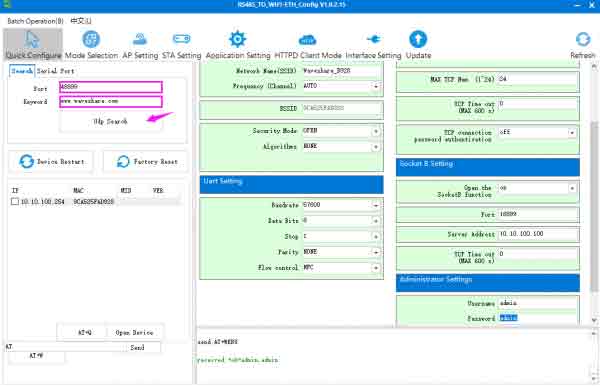
TAG:
Raspberry Pi Pico 2 RP2350-One Mini Board Type-A RP2350A
ESP32 2 inch Capacitive TouchScreen LCD Display ST7789 CST816D 240x320 For Arduino/Raspberry Pi/Pico
ESP32 1.54 inch E-Paper Smart Watch display Screen 200x200 Ultra-low power For Arduino/Micropython/RTOS For Watchy
ESP32-S3 GEEK
Raspberry Pi 5 D
ESP32-P4-WIFI6 4.3inch LCD Display AI Development Board 480×800 4.3 inch TouchScreen Deepseek
RS485 to Ethernet
Raspberry Pi5 PCIe TO M.2 MINI Support Gen2 and Gen3 SSD Compatible 2230 2242
GPU Monitor Display
Industrial USB TO RS232/485 (C) UART FT232RNL 2m For 3.3V / 5V For Switchable RS232/RS485
Raspberry Pi 5 Audio Card
UGV Rover PT Kit AI OpenCV Robot Car MediaPipe For Jetson Orin
Core3566104032
ESP32 P4 Development Board 7inch Display 7 inch TouchScreen Onboard ESP32-C6 Camera 1024×600
Raspberry Pi 5 inch (B) DSI MIPI LCD TouchScreen Display 5inch 720x1280 For Luckfox Lyra RK3506/ESP32-P4/Luckfox Omni3576
Luckfox Pico plus
Sipeed-Lichee-Tang-Nano-FPGA-Series-IDE-Install
Raspberry Pi RP2040
RK3566
E-Paper Font Tutorial
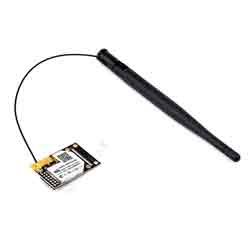
Industrial WiFi Module UART To WiFi Ethernet Module Embedded UART Serial Server Integrated 802.11b/g
TAG:
Computer GPUCPU Monitor Screen
Luckfox Core3576 Rockchip RK3576
Creative minimalist ornaments
NVIDIA
7inch Monitor LCD
Raspberry Pi 5 MIPI Cable
LuckFox
Raspberry Pi 8 inch DSI LCD Display MIPI 800×480 Capacitive TouchScreen 5MP Front Camera
PoE IO Expansion Board Raspberry Pi Compute Module CM4S/CM3
0.85 inch Display
Raspberry Pi Transparent LCD
1.54-inch LCD ornament
ESP32 S3 Development Board 3.5 inch LCD Capacitive Touch Screen 3.5inch Display 320×480 N16R8
TTGO T-Echo NRF52840 SoftRF Meshtastic LoRa SX1262 BME280 GPS GNSS L76K E-Paper 1.54 inch NFC LILYGO
Raspberry Pi 5 POE Power over Ethernet PCIe to M.2 NVMe SSD Board HAT+
Raspberry Pi 5 PCIe M.2 NVMe SSD Pi5 2280-2242-2230-Board-C
5.79inch e Paper Module(G) Red-Yellow-Black-White 792x272 E-Ink Raspberry Pi Jetson RDK-X3 Arduino STM32
1.91Inch AMOLED
3D Display Transparent Screen
Raspberry Pi-Zero-2W