- sales/support
Google Chat:---
- sales
+86-0755-88291180
- sales01
sales@spotpear.com
- sales02
dragon_manager@163.com
- support
tech-support@spotpear.com
- CEO-Complaints
zhoujie@spotpear.com
- Only Tech-Support
WhatsApp:13246739196
- Purchase/Shipping/Refund
WhatsApp:13424403025
Raspberry Pi gamepi154-Retropie-Display configuration tutorial
Official image version:
retropie-buster-4.7-xxxx.img
Board version:Raspberry Ri Zero/Zero 2/3B/4B/CM4
Download fbcp-ili9341 to your pi
git clone https://github.com/juj/fbcp-ili9341.git
(Make sure that you download fbcp-ili9341 under path /home/pi/)
cd fbcp-ili9341
sudo mkdir build
cd build
sudo nano ../st7735r.cpp
To change like this following picture
change madctl to 0xc0 (This is rotate 90 degree the LCD)
After changing

Set LCD resolution to 240x240
After changing

Then you need to compile this project
sudo cmake -DWAVESHARE_ST7789VW_HAT=ON -DGPIO_TFT_DATA_CONTROL=25 -DGPIO_TFT_RESET_PIN=27 -DSPI_BUS_CLOCK_DIVISOR=6 -DSTATISTICS=number ..
If all work well,you will get this following picture
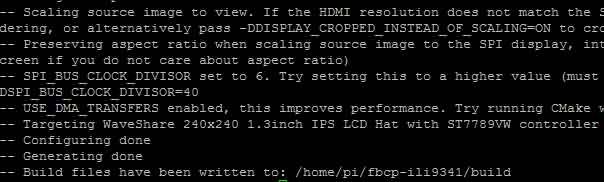
sudo make -j
If all work well,you will get this following picture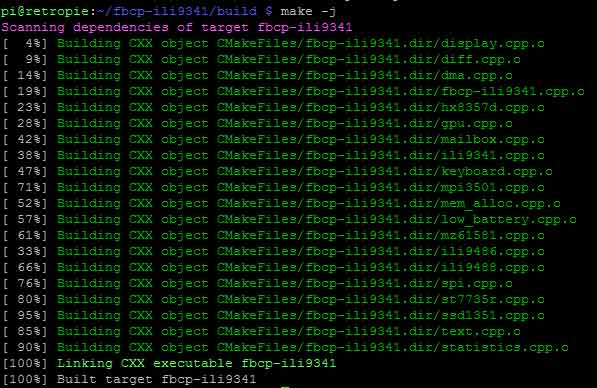
If you can not compile successfully , You can download our changed project form here
fbcp-ili9341-st7789-rotate90_211209.tar.gz
Run the display driver using :
sudo ./fbcp-ili9341
Then your LCD will display well, but the Fontsize is too small
Change the LCD display resolution
sudo nano /boot/config.txt
Add the following code
hdmi_force_hotplug=1
hdmi_group=2
hdmi_mode=1
hdmi_mode=87
hdmi_cvt 480 480 60 6 0 0 0
display_rotate=0
avoid_warnings=1
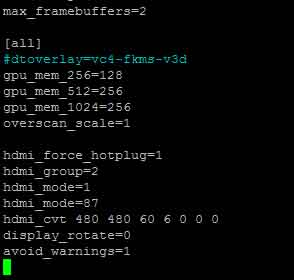
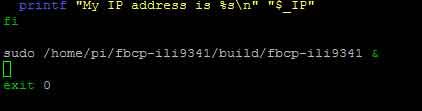
Make fbcp-ili9341 work automatically when your Pi boot
sudo nano /etc/rc.local
Add the following code
sudo /home/pi/fbcp-ili9341/build/fbcp-ili9341 &
sudo reboot
After your Pi reboot,Your LCD will display well