- sales/support
Google Chat:---
- sales
+86-0755-88291180
- sales01
sales@spotpear.com
- sales02
dragon_manager@163.com
- support
tech-support@spotpear.com
- CEO-Complaints
zhoujie@spotpear.com
- Only Tech-Support
WhatsApp:13246739196
- Purchase/Shipping/Refund
WhatsApp:13424403025
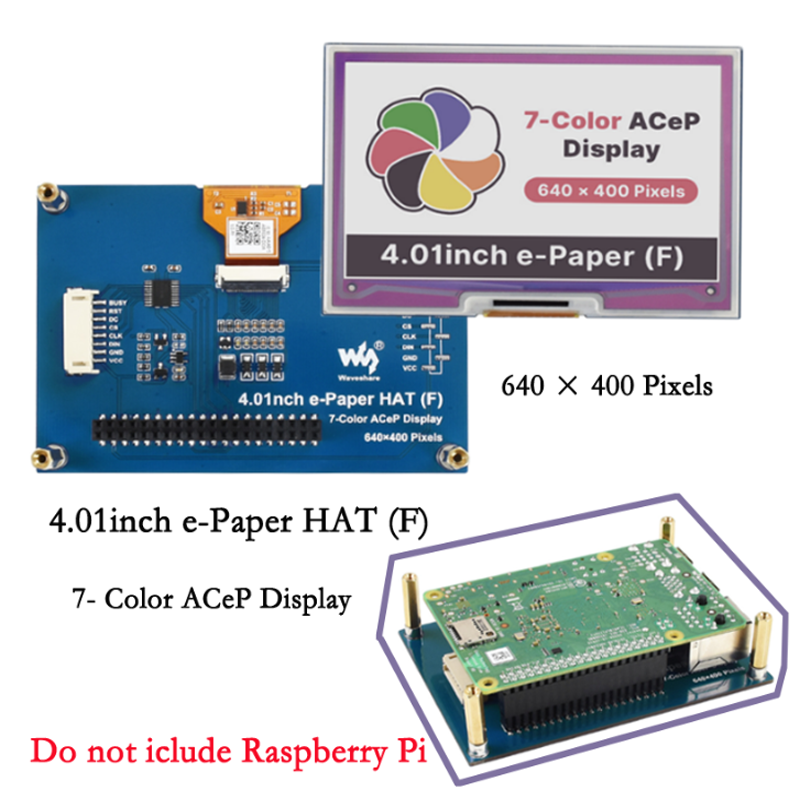
Raspberry Pi 4.01inch e-Paper HAT (F) User Guide
This 4.01inch Colorful E-Paper E-Ink Display HAT For Raspberry Pi, 640×400 Pixels, ACeP 7-Color, SPI Interface
Specifications
- Operating voltage: 3.3V/5V
- Display color: ACep 7-Color
- Interface: 3-wire SPI, 4-wire SPI
- Crey scale: 2
- Display size: 86.40 × 54.00mm
- Dot pitch: 0.135 × 0.135mm
- Resolution: 640 × 400 pixels
- Viewing angle: >170°
- Full refresh time: 15s
- Refresh power: 50mW(typ.)
- Standby current: <0.01uA(almost none)
- Outline dimension: 98.50 × 70.00mm
Interfaces
| VCC | 3.3V/5V |
| GND | GND |
| DIN | SPI MOSI |
| CLK | SPI SCK |
| CS | SPI chip select (Low active) |
| DC | Data/Command control pin (High for data, and low for a command) |
| RST | External reset pin (Low for reset) |
| BUSY | Busy state output pin |
SPI timing
This product is an E-paper device adopting the image display technology of Microencapsulated Electrophoretic Display, MED. The initial approach is to create tiny spheres, in which the charged color pigments are suspending in the transparent oil and would move depending on the electronic charge. The E-paper screen display patterns by reflecting the ambient light, so it has no background light requirement. Under ambient light, the E-paper screen still has high visibility with a wide viewing angle of 180 degrees. It is the ideal choice for E-reading. (Note that the e-Paper cannot support updating directly under sunlight)
- Communication protocol
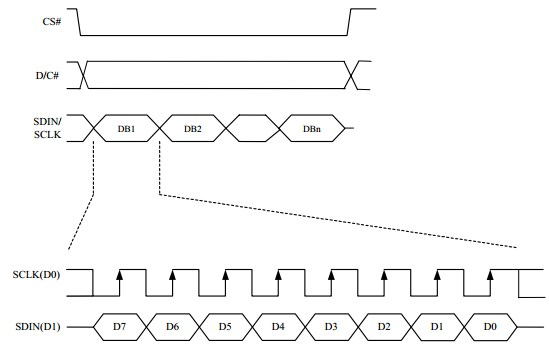
Note: Different from the traditional SPI protocol, the data line from the slave to the master is hidden since the device only has display requirement.
- CS is the slave chip select. When CS is low, the chip is enabled.
- DC is data/command control pin, when DC = 0, write command, when DC = 1, write data.
- SCLK is the SPI communication clock.
- SDIN is the data line from the master to the slave in SPI communication.
SPI communication has data transfer timing, which is combined with CPHA and CPOL.
- CPOL determines the level of the serial synchronous clock at idle state. When CPOL = 0, the level is Low. However, CPOL has little effect to the transmission.
- CPHA determines data is collected at the first clock edge or at the second clock edge of the serial synchronous clock; when CPHL = 0, data is collected at the first clock edge.
- There are 4 SPI communication modes. SPI0 is commonly used, in which CPHL = 0, CPOL = 0.
As you can see from the figure above, data transmission starts at the first falling edge of SCLK, and 8 bits of data are transferred in one clock cycle. In here, SPI0 is in used, and data is transferred by bits, MSB first.
Color of e-Paper
An image is made of pixels. The sizes of every pixel defined how many kinds of color are supported by the e-Paper. Monochrome image use one bit for one pixel (0 and 1, black and white), in this case, if we want to display more colors, we should use more bits for every pixel.
We need at least 3bits to display severe color. For easy programming, we and an 0 bit in front of it. In this case, we use 4 bits for every pixel.
| Color | BIN | HEX | The color (reference) |
| Black | 0b0000 | 0x0 | |
| White | 0b0001 | 0x1 | |
| Green | 0b0010 | 0x2 | |
| Blue | 0b0011 | 0x3 | |
| Red | 0b0100 | 0x4 | |
| Yellow | 0b0101 | 0x5 | |
| Orange | 0b0110 | 0x6 |
For example, if you want to display four colors, green, yellow, red and orange, it should be like as below:
| Pixel | 1 | 2 | 3 | 4 | ||||||||||||
| Bit | 0 | 1 | 2 | 3 | 4 | 5 | 6 | 7 | 8 | 9 | 10 | 11 | 12 | 13 | 14 | 15 |
| Data | 0 | 0 | 1 | 0 | 0 | 1 | 0 | 1 | 0 | 1 | 0 | 0 | 0 | 1 | 1 | 0 |
| Color | ||||||||||||||||
Data is saved in MSB formate and 1byte is equal to 8 bits.
| Pixel | 1 | 2 | 3 | 4 | ||||||||||||
| Bit | 7 | 6 | 5 | 4 | 3 | 3 | 1 | 0 | 7 | 6 | 5 | 4 | 3 | 2 | 1 | 0 |
| Data | 0 | 0 | 1 | 0 | 0 | 1 | 0 | 1 | 0 | 1 | 0 | 0 | 0 | 1 | 1 | 0 |
| Color | ||||||||||||||||
| Byte | 0x25 | 0x46 | ||||||||||||||
You can refer to the "Make BMP file for e-Paper" guide and make the image yourself for this module.