- sales/support
Google Chat:---
- sales
+86-0755-88291180
- sales01
sales@spotpear.com
- sales02
dragon_manager@163.com
- support
tech-support@spotpear.com
- CEO-Complaints
zhoujie@spotpear.com
- Only Tech-Support
WhatsApp:13246739196
- Purchase/Shipping/Refund
WhatsApp:13424403025
- HOME
- >
- ARTICLES
- >
- Common Moudle
- >
- UART Module
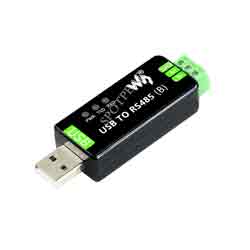
USB TO RS485 (B) User Guide
Function Description
CH343G is a USB bus adapter chip, which can convert USB to a high-speed asynchronous serial port, supports automatic identification and dynamic self-adaptation of communication baud rate of 115200bps and below, and provides commonly-used MODEM contact signals to expand asynchronous serial ports for computers. It can upgrade a common serial device or MCU directly to a USB bus.
Parameter
| Product Type | USB to 485 |
| Power Supply | 5V |
| Communication Rate | 50bps ~ 3Mbps |
| Operating System | Mac OS, Linux, Windows 11 / 10 / 8.1 / 8 / 7, Android |
How to Use
Windows
CDC Driver
The default driver of the computer is the CDC driver, which can be viewed through the device manager.
The software flow control is set by default. If you need to use CDC hardware flow, you need to connect the CFG of the board to EN (power-on self-test).
VCP Driver
The VCP driver is a manufacturer's driver and needs to be installed by itself. After installation, it can be viewed through Device Manager.
The default setting is software flow control. If you need to use VCP hardware flow, you can open it directly through the serial debugging assistant.
Linux/RPI
Taking RPI as an example, you can use the default driver. After connecting the device, you can use the following command to query the serial device name:
ls /dev/tty*
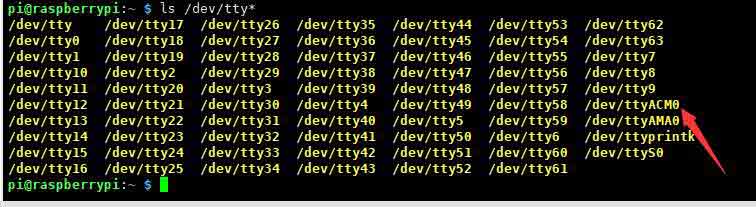
For example: use minicom to open UART0, then the command line input.
minicom -D /dev/ttyACM0
MacOS
- Please download and install the driver first.
- Click to learn how to install the driver.
- After installation, please open the assistant. (The serial debugging assistant can be downloaded directly by MAC.)
Android
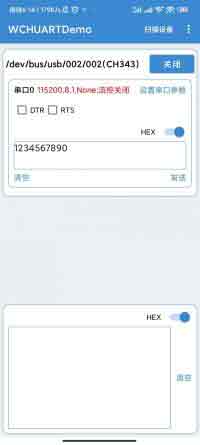
- The Android software, download and decompress it and install it.
1. Open the APP and click Scan Device. 
2. Click the scanned device. 
3. Set the parameters to use.