



- sales/support
Google Chat:---
- sales
+86-0755-88291180
- sales01
sales@spotpear.com
- sales02
dragon_manager@163.com
- support
tech-support@spotpear.com
- CEO-Complaints
zhoujie@spotpear.com
- Only Tech-Support
WhatsApp:13246739196
- Purchase/Shipping/Refund
WhatsApp:13424403025
- HOME
- >
- ARTICLES
- >
- Jetson Series
- >
- Jetson Kits
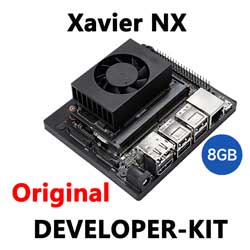
Jetson Nano Jetson Xavier NX User Guide
Introduction
Jetson Xavier™ NX brings supercomputer performance to the edge in a small form factor system on module (SOM). With up to 21 TOPS of accelerated computing, it can run modern neural networks in parallel and process data from multiple high-resolution sensors—a requirement for full AI systems. Jetson Xavier NX is production-ready and supports all popular AI frameworks.
Features
- GPU: 384-core NVIDIA Volta™ GPU with 48 Tensor Cores
- CPU: 6-core NVIDIA Carmel ARM®v8.2 64-bit CPU 6 MB L2 + 4 MB L3
- Memory: 8GB 2128-Bit LPDDR4x | 51.2GB/s
- Storage: 16GB eMMC 5.1
- Video:
- Encode: 4K x 2K 60 Hz (HEVC)
- Decode: 4K x 2K 60 Hz (12-bit support)
- Interfaces:
- Ethernet: 10/100/1000BASE-T auto-negotiation
- Wireless: 802.11ac WIFI + Bluetooth
- Camera: (16x) CSI-2 Lanes
- Display: HDMI 2.0
- USB: 2x USB 3.1, DP (Optional), PD (Optional) Close-System Debug and Flashing Support on 1 Port
- Others: GPIO, I2C, I2S, SPI, UART
- Power:
TAG:
1.83inch LCD TouchScreen Display 240×280 NV3030B Arduino Raspberry Pi ESP32S3 Pico STM32
Raspberry Pi 5 Case
ESP32-S3 MAX AI Camera 3.5inch LCD Dual MIC Development Board Display 320x480 3.5 inch TouchScreen Voice Interruption Object Recognition
ESP32 P4 Development Board 7-inch LCD Display 1024×600 7inch Touchscreen ESP32-C6 WiFi6 AI Deepseek
Raspberry Pi 5 Official Red-White Case
E-Paper
ESP32 S3 Development Board 1.9 inch LCD Capacitive Touch Screen 1.9inch Display 170×320 N16R8
LuckFox Pico
USB to I2C
Raspberry Pi Pico rp2040 Display image 1.3inch LCD ST7789 change bmp to hex
DAPLINK
Raspberry Pi 5 RTC Box
HDMI to LVDS
Raspberry-Pi-1.54inch-LCD-Display-Touchscreen-configuration-Bookworm-Lite For Pi5
ESP32 C6 Development Board 1.28 inch LCD Touch Screen 240x240 CST816S SD card slot
ESP32 P4 Development Board 7inch Display 7 inch TouchScreen Onboard ESP32-C6/Camera-Port/Speaker-Port
SpotPear
Industrial 4-ch PWM RS485 pulse output module Modbus RTU rail
Banana Pi
Milk-V Duo User Guide
TAG:
ESP32 C6 1.47 inch LCD Display Screen WiFi6 BLE5 ST7789
mobile phone
Computer Monitor Display
Pi5 Active Cooler Silver
RTL8723 WIFI SDIO Expansion Module Board For Luckfox Pico Mini B /Luckfox Pico Plus /Luckfox Pico Pro /Luckfox Pico Max
PI0 2W
Raspberry Pi 5 ABS Case 3.5inch Display Stripe Compatible Multi-Purpose with Removable Cover and Fan Mount
TTL UART To CAN Mini
MPS2242 POE Raspberry Pi 5 PCIe M.2 NVMe SSD Pi5 2242 2230
Jetson Orin 4G/3G/2G expansion board GNSS GPS SIM7600G-H-M.2
Raspberry Pi AF Camera
Raspberry Pi 5 Aluminum Case
Sipeed NanoKVM Cube KVM Remote OS Control Manager Power Control Desktop Server UART
Raspberry Pi 5 PCIe to M.2 SSD
Modbus RTU CAN
Raspberry Pi Pico 2 RP2350B 7inch Capacitive TouchScreen 7 inch LCD Display Development Board 800×480
Arduino UNO R4 case
RS485 to CAN
Raspberry Pi 5
MPTPU Raspberry Pi 5 TPU AI Kit PCIe Google Coral Edge