




- sales/support
Google Chat:---
- sales
+86-0755-88291180
- sales01
sales@spotpear.com
- sales02
dragon_manager@163.com
- support
tech-support@spotpear.com
- CEO-Complaints
zhoujie@spotpear.com
- Only Tech-Support
WhatsApp:13246739196
- Purchase/Shipping/Refund
WhatsApp:13424403025
- HOME
- >
- ARTICLES
- >
- For Arduino
- >
- Mother Board
Arduino UNO R4 Tutorial - Matrix LED
2,Compilation and Testing of LED Example
2.1】 When using the Arduino UNO R4 WIFI board for the first time and there is no serial port displayed upon inserting the USB cable,
Please wait for a while as the computer will automatically install the Arduino UNO R4 WIFI driver.
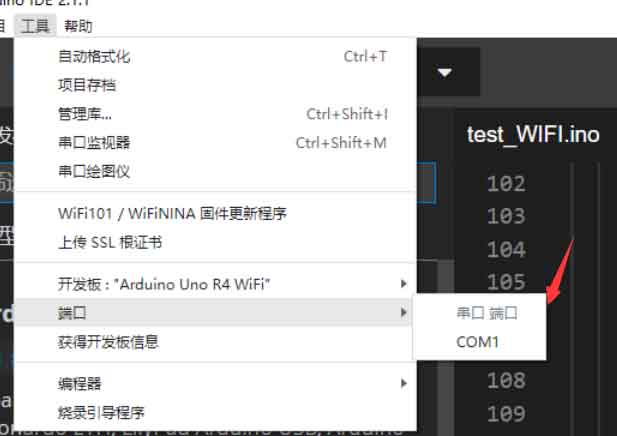
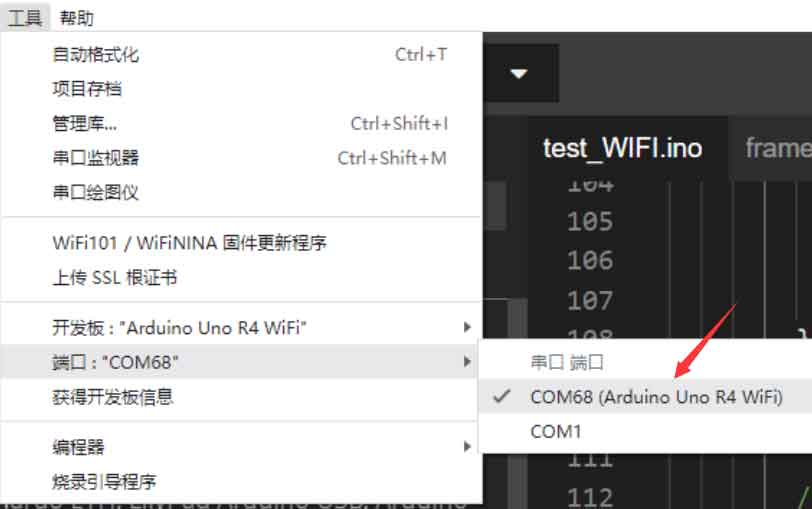
2.2】 After the driver installation is complete, click on COM Port.
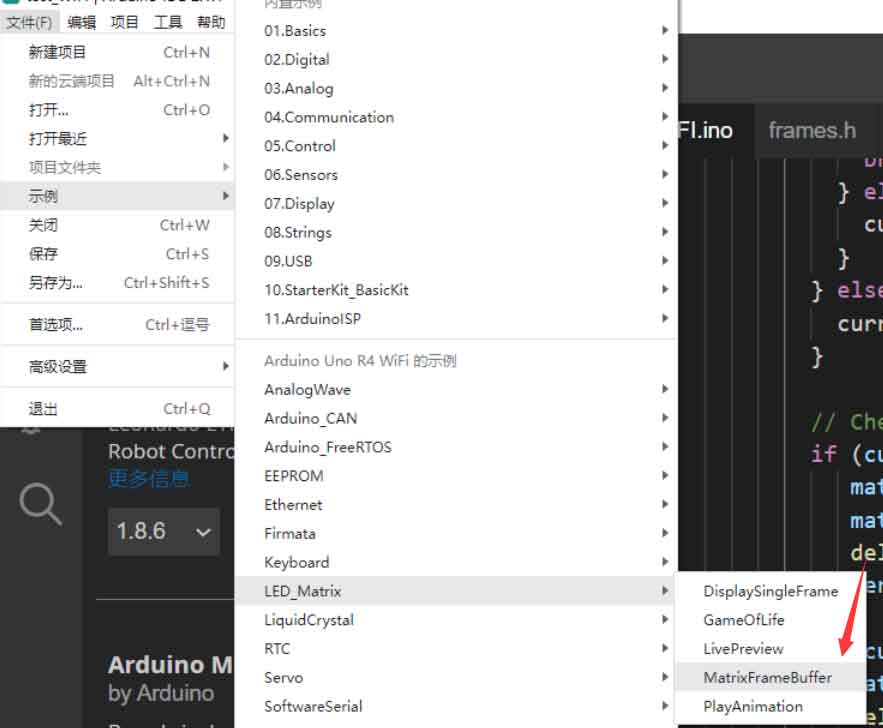
2.3】 Test the display effect of the matrix LED: Click on the built-in matrix LED example provided by the official Arduino IDE.
TAG:
Core3566102032
Raspberry Pi Pico RP2040 C Environment Window
Raspberry Pi 5 RTC
Pi5 Pure-Copper Active Cooler
Spotpear
spotpear
Raspberry Pi Pico 2 RP2350 1.47 inch LCD Display Development board RP2350A 1.47inch Screen RGB color $8.5
Raspberry Pi 5 IR Camera
ESP32 LVGL
DPI Interface
Raspberry Pi 5
CPU Monitor Display
Raspberry Pi 5 Power
10-Axis DOF ROS IMU (A) Sensor UART ARM 32 DSP Processor BLE 5.3 Bluetooth / Accelerometer / Gyroscope / Magnetometer / Temperature & Pressure
Raspberry Pi PICO
Mechanical Keyboard
UNO Minima RA4M1 ZERO Tiny SuperMini R7FA4M1 Board Compatible With R4 For Arduino
ESP32 C6 Development board 1.9 inch LCD display 1.9inch Screen 172×320 With SD slot RGB LED QMI8658 6-Axis-Sensor ST7789 CST816
7inch-DSI-LCD-H User Guide
Good low light performance
TAG:
Raspberry Pi 5 Copper Heatsink Option Fan or No-Fan
ESP32 1.54inch OLED
Raspberry Pi 5 Cooling
SpotPear
Jetson Camera
Arduino Thermal imaging
Flipper Zero WiFi multiboard NRF24+ESP32
BPI
Programmable Keyboard
Raspberry Pi 3.5 inch DSI Display MIPI LCD (H) Capacitive TouchScreen 480x800
Raspberry Pi Pico 2 RP2350B Linux
PoE IO Expansion Board Raspberry Pi Compute Module CM4S/CM3
Raspberry Pi Camera IMX415 8MP Full-color 95.5° Wide Angle Auto Focus Distortion-free
RM502Q AE IoT EMBB 5G 4G 3G M.2 LTE-A/NSA SA GNSS DFOTA VoLTE Quectel
ESP32-S3 1.69inch LCD Display WiFi Bluetooth QST Attitude Gyro Sensor QMI8658C Arduino Python
Top-Version Luckfox Lyra Ultra RK3506B OnBoard EMMC-8GB Mic Option WiFi6 /PoE With Audio and Display Port
Raspberry Pi 5 Rainbow Acrylic Case Colorful Translucent Acrylic Case Supports Installing Official Active Cooler
Raspberry Pi CM4
Raspberry Pi Buzzer
Raspberry Pi RP2040