- sales/support
Google Chat:---
- sales
+86-0755-88291180
- sales01
sales@spotpear.com
- sales02
dragon_manager@163.com
- support
tech-support@spotpear.com
- CEO-Complaints
zhoujie@spotpear.com
- Only Tech-Support
WhatsApp:13246739196
- Purchase/Shipping/Refund
WhatsApp:13424403025
X1002 User Guide
Overview
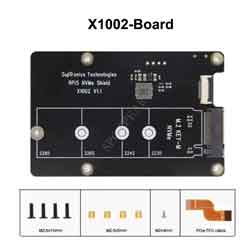
The X1002 shield is a bottom NVMe M2 2280 SSD PIP (PCIe Peripheral Board) for the Raspberry Pi 5 that uses the new PCIE interface of the Raspberry Pi 5 to utilise the NVME M2 SSDs for fast data transfers and ultra-fast booting.
This shield follows the new "PIP" design guideline from Raspberry Pi fundation ensuring that it will be easy to use and be supported long term by updates to Raspberry Pi OS - though it is very early days and things are improving rapidly there!
[Update]
On August 2024, now we use black FPC wire, which has electromagnetic shielding and anti-interference.(Accessories may vary from platform to platform, some platform inventory may not have been updated, please refer to the sales page information is mainly)
On 13 January 2024, X1002 V1.1 has been released. Compared with V1.0, only pogo pin power supply has been added.
Geekworm PCIe to NVME Sets:
After the release of the Raspberry Pi AI Kit, we tested four PIPs: X1001, X1004, X1011, and M901. X1001, X1004, and M901 all support the hailo-8 ai accelerator, but X1011 does not.
It should be noted that X1004 uses ASMedia ASM1182e PCIe switch, and X1011 uses ASM1184e, they can't support PCIe Gen 3 speed, so even though we forced to enable PCIe Gen 3.0 setting in Raspberry Pi 5, it is limited by ASMedia ASM1182e PCIe switch, and speed is still PCIe Gen 2.0 5Gbps speed. when you use an hailo-8 ai accelerator, Raspberry Pi Fundation highly recommends using PCIe 3.0 to achieve best performance with your AI Kit.
Our tentative conclusions are as follows:
- If you need to use hailo-8 ai accelerator with high performance, it is recommended to use X1015/X1002/X1003/M901/the official M.2 HAT+ etc. When choosing these PIP boards, you should focus on whether there is a conflict between the camera cable and the PIP board installation, and enable PCIe3.0 to use hailo-8 ai accelerator. At the same time, you need to prepare an SD card as the system disk.
- If you don't care about the high performance brought by PCIe 3.0, then you can consider using X1004, so that you can use any socket of X1004 to install NVME SSD as the system disk, and another socket to install hailo-8 ai accelerator, so as to have both.
| Model | Compatible with | Position | NVMe M2 SSD Length Support | Matching Case | Matching Cooler | Support NVMe Boot | Support PCIe 3.0 | Support Hailo-8 AI Accelerator |
|---|---|---|---|---|---|---|---|---|
| X1000 | Raspberry Pi 5 | Top | 2230/2242 | P579 | Official Cooler / Argon THRML Cooler / H505/H501 | Yes | - | Not tested |
| X1001 | Raspberry Pi 5 | Top | 2230/2242/2260/2280 | P579 | Official Cooler / Argon THRML Cooler / H505/H501 | Yes | - | Yes |
| X1002 | Raspberry Pi 5 | Bottom | 2230/2242/2260/2280 | P580 / P580-V2 | Official Cooler / Argon THRML Cooler / H505/H501 | Yes | - | NO |
| X1003 | Raspberry Pi 5 | Top | 2230/2242 | P579 / P425 | Official Cooler / H501 Only | Yes | - | Not tested |
| X1004 | Raspberry Pi 5 | Top | Dual ssd: 2280 | P579-V2 | Official Cooler / Argon THRML Cooler / H505/H501 | Yes (Requires EEPROM 2024/05/17 and later version) | NO | Yes |
| X1015 | Raspberry Pi 5 | Top | 2230/2242/2260/2280 | P579 | Official Cooler / Argon THRML Cooler / H505/H501 | Yes | - | Yes |
| X1005 | Raspberry Pi 5 | Bottom | Dual ssd: 2230/2242/2260/2280 | P580-V2 | Official Cooler / Argon THRML Cooler / H505/H501 | Yes (Requires EEPROM 2024/05/17 and later version) | NO | Yes |
| X1011 | Raspberry Pi 5 | Bottom | 4 ssds: 2230/2242/2260/2280 | X1011-C1 | Official Cooler / Argon THRML Cooler / H505/H501 | Yes (eeprom 2024/05/17 and later version) | NO | NO |
| X1012 | Raspberry Pi 5 | Top | 2230/2242/2260/2280 | P579 | Official Cooler / Argon THRML Cooler / H505/H501 | Yes | - | Not tested |
| M901 | Raspberry Pi 5 | Top | 2230/2242/2260/2280 | P579 | Official Cooler / Argon THRML Cooler / H505/H501 | Yes | - | Yes |
| Q100 | Raspberry Pi 5 | Top | 2242 | P579 | Official Cooler / Argon THRML Cooler / H505/H501 | Yes | - | Not tested |
| Q200 | Raspberry Pi 5 | Top | Dual ssd: 2280 | P579 | Official Cooler / Argon THRML Cooler / H505/H501 | NO | - | Not tested |
| M300 | Raspberry Pi 5 | Top | 2230/2242 | P579 | Official Cooler / Argon THRML Cooler / H505/H501 | Yes | - | Not tested |
| M400 | Raspberry Pi 5 | Top | 2230/2242/2280 | P579 | Official Cooler/ Argon THRML Cooler / H505/H501 | Yes | - | Not tested |
Important Notes
NVMe SSD Incompatibility List
We recommend avoiding the following NVMe SSD drives which is equipped with a Phison controller due to their proven incompatibility:
- WD Blue SN550 series (Solved! Refer to New rpi-eeprom-update 2024-01-24 WD Blue SN550 nvme works now.)
- WD Blue SN580 series
- WD Green SN350 series (Solved! Refer to NVMe_SSD_boot_with_the_Raspberry_Pi_5#comment-4602)
- WD Black SN850 series
- WD Black SN770
- WD SN740
- Inland tn446 nvme drive
- Corsair MP600 SSD
- Micron 2450 SSD (Can be recognised but not support boot from NVME)
- Other NVMe SSD drivers equipped with the same Phison controller
These specific models have demonstrated compatibility issues, and it is advisable to avoid them when considering NVMe SSD options for the X10xx series NVMe shield. You can run "lspci" command to check the controller brand of the SSD.
We confirm that the following SSDs are incompatible:
- Micron 2200 256GB M.2 NVMe Gen3 x4, MODEL: MTFDHBA256TCH, The SSD is recognized but I cannot boot from it.
Also note:
- Compatible with M.2 NVMe SSDs only, Not compatible with M.2 SATA SSDs, M.2 PCIe AHCI SSDs, or other M.2 non-NVMe devices
- Older NVMe drives with less efficient flash media may not perform as well as newer drives
- New NVMe SSDs are not partitioned and will need to be both partitioned and formatted when first connected to the Raspberry Pi before they will be accessed in the Explorer.
- We get feedback from customers that Polaris Controller will also have compatibility problems. Please replace the other SSD test if it not work, whether it is compatible with the Raspberry Pi 5 does not depend on the X100X series boards
- NVMEs using the MAP1202 controller may not support PCIe Gen 2, and must be forced to enable PCIe Gen 3 in order to be recognised. This is due to the fact that the controller is not backward compatible with PCIe Gen 2, and NVMEs using this controller will have compatibility issues, and are not recommended for use. Can refer to https://zhuanlan.zhihu.com/p/644984347
PS: There is also feedback from buyers that even NVME SSDs with Phison controller are supported after updating the latest firmware. Please refer to go to: X1001#comment-4638
Features
- Full compatible with other HAT shield;
- Customized FPC cable for easy use of TF card
- Supports installation of official active coolers also;
- With ACT LED Indicator; On: Power OK/Standby,Flashing: Reading/Writing
- Supports 2230/2242/2260/2280 NVMe M2 SSD.
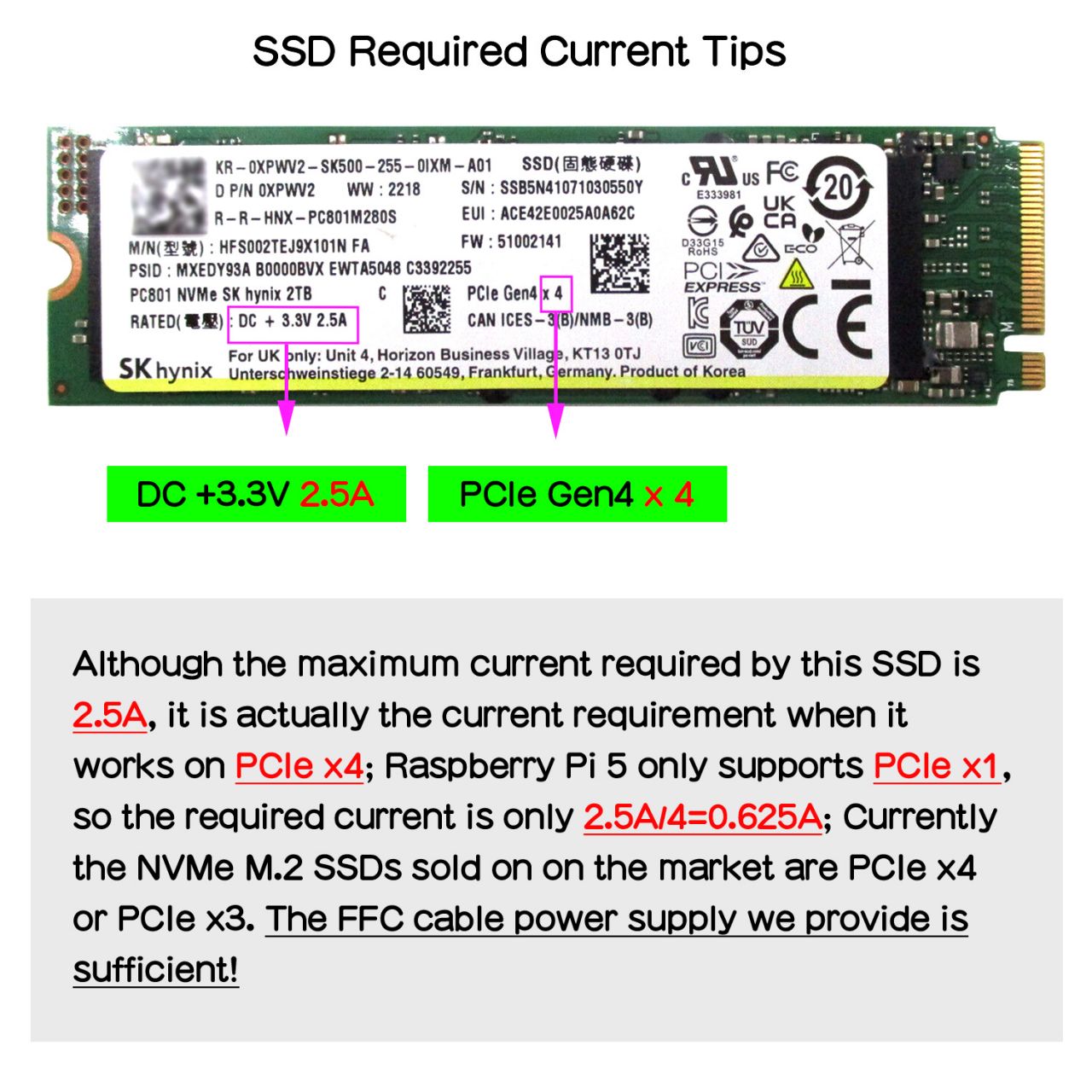
- Can power the X1002 shield directly from the FFC PCIe ribbon (providing maximum 5W of continuous power)
PS:
- The X1002 hardware has no limit on NVME SSD capacity, which is dependent on the Raspberry Pi OS.
- Do not reserve the nut column to fix the 2230/2242/2260 SSD, users need to find proper way to fix them.
How to Power
Can power the X1002 shield directly from the FFC PCIe ribbon (providing maximum 5W of continuous power)
After-sales
Monday-Friday (9:30-6:30) Saturday (9:30-5:30)
Email: services01@spotpear.com