- sales/support
Google Chat:---
- sales
+86-0755-88291180
- sales01
sales@spotpear.com
- sales02
dragon_manager@163.com
- support
tech-support@spotpear.com
- CEO-Complaints
zhoujie@spotpear.com
- Only Tech-Support
WhatsApp:13246739196
- Purchase/Shipping/Refund
WhatsApp:13424403025
RSBL85-24 User Guide
Overview
Introduction
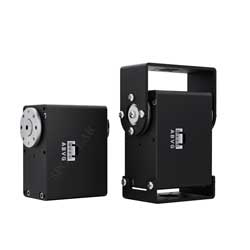
The RSBL85-12/RSBL85-24 is a programmable RS485 serial servo motor with a locked-rotor torque of 85KG.CM. It features a full aluminum alloy case, a brushless motor, a steel gear box, a 360° high-precision magnetic encoder, and an external stainless steel primary multi-servo disk. The servo motor allows for programming to set any angle as the servo motor's middle position, enabling 360° controllable angles and multi-turn continuous rotation. It includes a built-in acceleration start/stop function for smoother movements.
Each servo motor has two interfaces, allowing multiple servo motors to be connected in series. Theoretically, up to 253 servo motors can be controlled simultaneously, with each servo motor capable of reporting its current angle, load, voltage, mode, and other information. This servo motor is suitable for robotic arm projects, hexapod robots, humanoid robots, wheeled robots, and other robot applications requiring closed-loop control, easily handling heavy loads.
Additionally, we provide a robotic arm model for this servo motor model, as showcased on the detail page. You can download the open-source structure model and engineering files from the "Resources - Open Source Structure" section at the bottom of the page.
Specification
RSBL85-12
- WORKING VOLTAGE: 9 ~ 12 V (typ. 12V)
- MECHANISM LIMIT ANGLE: No limit
- ROTATION ANGLE: 360° (angle control in servo mode)/continuous rotation in motor mode
- BAUDRATE: 38400bps~1Mbps (1Mbps by default)
- GEAR: high precision steel gear (reduction ratio 1:254)
- NO-LOAD SPEED: 0.167sec/60°(60RPM)
- POSITION SENSOR RESOLUTION: 360°/4096
- ID RANGE: 1 ~ 253
- FEEDBACK: Position, Load, Speed, Input Voltage, Current, Temperature
- NO-LOAD CURRENT: 540mA
- LOCKED-ROTOR CURRENT: 7.9A
- WEIGHT: 215g
RSBL85-24
- WORKING VOLTAGE: 9 ~ 24 V (typ. 24V)
- MECHANISM LIMIT ANGLE: No limit
- ROTATION ANGLE: 360° (angle control in servo mode)/continuous rotation in motor mode
- BAUDRATE: 38400bps~1Mbps (1Mbps by default)
- GEAR: high precision steel gear (reduction ratio 1:254)
- NO-LOAD SPEED: 0.154sec/60°(65RPM)
- POSITION SENSOR RESOLUTION: 360°/4096
- ID RANGE: 1 ~ 253
- FEEDBACK: Position, Load, Speed, Input Voltage, Current, Temperature
- NO-LOAD CURRENT: 250mA
- LOCKED-ROTOR CURRENT: 5.6A
- WEIGHT: 215g
Features
- Can be used in series, controlling up to 253 servo motors simultaneously (provided sufficient power supply) and obtaining feedback information from each servo motor.
- 360° magnetic encoder allows for a wider range of angle control.
- High precision with angle control accuracy reaching 360°/4096.
- Any angle can be set as the servo motor's middle position, making assembly more convenient.
- Acceleration start/stop function provides smoother movement.
- Compact structural design and more nice-looking appearance.
- Wide voltage input range of 9-24V, can be directly powered by 2S or 3S lithium batteries.
- High torque, RSBL85-12/RSBL85-24 reaches up to 85kg.cm@12V/85kg.cm@24V respectively.
- Programmable working modes: servo mode for angle control or motor mode for continuous rotation.
Hardware Usage
- You can use our serial bus servo driver HAT to control serial bus sevos.
Software Usage
Here we demonstrate how to control the RSBL45-24 servo motor using our bus servo driver board and running a Python example. To control the servo motor directly using the Python example, the driver board must be set to the USB port control.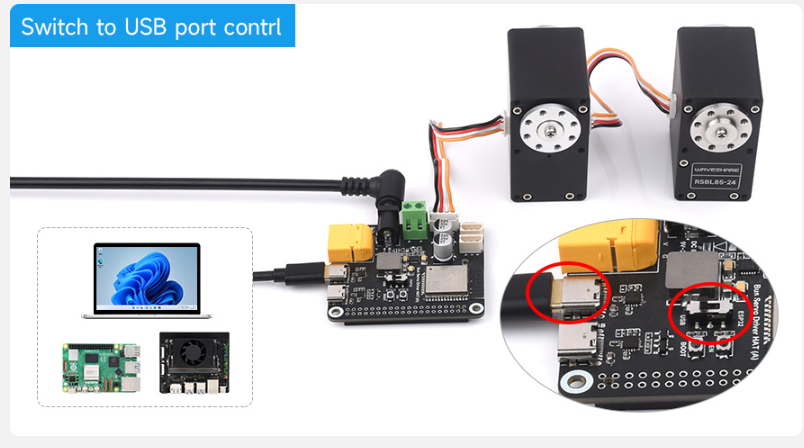
Python Environment Setup On Windows
First, download the latest installation package from the Python website. Please download it according to your OS. Here the package I downloaded is Python 3.11.5 for Windows.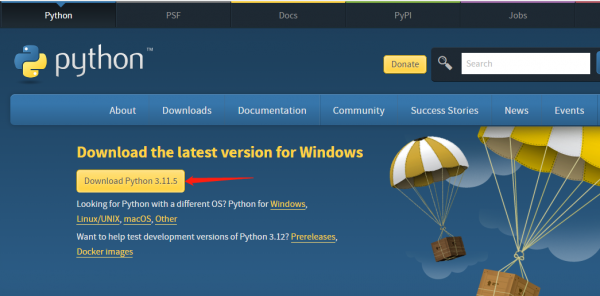
After downloading, double-click python-3.11.5-amd64 to install, and click "Customize installation" to enter "Optional Features". Keep clicking on "Next" to enter the "Advanced Options" interface. Be sure to keep "Add Python to environment variables" checked, and click "Browse" to modify the installation address. Here is the default installation address. Click "Install" after setting, and then just wait for the installation.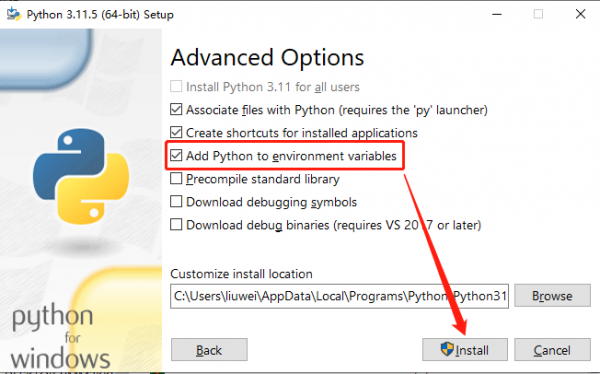
Once installed, let's move on to the Python project compilation example.
ST Series Servo Python Example
Download ST serial bus servo control library (Python) demo, unzip, and then input "cmd" in the start menu bar to open the Windows command prompt interface, type "cd folder path" to enter the STServo_Python project folder, where the virtual environment has been created, the name is stservo-env, and then enter:
stservo-env\Scripts\activate.bat
This command is to activate the virtual environment.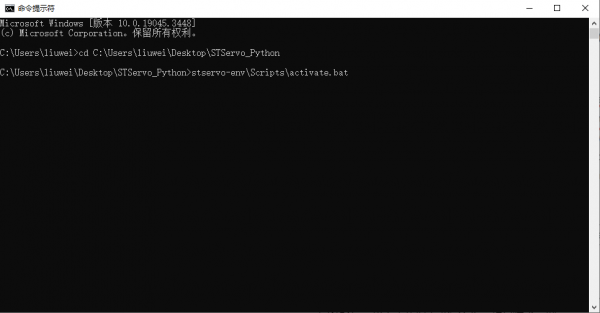
In the STServo_Python project, you can see the "requirements.txt" file, which is for storing the installation package list used in this project. After entering the virtual environment, input:
python -m pip install -r requirements.txt
This command can be used to install the package in this project, and you can see the package to be used only is "pyserial" and has been installed.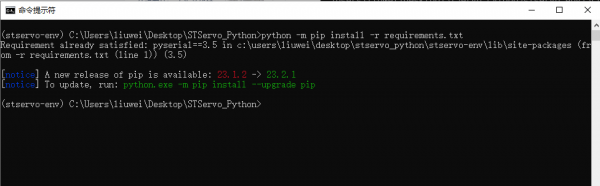
Connect the RSBL85-12 to the RS485 bus servo interface on the driver board, and connect the 9~24V power supply through the DC IN 9V-25V interface on the driver board, and then use the USB cable to connect to the computer through the USB interface of the Bus-Servo on the driver board. Search for Device Manager in the start menu bar to check the newly connected port number.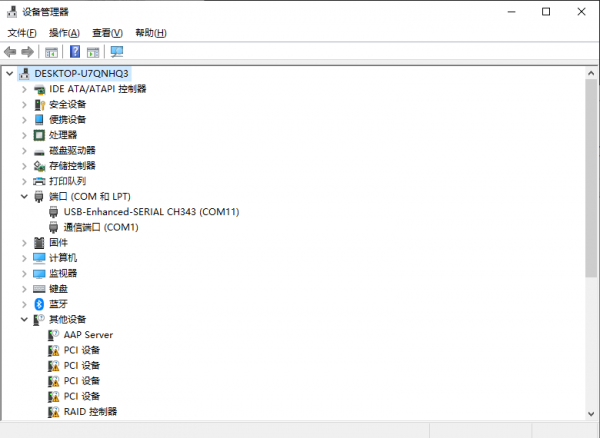
Next, change the name of the device in the demo you want to run to the access port number, in my case COM11 (different computers have different access port numbers).
Once modified you can run it, here is an example of the ping.py file, enter:
python ping.py
You can see it runs successfully and the servo with ID 1 is connected successfully.
These are simple tutorials for Python examples.
Resource
Demo
Software
Support
Monday-Friday (9:30-6:30) Saturday (9:30-5:30)
Email: services01@spotpear.com