- sales/support
Google Chat:---
- sales
+86-0755-88291180
- sales01
sales@spotpear.com
- sales02
dragon_manager@163.com
- support
tech-support@spotpear.com
- CEO-Complaints
zhoujie@spotpear.com
- Only Tech-Support
WhatsApp:13246739196
- Purchase/Shipping/Refund
WhatsApp:13424403025
- HOME
- >
- ARTICLES
- >
- Common Moudle
- >
- ESP
ESP32-S3-LCD-0.85-SD User Guide
【Resource Overview】
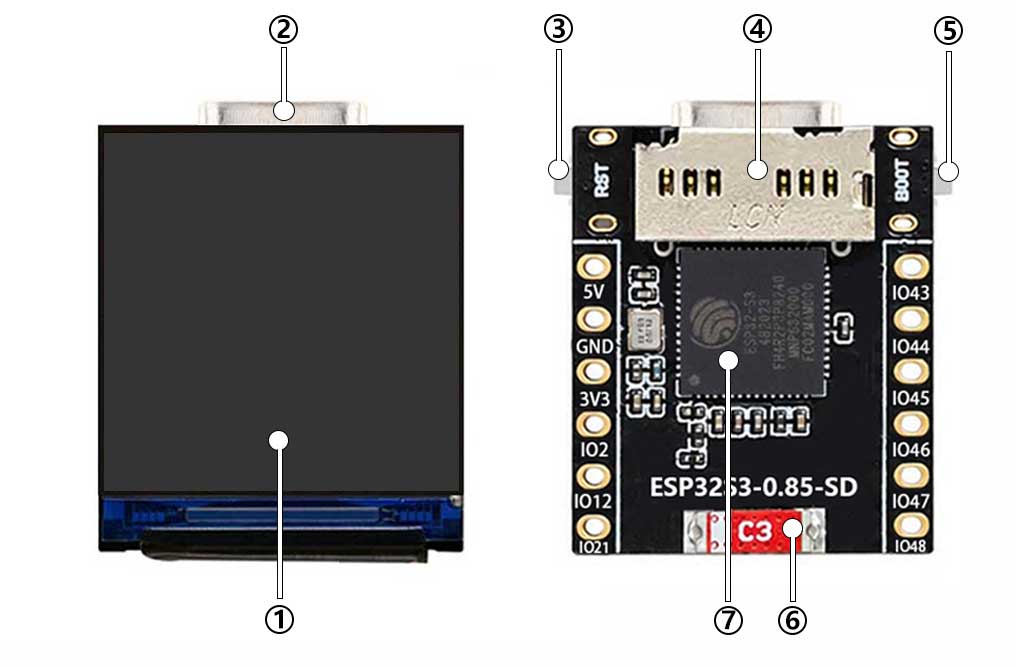
- Display screen
- Type-C
- RST
- Micro SD Port
- BOOT
- Patch ceramic antenna
- SP32-S3FH4
【Pin Definitions】
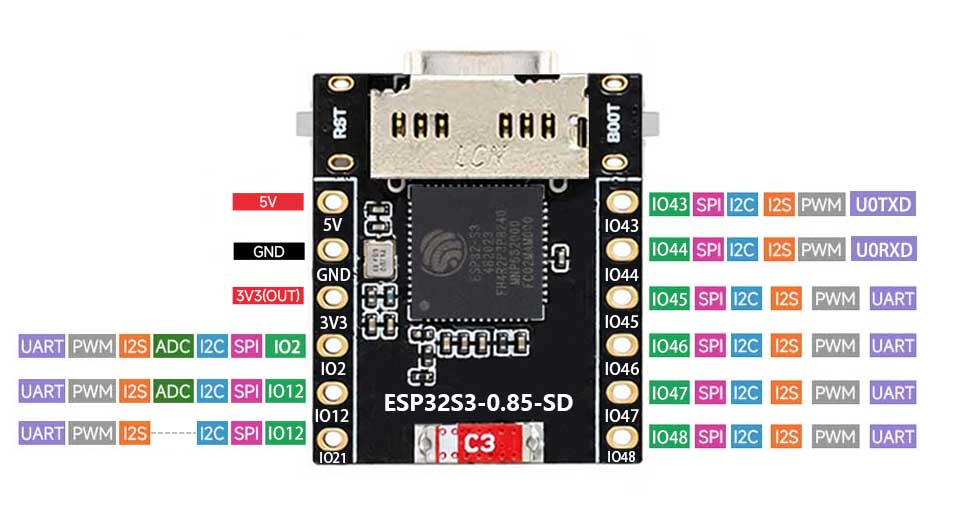
[] SPI Interface definition
DC ==> GPIO42
CS ==> GPIO41
SCLK ==> GPIO40
MOSI ==> GPIO39
BL ==> GPIO14
RESET ==> GPIO38
[] SD
SD_CS ==> GPIO15
SD_MOSI ==> GPIO16
SD_CLK ==> GPIO17
SD_MISO ==> GPIO18
[] RGB
RGB ==> GPIO13
[] Download and install Arduino IDE: https://www.arduino.cc/en/software
[] Import ESP32 series chips and motherboard libraries in Arduino IDE
Please download the Esp32 by espressif systems 3.0.3, other versions may have problems
[] Import ESP32-S3-0.85 library
Open the downloaded Demo, enter the ESP32-S3-0.85-demo\Arduino\libraries folder, and copy all the files under lib to the library storage path
C:\Documents\Arduino\libraries (click to confirm how to view your own path)
Note: If you have installed the LVGL library before, please delete the previous LVGL and copy the files in lib to the libraries folder
Version compatibility notes:
There are strong dependencies between versions of LVGL and its driver library. For example, a driver written for LVGL v8 may be incompatible with LVGL v9. To ensure stable reproduction of the examples, it is recommended to use the specific versions listed in the table above. Mixing different versions of the library may cause compilation failures or runtime exceptions.
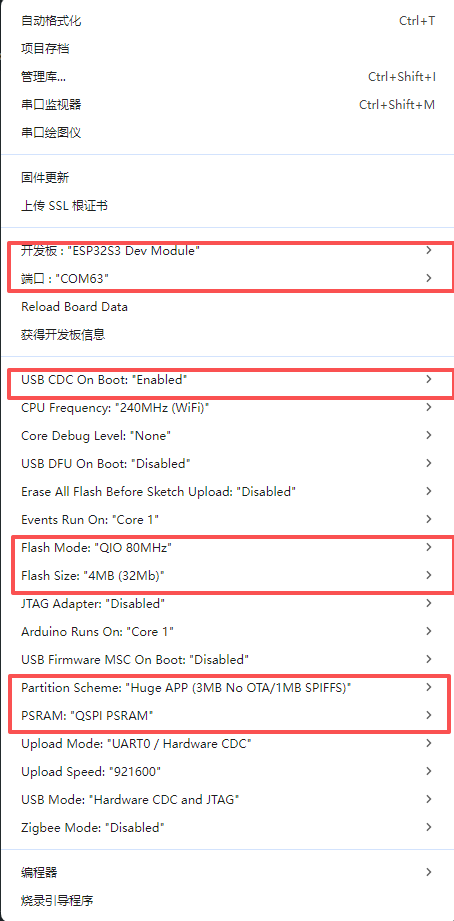
】Arduino Engineering Parameter Settings
Run the demo
Power-on default
[] The screen flashes red, blue, and green, then RGB lighting, before transitioning to a weather clock effect. (Phone settings)
Wi-Fi hotspot name: spotpear Password: spotpear123
The device will then automatically connect to your phone's hotspot and enter the Astronaut Weather Clock interface.
[] Press and hold the boot button. The default GIF will then play in Flash.
[] Press and hold the boot button again. Enter SD motion picture playback. After entering SD mode, press the boot button briefly to switch between different videos. [] It will cycle back to the weather clock.
RGB_LCD
Program Description
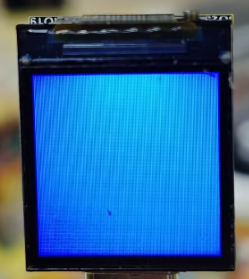
● This example demonstrates simultaneous RGB and LCD screen refresh display.
● setup() function:
undefined LCD_Init(): Initializes the GC9107 display (configures SPI, screen commands, backlight, etc.);
uundefined WS2812 _Init(): Initializes the GC9107 display (configures SPI, screen commands, backlight, etc.)
● loop() function:
undefined continuously refreshes the LCD and RGB
undefined delay(1000): Delay for 1 second to ensure refresh frequency.
Running effect


_Video_demo
Program Description
● This example demonstrates SD card detection, video multimedia playback, and image playback.
Code Analysis
● setup() function
undefined Hardware initialization: Complete the Flash test, GC9107 display initialization, backlight settings, and WS2812B LED strip initialization in sequence;
undefined RGB self-test: The screen and light strip synchronously display red, green and blue colors in sequence, each for 1 second, and then the light strip turns off;
undefined SD Card Detection: Identifies the SD card type. If no card is found, an error message is displayed on the screen and the subsequent process is terminated. If a card is found, the video file is checked; if a video is present, the video playback module is initialized.
● loop() function
undefined Minimum play logic: If the SD card is not detected, simply delay the loop and do not perform any playback operation;
undefined Playback streaming: If the video module has been initialized, call Video_Play_Loop() to loop the video playback;
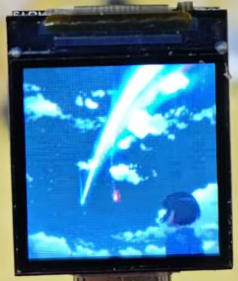
Running effect
If an SD card is present, press the button to switch videos; otherwise, an error message will be displayed on the screen and the process will terminate.

_LVGL_WeatherClock
Program Description
● This example demonstrates a weather clock system and video playback, displaying a weather clock on the GC9107 display and allowing users to switch videos using buttons, while balancing smooth operation with optimized CPU resource usage.
Code Analysis
● setup function
undefined Serial port initialization: The serial port is opened at a baud rate of 115200 for system log printing, which is convenient for debugging;
undefined Hardware/Driver Initialization: Perform Flash test, GC9107 display initialization, LVGL graphics library initialization, and SD card initialization in sequence;
undefined Peripheral configuration: Set the display backlight to 100% and initialize the weather clock business logic;
undefined Log output: Initialization progress is fed back via serial port, which is helpful for troubleshooting startup anomalies.
● loop function
undefined LVGL core processing: Calling Timer_Loop ensures that LVGL timers and animations are updated normally;
undefined Business logic loop: Execute WeatherClock_Loop to handle the real-time data update and display logic of the weather clock;
undefined Loop key detection: Determine if a key is pressed; if pressed, perform the corresponding operation.
undefined Resource optimization: Only 1ms latency is retained, which avoids excessive CPU usage and ensures high-frequency LVGL scheduling, balancing smoothness and resource consumption.