- sales/support
Google Chat:---
- sales
+86-0755-88291180
- sales01
sales@spotpear.com
- sales02
dragon_manager@163.com
- support
tech-support@spotpear.com
- CEO-Complaints
zhoujie@spotpear.com
- Only Tech-Support
WhatsApp:13246739196
- Purchase/Shipping/Refund
WhatsApp:13424403025
Raspberry Pi ------ 4.0 Python software installation User Guide
1.Start up Raspberry Pi I2C function
Input following command:
sudo apt-get install -y python-smbus i2c-tools
PS: The communication method of the Raspberry-Pi-RGB-Cooling-HAT and the Raspberry Pi is operated through I2C.
So before using Raspberry-Pi-RGB-Cooling-HAT, we need toenable the I2C service of the Raspberry Pi.
Input following command:
sudo raspi-config
Choose【Interfacing Options】.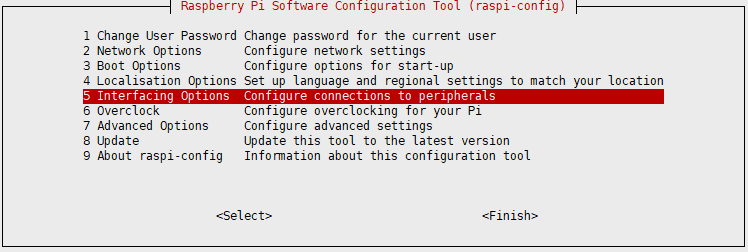
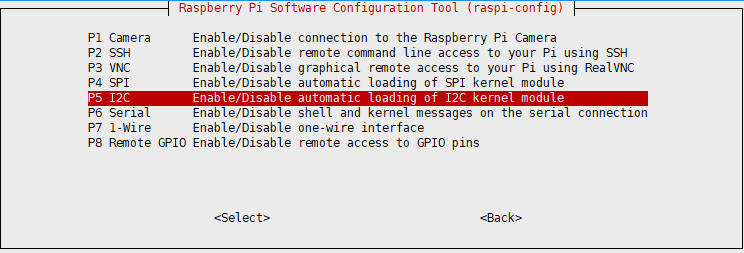
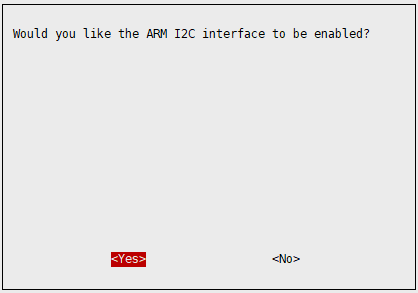
Choose【I2C】---【YES】.
2.Install Adafruit-SSD1306 library
Adafruit-SSD1306 is a Python OLED library that can be used for screens controlled by 128×64 and 128×32 pixel SSD1306 chips.
Input following command to install it.
sudo python -m pip install --upgrade pip setuptools wheel
Input following command to install it.
sudo pip install Adafruit-SSD1306
Note: After testing the fan control and RGB light control procedures in 3B/3B+, the official mirror control for 2019 is abnormal.
If you are a 3B/3B+ user, It is recommended that use the latest official image to configure.