




- sales/support
Google Chat:---
- sales
+86-0755-88291180
- sales01
sales@spotpear.com
- sales02
dragon_manager@163.com
- support
tech-support@spotpear.com
- CEO-Complaints
zhoujie@spotpear.com
- Only Tech-Support
WhatsApp:13246739196
- Purchase/Shipping/Refund
WhatsApp:13424403025
IMX415 8MP AF Camera (B) User Guide
Specifications
| Category | Parameter |
|---|---|
| Sensor | Sony IMX415 |
| Resolution | 8MP (3840 × 2160) |
| Focus Mode | Autofocus |
| CMOS Size | 1/2.8 inch |
| Aperture | F2.2 |
| Distortion | -0.4% |
| Focal Length | 3.3mm |
| Field of View (FoV) | 93.5°(D) × 85.2°(H) × 55.5°(V) |
| Supported Devices | Compatible with Raspberry Pi series boards and compute modules |
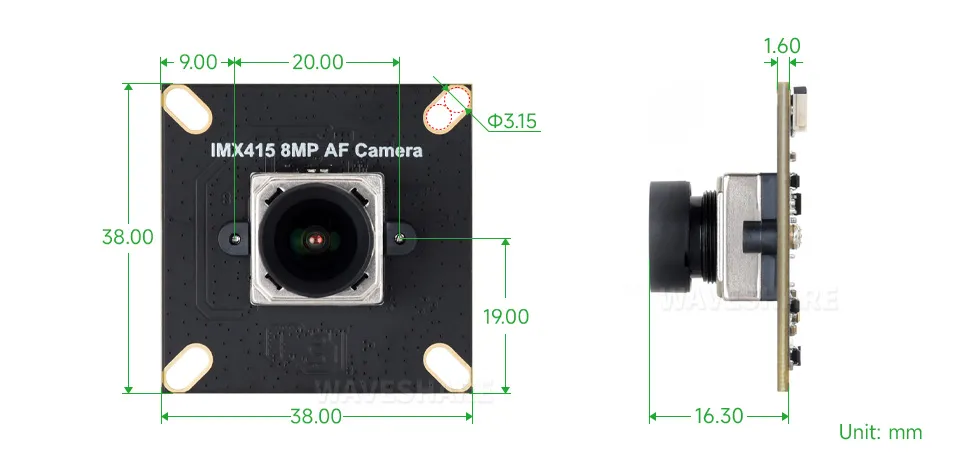
Dimensions
Working with Raspberry Pi
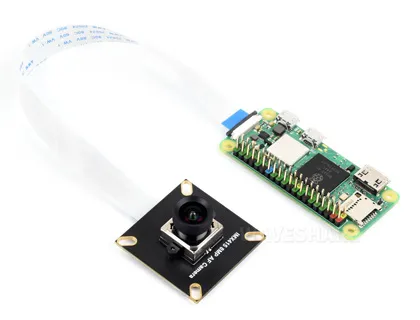
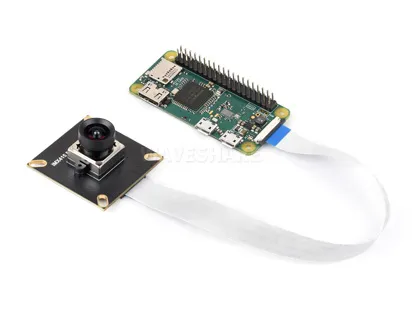
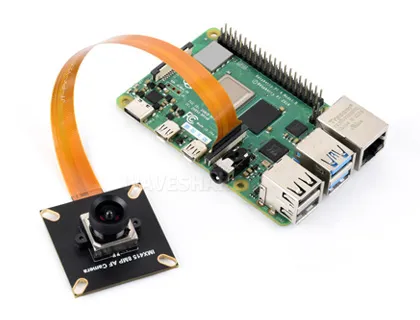
Hardware Connection
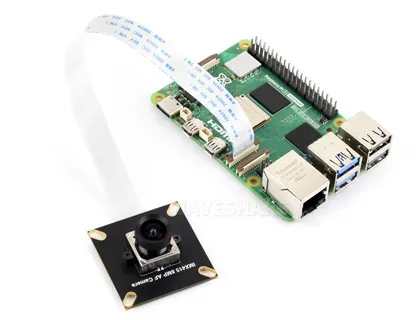
Software Environment Configuration and Testing
Flash the Official Raspberry Pi OS Image
- First, flash the latest official Raspberry Pi OS image to a TF card.
- After flashing, start the Raspberry Pi and complete the basic initial configuration.
Download the Driver and Copy it to the Raspberry Pi
wget https://files.waveshare.com/wiki/IMX415-8MP-AF-Camera/IMX415-8MP-AF-Camera.zip
If using only one camera, connect it to the CAM1 port.
Extract the Package and Enter the Directory
unzip IMX415-8MP-AF-Camera.zip
cd IMX415-8MP-AF-Camera
Add Execute Permissions to the Installation Script and Run It
chmod +x install.sh
./install.sh
Reboot the Raspberry Pi After Installation
sudo reboot
2-lane / 4-lane Mode Description
- By default, 2-lane mode is used, and the IMX415 preview frame rate is 15fps.
- Raspberry Pi 5 supports 4-lane mode, which can increase the preview frame rate to 30fps. To enable it, add the
4laneparameter to the dtoverlay line in/boot/firmware/config.txt:
dtoverlay=imx415,4lane,clk-37125,addr=0x1a,vcm,aw86017
- After saving the change, reboot the Raspberry Pi for it to take effect.
Check if the Camera is Successfully Detected
- After reboot, run:
rpicam-hello --list-cameras
- If the camera is successfully detected, you should see output similar to:
Available cameras
-----------------
0 : imx415 [...]
Preview and Autofocus Test
Raspberry Pi 5
- Run:
rpicam-hello --autofocus-mode continuous --qt-preview -t 0 --info-text "focus:%focus, lp:%lp, afstate:%afstate" --tuning-file ~/imx415_af.json
- Move the object at different distances and check if autofocus works properly.
Raspberry Pi 4 and Other Models
- Run:
rpicam-hello --autofocus-mode continuous --qt-preview -t 0 --info-text "focus:%focus, lp:%lp, afstate:%afstate" --tuning-file ~/imx415_af_vc4.json
Move the object at different distances and check if autofocus works properly.
For more information about rpicam commands, please refer to Raspberry Pi rpicam Tool Documentation.
Resources
1. Other Resources
Support
Monday-Friday (9:30-6:30) Saturday (9:30-5:30)
Email: services01@spotpear.com
TAG:
NVIDIA Jetson TX2 NX Module
SpotPear
Raspberry Pi AI HAT+ Official Original Hailo-8/8L 13/26Tops For Pi5 PCIe M.2 Gen3
ESP32 C3 Round LCD Development Board Electronic EYE 0.71 inch Display Watch Screen GC9A01 160x160
Raspberry Pi 5 PCIe to SATA Expansion Board with EEPROM HAT+
RS485 Interface
ESP32-C6 2.16inch AMOLED Display AI Development Board 480×480 2.16 inch TouchScreen Deepseek
Raspberry Pi Camera 8MP IMX415 also For Luckfox-Omni3576 RK3576
Arduino 1.5inch LCD
Core3566102000
Raspberry Pi 7inch DSI
ESP32 S3 Development Board 2.8 inch Round LCD Display 480x480 QMI8658 Sensor / MIC / SD /MP3 Audio /Battery Port LVGL/HMI For Arduino
Font-Modulation-Tutorial User Guide
ESP32 C3 Round LCD Development Board Electronic EYE 0.71 inch Display Watch Screen GC9A01 160x160
Raspberry Pi UART
ESP32-S3 Industrial 8-CH Relay IOT LAN WiFi /Bluetooth /RS485 /RJ45 Ethernet /POE
Jetson Nano 1.54inch OLED
ESP32-P4-Core Board with 32MB PSRAM USB With Camera Port / Display Port
Raspberry Pi 5 PCIe to 2-CH PCIe FFC Dual PCIe HAT Board Pi5 Double
ESP32 C3 LCD
[Tutorial Navigation]
- Specifications
- Dimensions
- Working with Raspberry Pi
- Hardware Connection
- Software Environment Configuration and Testing
- Flash the Official Raspberry Pi OS Image
- Download the Driver and Copy it to the Raspberry Pi
- Extract the Package and Enter the Directory
- Add Execute Permissions to the Installation Script and Run It
- Reboot the Raspberry Pi After Installation
- 2-lane / 4-lane Mode Description
- Check if the Camera is Successfully Detected
- Preview and Autofocus Test
- Resources
- Support