


- sales/support
Google Chat:---
- sales
+86-0755-88291180
- sales01
sales@spotpear.com
- sales02
dragon_manager@163.com
- support
tech-support@spotpear.com
- CEO-Complaints
zhoujie@spotpear.com
- Only Tech-Support
WhatsApp:13246739196
- Purchase/Shipping/Refund
WhatsApp:13424403025
PICO-Cam-B Guide
Resources】
C demo code
C Tutorial】
1】Install the compilation environment.
2】Run the Demo program
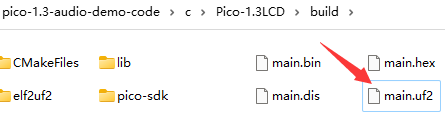
After that, the .uf2 file generated in the build folder can be transferred to the Pico for execution.
TAG:
Raspberry Pi LCD Capacitive TouchScreen Display HDMI 6.25inch 720x1560
Pi5 Pure-Copper Active Cooler
ESP32-S3 1.28inch
NVIDIA
Raspberry Pi Mipi
ESP32 S3 Development Board 1.64 inch AMOLED Display 1.64inch TouchScreen For Arduino LVGL With SD-Port/ QMI8658C 6-Axis Sensor
Pi5-Pcie-Fish-Boar
Raspberry Pi Pico 2 RP2350 0.85 inch LCD Display mini Development Board 0.85inch Screen RGB LED/SD Slot /QMI8658 Gyroscope Sensor
Raspberry Pi 5 PD Induction
Computer Secondary Screen
MPS2280D Raspberry Pi 5 PCIe to M.2 NVMe Dual SSD Adapter Board HAT Pi5 Double 2280
ESP32-P4 Core Board 32MB PSRAM 16MB Flash
PoE-M.2-HAT+B User Guide
MAX9296 GMSL Camera Adapter Board 2-Ch High-Speed And Low-Latency Transmission For Jetson Orin Nano/NX
Sipeed NanoCluster Mini Cluster Board mini data center For Raspberry Pi CM45 / Computer /LM3H /M4N
Raspberry Pi 5 RTC Box
Jetson Nano Heatsink
Jetson Nano 4G module
BG95-M3-Zero QuecPython EVB development support LTE/EGPRS and GNSS
ESP32-Hi Mechanical Dog ESP32 C3 Servo AI Voice Chat Development Board Deepseek
TAG:
Raspberry Pi 60GHz mmWave Radar Sensor High-Precision Human Body PCR For Arduino ESP32
ESP32 S3 AI 1.85 inch Development Board with 1.85inch LCD Touchscreen Round Screen Electronic Badge Deepseek
Raspberry Pi UPS HAT E 21700 Li battery (NOT included) 5V 6A Uninterruptible Power Supply
USB camera 8MP OS08A10 Excellent low light performance USB 2.0 plug and play
White
Milk-V Duo RISC V
ESP32 desktop trinket
WT9011DCL-BT50 9Axis Accelerometer Gyroscope Sensor Electronic Compass Magnetometer
LoRa32 ESP32 OLED 0.96 inch Paxcounter Disaster-Radio CH9102 SX1278 SX1276 LILYGO TTGO
AI Machine Vision Kit OAK D Pro JPEG Encoder 12MP 4TOPS OpenCV Depth measurement Camera
ESP32 Microcontroller Development Board 240MHz ESP32-WROOM/WROVER
Raspberry Pi 10.1 inch DSI LCD TouchScreen Display 800x1280 RK3576 RK3506 ESP32-P4 Luckfox Lyra
Raspberry Pi Pico 2 RP2350A Zero-CM Mini Board
Arduino UNO R4 WiFi
SpotPear
USB Camera
Spotpear
DeepSeek AI Chat Box ESP32-S3 1.54 inch LCD N16R8 Development Board Display Screen Wifi Weather Station TimeClock
Raspberry Pi Secondary Screen
Luckfox Pico Zero RV1106G3 SD WiFi6 Audio eMMC-8G RAM-256MB