




- sales/support
Google Chat:---
- sales
+86-0755-88291180
- sales01
sales@spotpear.com
- sales02
dragon_manager@163.com
- support
tech-support@spotpear.com
- CEO-Complaints
zhoujie@spotpear.com
- Only Tech-Support
WhatsApp:13246739196
- Purchase/Shipping/Refund
WhatsApp:13424403025
RS485-HUB-2P User Guide
Overview
Introduction
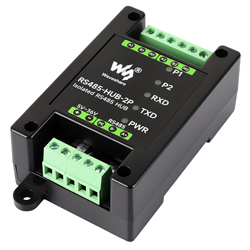
RS485-HUB-2P is an industrial-grade isolated RS485 hub that can expand one RS485 host port into two RS485 slave ports. It can achieve RS485 network relay, expansion, and isolation functions. It adopts a terminal type power supply access and rail-mounted housing design, making it easy to install and cost-effective. It is suitable for fields such as data acquisition, IoT gateways, security IoT, and intelligent instrument monitoring.
Specifications
| Interface standards | Compliant with RS485 standard |
|---|---|
| Physical interface | RS485 screw terminals |
| Communication rate | 300~460800bps baud rate (adaptive) |
| Supported nodes | Each RS485 port supports up to 32 nodes |
| Communication distance | 1200m (9600bps), the higher the communication rate, the shorter the distance |
| Operating mode | RS485 two-wire (A, B), half-duplex transparent transmission |
| Power Supply | DC 5~36V |
| Operating temperature | -45 ~ +85℃ |
| Environment humidity | <95%RH |
| Transmission medium | Normal parallel cables/twisted-pair cables |
Interfaces
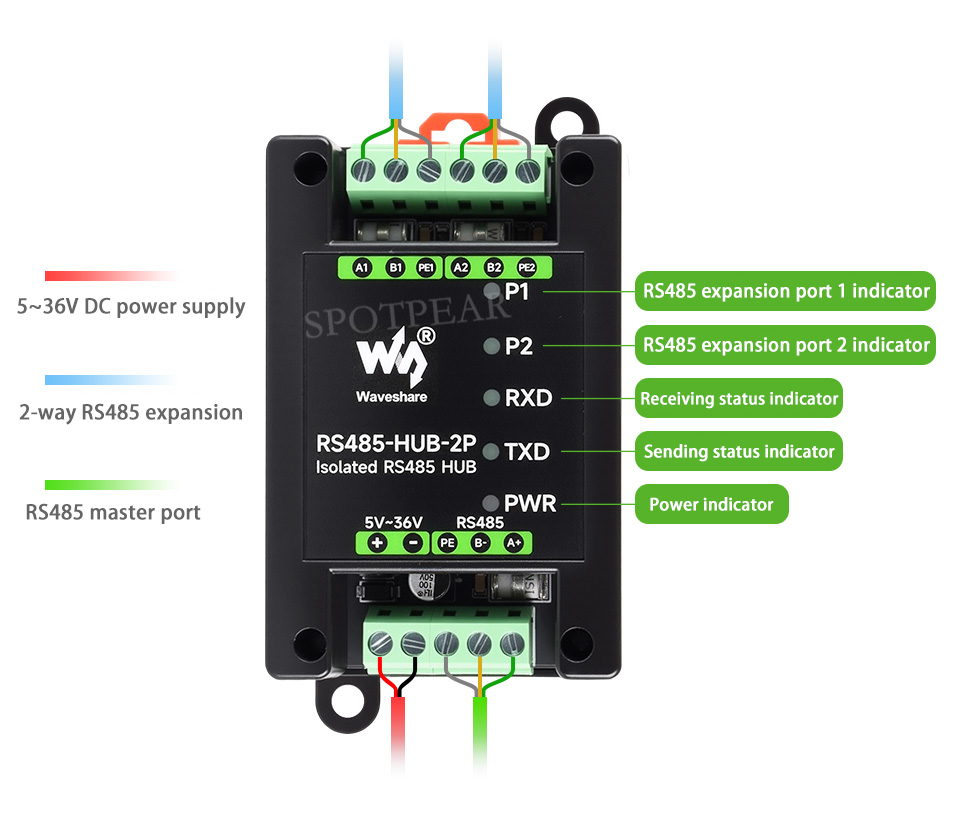
| Interfaces | Description |
|---|---|
| +5~36V, GND | Power supply terminal input |
| OUT1A~OUT2A, OUT1B~OUT2B | RS485 slave ports 1~2 |
| 485A, 485B | RS485 host port |
| P1~P2 | RS485 1~8 slave port data reception indicators |
| RXD | 485 host port data reception indicator |
| TXD | 485 host port data transmission indicator |
| POWER | Power indicator |
Function Description
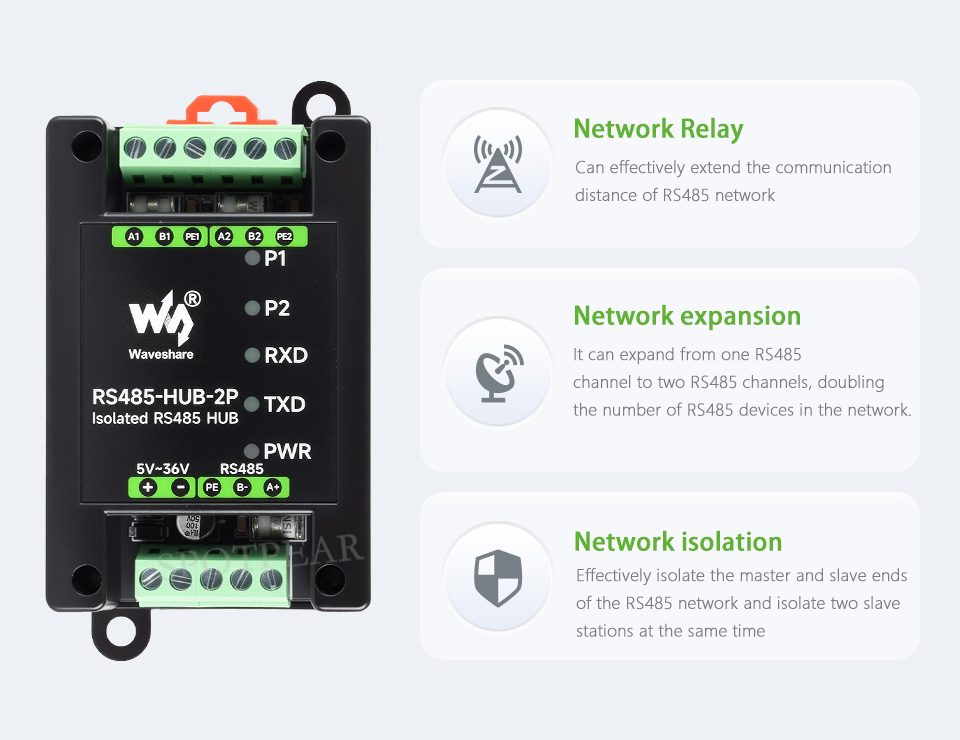
Extension
When the host RS485 device needs to connect 2 RS485 slave stations via a star connection, connect the host station to the host port of the RS485-HUB-2P, and connect the slaves to the slave ports of the RS485-HUB-2P. This can prevent interference between RS485 and achieve effective isolation.
Isolation
Connect one end of the RS485 to the RS485 host port, and the other end to any RS485 slave port. At this point, the RS485 line is effectively isolated, providing protection against lightning strikes and interference. This effectively protects the other end of the RS485 device from being damaged by high voltage and strong current.
Relay
When RS485 cables exceed 1200 meters or longer distances, signals will attenuate and interference will increase. By using RS485-HUB-2P, the communication distance can be extended.
Hardware Connection Diagram
RS485 Point-to-Point Relay Communication
RS485 1-to-2, point-to-point, half-duplex, relay communication
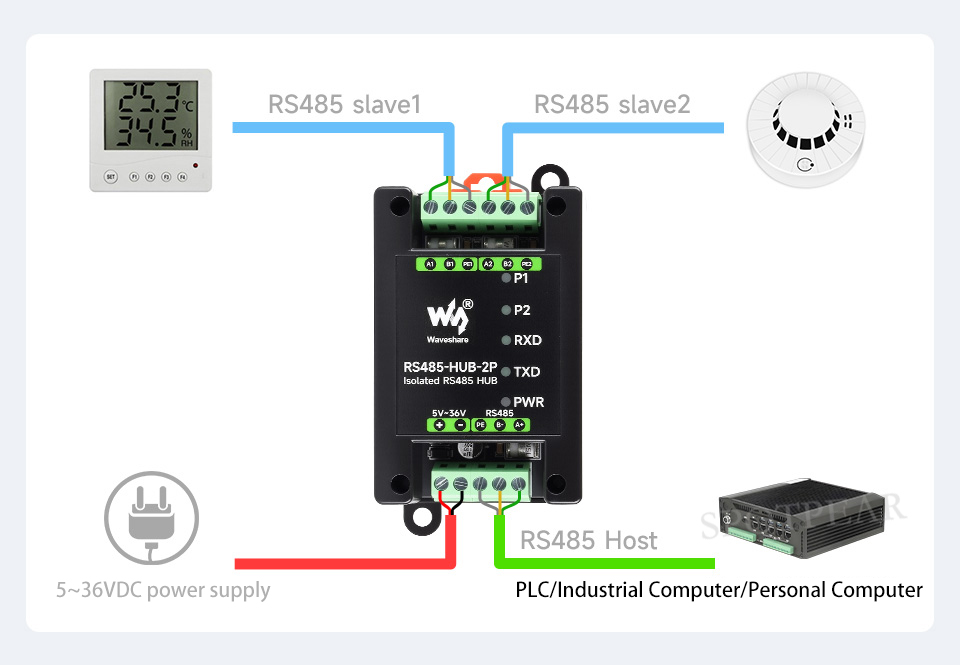
RS485 Point-to-Multipoint Relay Communication
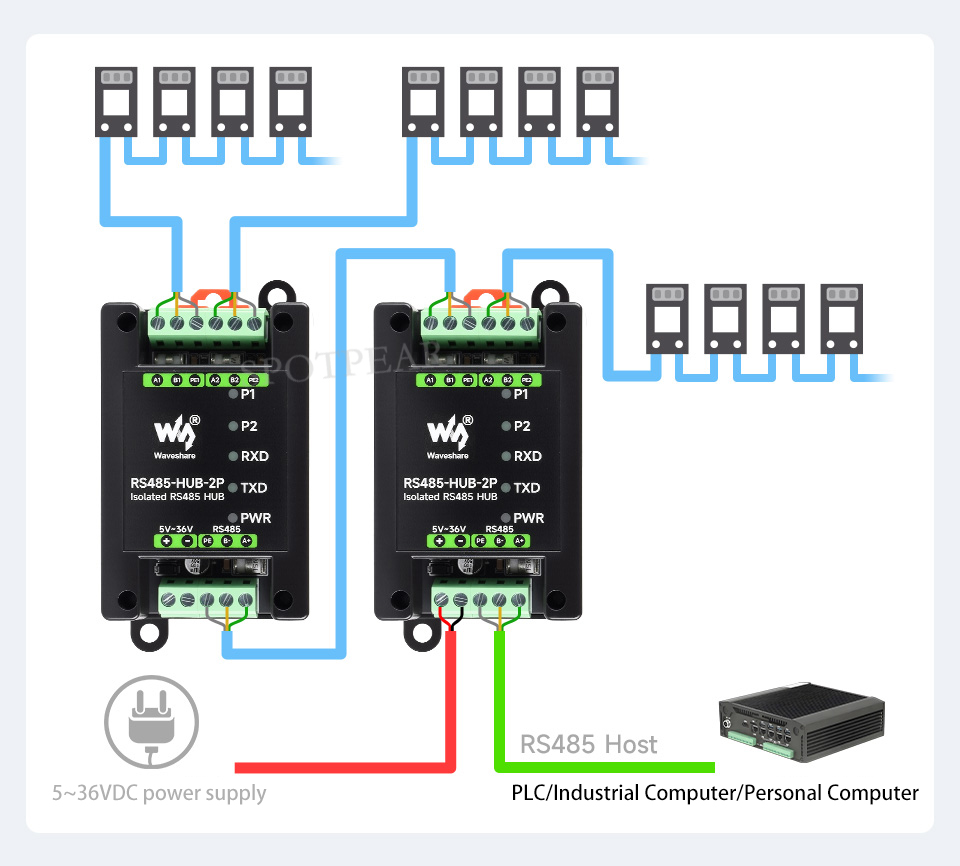
It supports star-type segmentation connection for RS485 bus, enables flexible networking, and features signal relay and amplification functions
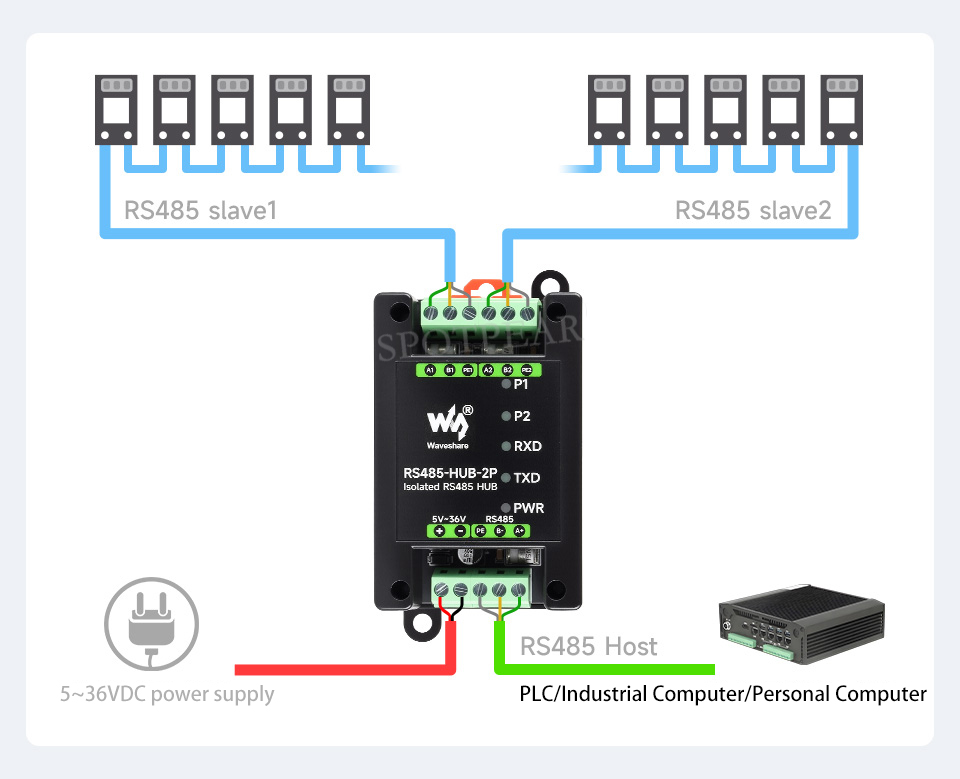
RS485 Point-to-Multipoint Relay Communication
It supports the cascading of multiple RS485 devices, solving connectivity issues in large systems with multiple node networking, ensuring stable and reliable signal amplification
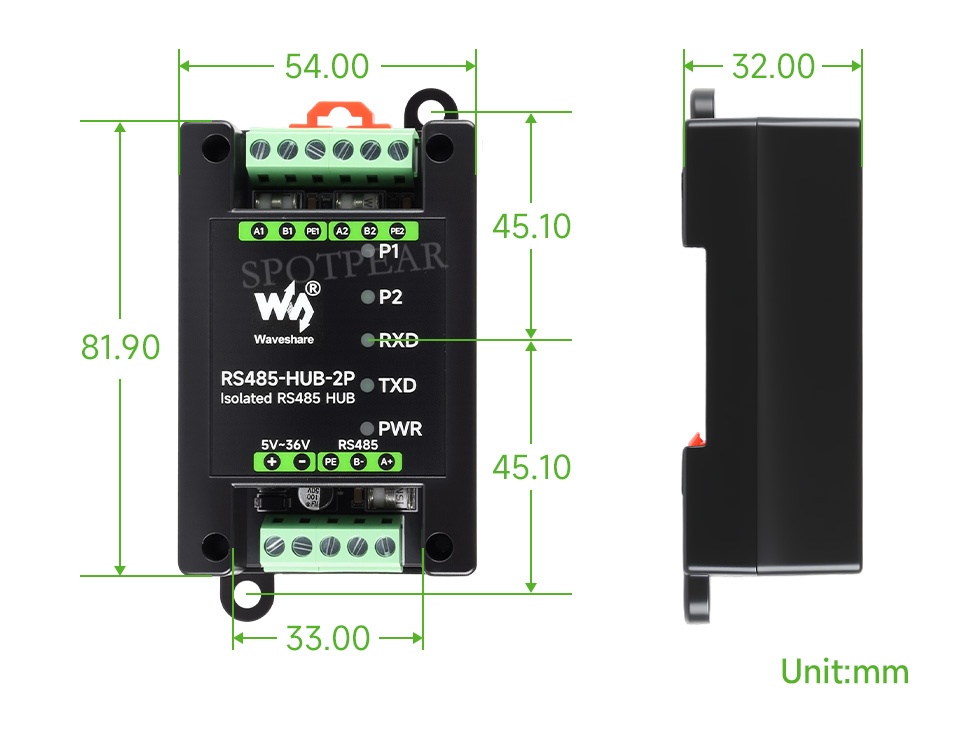
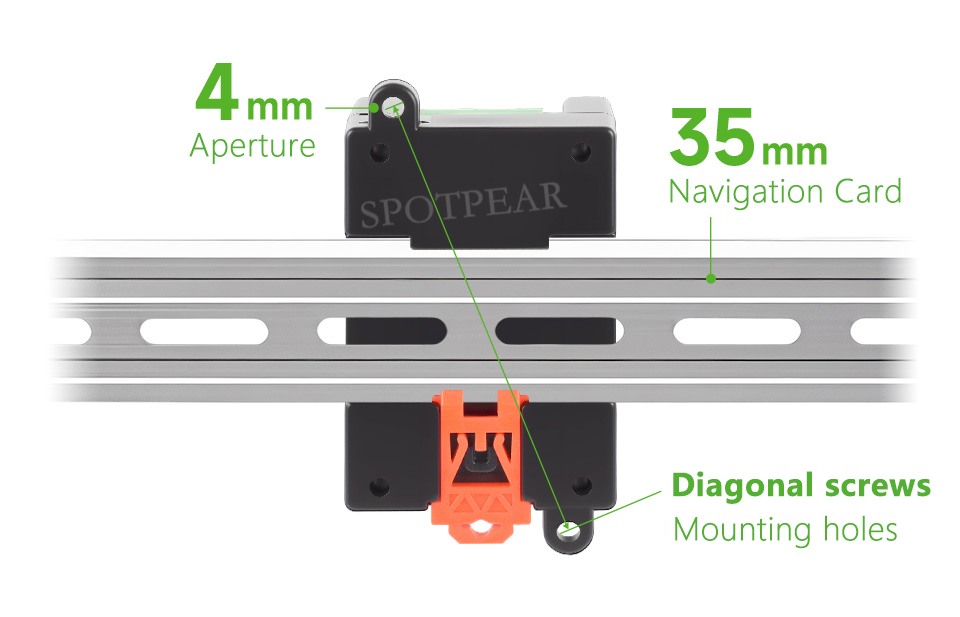
Dimensions
FAQ
Question: How to connect multiple RS485-HUB-2P to the same RS485 interface of the same device?
It is a device with one host and eight slaves, purely hardware wired, and must meet three prerequisites:
- 1. The serial port parameters are consistent;
- 2. The communication protocol is half-duplex, one question and one answer type, such as the Modbus RTU protocol;
- 3. The device addresses are different. Seven 485 slave ports can be connected to one 485 device or a 485 bus
- 4. The scanning cycle time set by the program should not be too short. Adjust the time as long as possible, as the device needs sufficient time
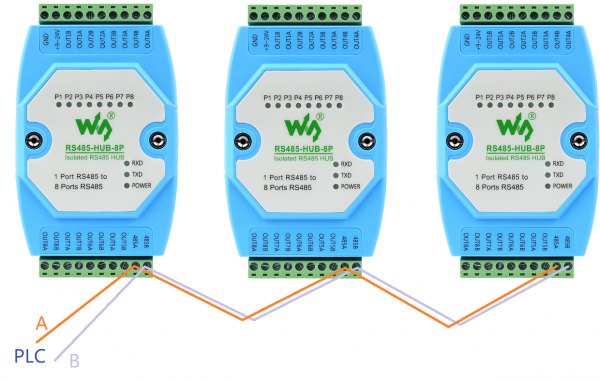
- 5. Cannot be connected in parallel to the host's 485 port; it must be connected in handshake cascading, as shown in the figure below:
Question: We have purchased RS485-HUB-2P, can you send us its protocol?
- This device is mainly an extension of the physical layer, which does not involve specific communication protocols, but ensures that the electrical characteristics of the RS485 standard, such as differential signal transmission, multi-point communication, etc., are supported at the hardware level.
- The device does not contain any functionality to change its role or control communication protocols; it is merely a transparent signal forwarder.
Question: What is the power of RS485 HUB-2P?
- Powered by 24V, the no-load current is 0.02A, 0.24W
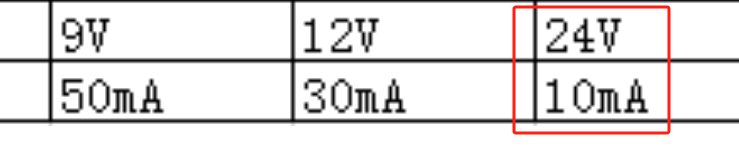
- Powered by 12V, the no-load current is 0.03A, 0.36W
Question: We have purchased RS485-HUB-2P, can you send us its protocol?
- This device is mainly an extension of the physical layer, which does not involve specific communication protocols, but ensures that the electrical characteristics of the RS485 standard, such as differential signal transmission, multi-point communication, etc., are supported at the hardware level.
- The device does not contain any functionality to change its role or control communication protocols; it is merely a transparent signal forwarder.
Question: Does the RS485-HUB-2P have a 120Ω balancing resistor internally?
No, you can connect a 120 Ω balanced resistor externally, as shown in the following figure: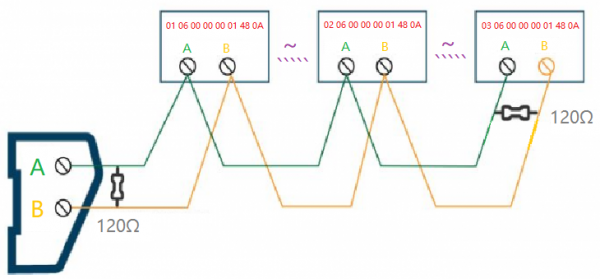
Support
Monday-Friday (9:30-6:30) Saturday (9:30-5:30)
Email: services01@spotpear.com
[Tutorial Navigation]
- Overview
- Introduction
- Specifications
- Interfaces
- Function Description
- Hardware Connection Diagram
- RS485 Point-to-Point Relay Communication
- RS485 Point-to-Multipoint Relay Communication
- RS485 Point-to-Multipoint Relay Communication
- Dimensions
- FAQ
- Question: How to connect multiple RS485-HUB-2P to the same RS485 interface of the same device?
- Question: We have purchased RS485-HUB-2P, can you send us its protocol?
- Question: What is the power of RS485 HUB-2P?
- Question: We have purchased RS485-HUB-2P, can you send us its protocol?
- Question: Does the RS485-HUB-2P have a 120Ω balancing resistor internally?
- Support