




- sales/support
Google Chat:---
- sales
+86-0755-88291180
- sales01
sales@spotpear.com
- sales02
dragon_manager@163.com
- support
tech-support@spotpear.com
- CEO-Complaints
zhoujie@spotpear.com
- Only Tech-Support
WhatsApp:13246739196
- Purchase/Shipping/Refund
WhatsApp:13424403025
Image-Modulation-Tutorial User Guide
Introduction
When developing an embedded microcontroller, you need to use LCD/OLED to display a picture. The most direct and simple way is to use corresponding tools to convert the picture into corresponding data points (actually a 2-dimensional array), and then you can use the corresponding code to display the array on the LCD/OLED display by sequence.
Steps
1. Click Image2Lcd2.9.zip to download the tool.
2. Double-click to enter the interface.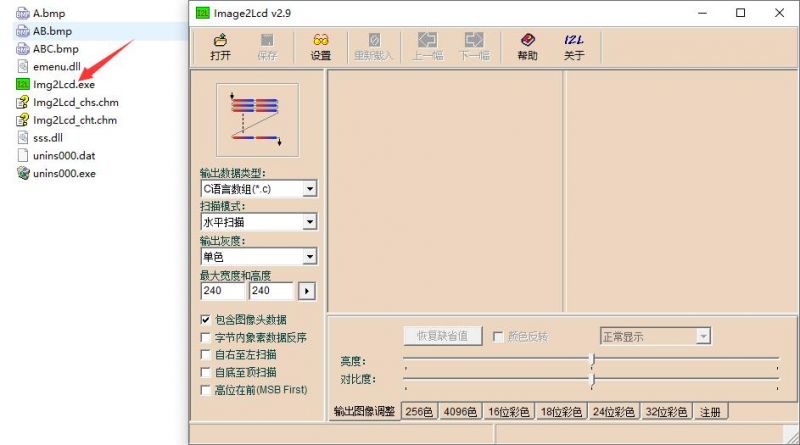
3. Open the image that needs to be extracted. (Here we take a 1.47inch LCD Module as an example.)
- Parameter setting
Output data type: C array (*.c)
Scan mode: vertical
Output grayscale: 16-bit true color
Maximum width and height (set according to the actual aspect ratio of the image): 172x320
Output image adjustment: the default setting is fine, if you need color inversion, check Color Inversion
Click 16-bit color: color bits -> RGB565, order of colors -> RGB
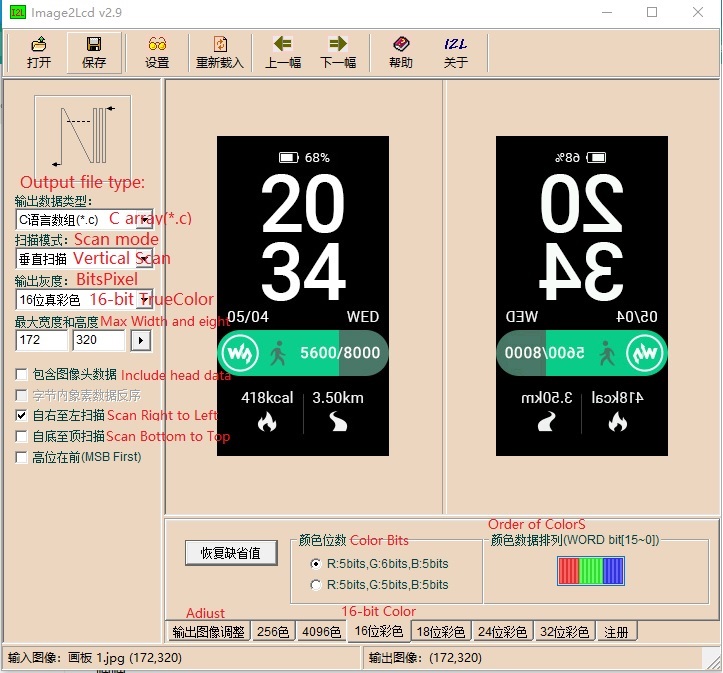
4. Save the setting.
- The path and name are set by the user.
- The file type is .c file.
- After saving, an array will be generated, after ctrl+A selects all:
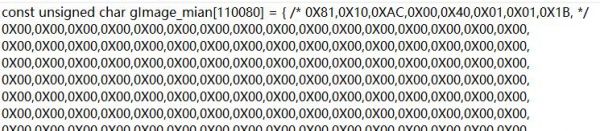
- Copy it to the "Image. c" file.
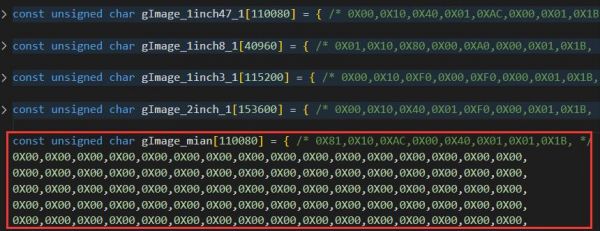
- And declare it in Image.h:
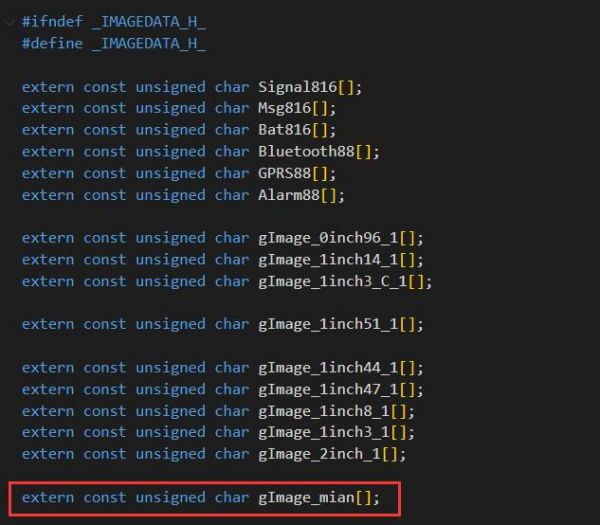
- Finally, call the main function and map it to the screen.

The effect is shown below: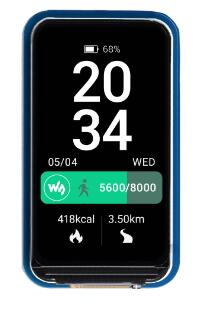
TAG:
ESP32-S3 Mini
SpotPear
Industrial Modbus RTU Dual Ethernet RJ45 To 8ch POE ETH Relay (C) PoE Power over Ethernet
ESP32 ST7789 configuration
Raspberry Pi 5 Aluminium Case
RK3566
Raspberry Pi 5 inch DSI MIPI Display LCD (D) Capacitive TouchScreen 720x1280
Raspberry Pi 5
Jetson
VGA to LVDS
Raspberry Pi 5 PCIe FFC Connector to Standard PCIe x1 Slot (C) Expansion Board
EchoEar ESP32 S3 AI Development Board with 1.85-inch LCD Display Cute Cat Pet Chatting Robot N32R16
SpotPear
Screen
Raspberry Pi CM5 Mini Base IO Board NANO B Development For Compute Module 5
Raspberry Pi 5/4B not boot To update BootLoader EEPROM Tutorial
Intel 12th
Raspberry Pi DSI display
Flash Firmware Flashing and Erasing User Guide
UART Serial TTL To RS232 B Built-In Protection Circuits Rail-mount
TAG:
14 inch LCD 2K Type C HDMI Capacitive Touchscreen Display Raspberry Pi Jetson Nano mini PC 2160x1440
Jetson Nano Cooler
DTM3202
Raspberry Pi 4.26 inch e-Paper link (G) RYBW 800x480 For Arduino / Jetson / STM32 /ESP32
LCD
ESP32-S3FH4R2
SpeedyBee F405 Mini FC F4 Flight Controller FPV DJI Drone
USB To CAN FD Bus Data Analyzer Bus Communication
Raspberry Pi Pico 1.14inch LCD
Raspberry Pi 7 inch DSI MIPI LCD TouchScreen Display 7inch 1024x600 For Luckfox Lyra RK3506/ESP32-P4/Luckfox Omni3576
ESP32 S3 LCD Development Board 1.3 inch Display
IPS
Case For Luckfox Pico Mini A Or B
NVIDIA Jetson Nano Developer Kit (B01) Upgraded 2 lanes CSI
Raspberry Pi Camera
Raspberry Pi IR-CUT 12.3MP Camera with IMX477 For Jeston/RDK
Arduino UNO R4 case
SpeedyBee F405 V3 BLS 60A FC ESC Stack Flight Controller DJI FPV Drone
7inch Round LCD HDMI Capacitive 7 inch Touchscreen Display 1080x1080 For Raspberry Pi/Jetson Nano/mini PC
Raspberry Pi 5 PCIe to M.2 NVMe SSD