


- sales/support
Google Chat: zj734465502@gmail.com
- sales
+86-0755-88291180
- sales01
sales@spotpear.com
- sales02
dragon_manager@163.com
- support
tech-support@spotpear.com
- CEO-Complaints
zhoujie@spotpear.com
- sales/support
WhatsApp:13246739196
SIM820X RNDIS Dial-Up
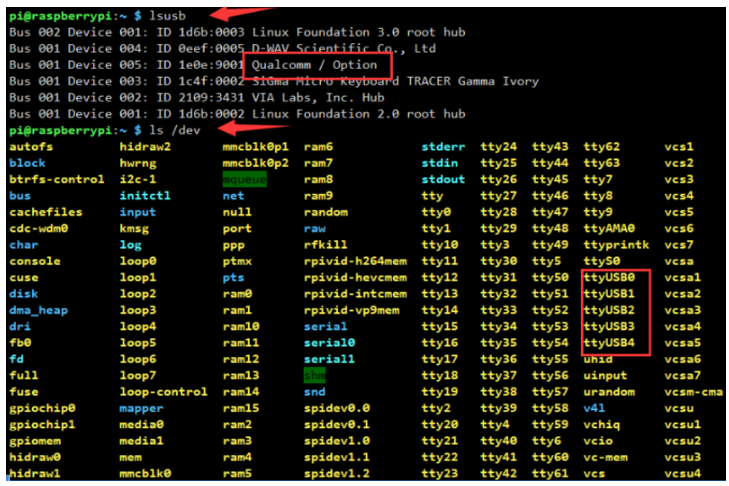
- Check whether SIM820X and Raspberry Pi and other devices are connected well through the following commands, if there is no problem, you can see Qualcomm devices and ttyUSB0-USB4
 lsusb
 ls /dev
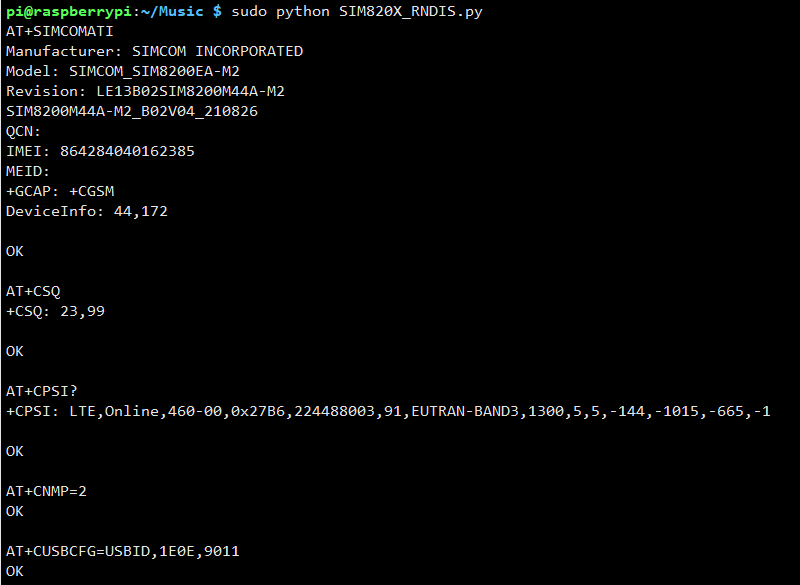
- After connecting the device, copy the following commands to the Terminal:
wget https://www.waveshare.com/w/upload/1/1e/SIM820X_RNDIS.zip
sudo apt-get install python3-pip
sudo pip3 install pyserial
sudo apt-get install unzip
unzip  SIM820X_RNDIS.zip
sudo chmod 777 SIM820X_RNDIS.py
sudo python3 SIM820X_RNDIS.py
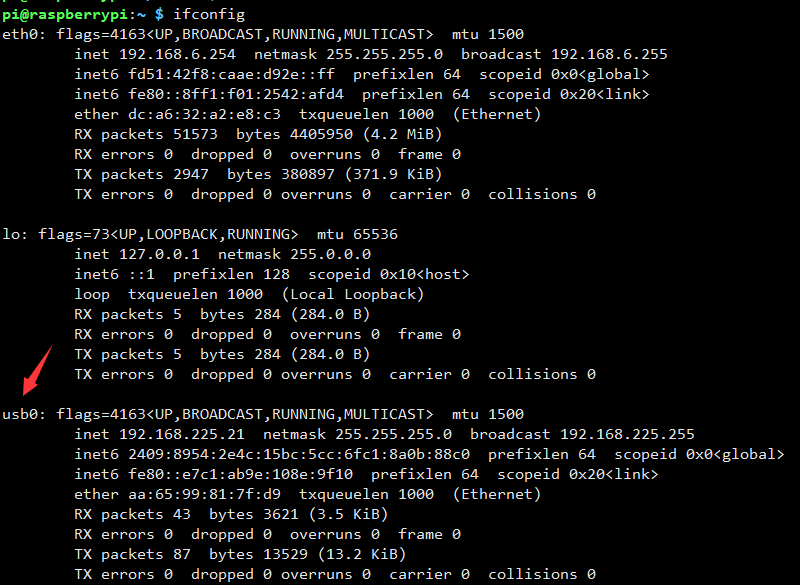
- After dialing, the Raspberry Pi can see that usb0 gets the ip through the following command:
ifconfig
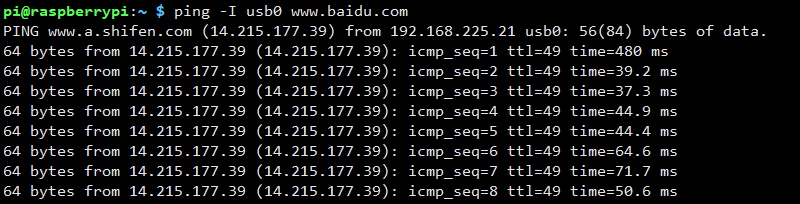
- Test usb0 networking status
ping -I usb0 www.baidu.com
- If you cannot get the IP or fail to connect to the Internet, use the following commands to get the IP and connect to the Internet:
sudo dhclient -v usb0
sudo apt-get install udhcpc
sudo udhcpc -i usb0
sudo route add -net 0.0.0.0 usb0
If you need to switch to windows, or restore the default settings of the module, you can send the following command to restore through the serial port:
at+cusbcfg=usbid,1e0e,9001
TAG:
EyeLink-RC-S1 Industrial Edition 5.5 inch Touchscreen Camera R1M Card Recording Flight Controller FPV Drone ground station image transmission remote
NV3030B
Computer Desktop Monitor Display
Luckfox Pico Max
Wiki
JETSON NANO MINI Expansion Board
Milk-V Duo Code
ESP32-S3 Development Board 1.85 inch Round LCD N16R8 DeepSeek AI Voice Chat Robot BOX Magnetic-charging
Raspberry Pi 5/4B easy Adapter Micro HDMI to HDMI 4K All Ports To Pi's USB Side
NVIDIA-acess User Guide
Raspberry Pi
Raspberry Pi 2inch LCD
Day and IR Night Vision
ESP32 C6 Development Board with 1.32inch AMOLED Display QSPI Interface WiFi 6 Audio Acquisition Deepseek
How to Use Product ROS2
Raspberry Pi 5 TTL
Raspberry Pi CM5 IO BASE B Mini Board a Base Development Platform Compute Module 5 IO Board with EEPROM And Encryption chip
RS232 to Ethernet
RS485 to RJ45
Raspberry Pi 5


TAG:
1.28 inch Round Rotary LCD Smart Screen 1.28inch Knob Display 240x240 Option Touch/No-Touch
DeepSeek ESP32 S3 1.8 inch AMOLED Display TouchScreen AI Voice Programmable Watch
MP2.5G Raspberry Pi 5 PCIe 2.5G Ethernet Pi5 RTL8125
14 inch Dual Double LCD Computer PC Monitor Display Secondary Screen TypeC Mini HDMI Windows MacOS
VGA to TTL
RP2040 0.85inch LCD
LPWA LoRa Antenna 2dBi gain 433/868MHz
Nickel-plated Iron Shell Protection
ESP32-S3FH4R2 Matrix 8x8 RGB-LED-WiFi Bluetooth QST Attitude Gyro Sensor QMI8658C Arduino Python
Raspberry Pi CM5 IO BOARD CASE A WIth Fan Compute Module 5 IO Board SpotPear
Raspberry Pi 5 Argon-ONE-V3-M.2-NVME-PCIE-Expansion-Board Argon ONE V3 Case
NVIDIA
ESP32-H2-MINI-1-N4
12.3 inch LCD In-Cell Type C HDMI Capacitive Touchscreen Display Raspberry Pi Jetson Nano mini PC 1920x720
R7FA4 Plus A Board Based on R7FA4M1AB3CFM Compatible with Arduino UNO R44 Minima
Raspberry Pi Capacitive Touchscreen
Raspberry Pi 10.1 inch DSI LCD TouchScreen Display 800x1280 RK3576 RK3506 ESP32-P4 Luckfox Lyra
Arduino 1.54inch OLED
USB IR Infrared Thermal Imaging Camera C 45°/88° 160x120 For Phone/PC High Temp Warning/Take Photo /Recording video
Raspberry Pi 5