- sales/support
Google Chat:---
- sales
+86-0755-88291180
- sales01
sales@spotpear.com
- sales02
dragon_manager@163.com
- support
tech-support@spotpear.com
- CEO-Complaints
zhoujie@spotpear.com
- Only Tech-Support
WhatsApp:13246739196
- Purchase/Shipping/Refund
WhatsApp:13424403025
Raspberry Pi ------ 4.4 Control RGB light User Guide
4 Control RGB light
The Raspberry Pi RGB_Cooling_HAT needs to be properly plugged into the GPIO port of the Raspberry Pi and open the Raspberry Pi system I2C function.
This experimental phenomenon shows that all RGB light become green.
1. File transfer
1.1 Install WinSCP tool on the computer side, connect the Raspberry Pi and transfer the temp_control.zip package to the pi directory of the Raspberry Pi.
Path of WinSCP:[Raspberry Pi RGB_Cooling_HAT]---[Tools]---[winscp556_setup.1416364912.exe]

1.2 Extract file
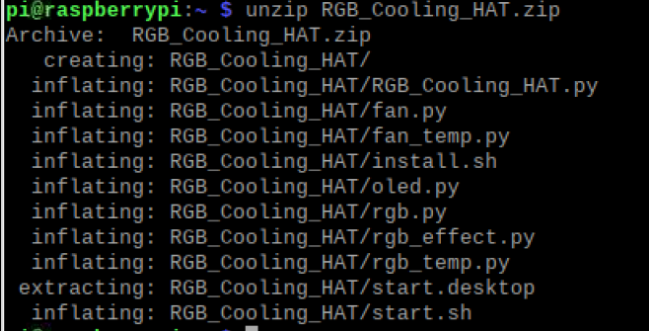
Open the Raspberry Pi terminal and input command ls to find the RGB_Cooling_HAT.zip file.
As shown below:

Input command to extract file:
unzip RGB_Cooling_HAT.zip
2. Compiling and running program
2.1 Input command to enter temp_control find file:
cd RGB_Cooling_HAT/
ls

2.2 Input command to run the program
python rgb.py

We can see that all RGB light become blue.
3. About code
3.1 Initialize the I2C configuration of the Raspberry Pi, import the smbus module for I2C communication, import the time module for delay.
There are three RGB lamps on the RGB-Cooling-HAT, so the maximum number of lamps is 3.

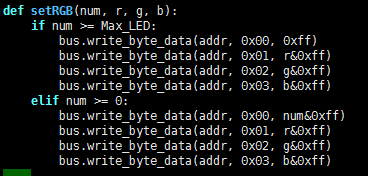
3.2 setRGB(num, r, g, b): Function
Set the RGB lamp color, num refers to which lamp, 0 is the first lamp, 1 is the second lamp, 2 is the third lamp.
If greater than or equal to 3, all lamps are set at the same time.
The range of R, G, B values is 0~255.
3.3 Turn off RGB. According to the protocol, the register to turn off RGB is 0x07, and the data is 0x00.

3.4 Turn off the RGB lights first, and then set the RGB lights.
If you do not turn off the lights, it will affect the display effect.
The effect of setRGB can be set by yourself, for example blue lights.