




- sales/support
Google Chat:---
- sales
+86-0755-88291180
- sales01
sales@spotpear.com
- sales02
dragon_manager@163.com
- support
tech-support@spotpear.com
- CEO-Complaints
zhoujie@spotpear.com
- Only Tech-Support
WhatsApp:13246739196
- Purchase/Shipping/Refund
WhatsApp:13424403025
Raspberry Pi USB HUB HAT User Guide
Introduction
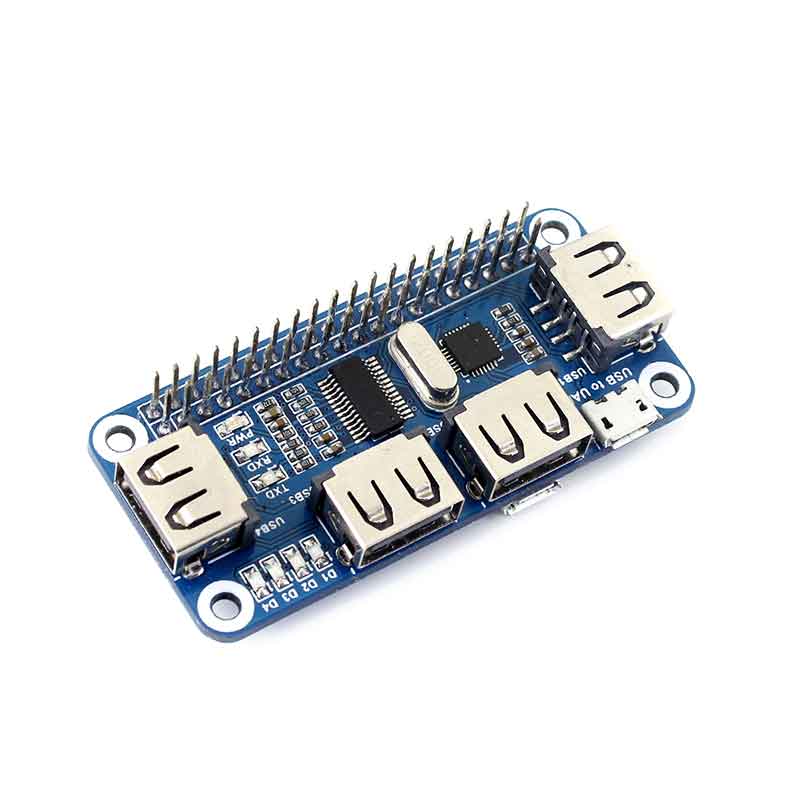
4 Port USB HUB HAT for Raspberry Pi Zero / Zero W, USB to UART Onboard
How to use
Take Raspberry Pi Zero W as an example:
- Plug the module to the 40Pin GPIO connector on the Zero Board.
- Plug the Micro USB connector to both the micro USB ports on the Zero W and the USB HUB HAT.
- For serial connection: connect the "USB to UART" port to your PC with a USB cable and the LED will be turned on. Then install the CP2102 driver on your PC. Now you can access your Pi using serial connection (you should enable shell and kernel messages on the serial connection).
- Attach USB devices to the USB1~USB4 ports and the corresponding LED will be turned on to indicate working state.
Note:
- There are two micro USB ports on the USB HUB HAT. Only the "USB HUB" (but not "USB to UART") connector is used for USB expansion.
- You have to attach the USB HUB HAT to a Raspberry Pi B+/2B/3B with a USB cable although the module can be attached to a Pi Zero W with the Micro USB connector.
- If you cannot access your Pi using serial connection, try to enable the serial option in "sudo raspi-config".
TAG:
Raspberry Pi Camera Module 3 Sensor Assembly IMX708 Official Original 11.9MP Camera
How to Use Product ROS2
Raspberry Pi IR Thermal Imaging Camera
Raspberry Pi RTC
Raspberry Pi 5
Spotpear
ESP32 P4 Development Board WIFI6 4 inch LCD Round Display 4inch TouchScreen 720×720 Dual Microphones
Jetson Nano Development
Industrial
User Guide
Raspberry Pi Pico 2 RP2350 1.28 inch Round LCD Development Board 240x240 Display Screen QMI8658 6-Axis
DeepSeek XiaoZhi AI Voice Chat Robot BOX ESP32-S3 Development Board 3.5 inch LCD N16R8 Touchscreen Display 6-Axis /Camera /SD
pcb800099-v.9
Spotpear
Mobile Robot
Raspberry Pi LCD
Developer Kit
ESP32-S3 Industrial Grade Dual Channel CAN Relay IoT Device
Raspberry Pi 4/5 UPS Uninterruptible Power Supply HAT Lithium Battery Module
Industrial RS485 Modbus RTU Relay
TAG:
Raspberry Pi RP2040 1.14inch LCD
RV1106 SC3336
Linux Board
SpotPear
Raspberry Pi 5 PCIe to NVMe
Arducam
Metal Case
SpeedyBee Bee35 3.5 inch Frame RC FPV Drone
Raspberry Pi Compute Module 0 CM0
Raspberry Pi Compute Module 4 CM4 PCIe to M.2 NVMe SSD
Raspberry Pi 5 Aluminum Case
Raspberry Pi 5 Aluminum Metal Case
Cyberpunk LED Matrix Hourglass Gravity Sensor DIY Countdown Timer Clock STEM Educational Soldering Project for Beginners & Adult
Computer Monitor Display
Arduino IR Thermal Imaging Camera
Raspberry Pi Bumper Clip-on Silicone Case Raspberry Pi 5
Core3566104000
USB Camera 2MP PS5268 USB 2.0 Dual-Mike Wide Dynamic range
Jetson Xavier NX Kit
Raspberry Pi 5 inch e-Paper ink screen display black white 960×552 For Arduino /Jetson /STM32 /ESP32