




- sales/support
Google Chat:---
- sales
+86-0755-88291180
- sales01
sales@spotpear.com
- sales02
dragon_manager@163.com
- support
tech-support@spotpear.com
- CEO-Complaints
zhoujie@spotpear.com
- Only Tech-Support
WhatsApp:13246739196
- Purchase/Shipping/Refund
WhatsApp:13424403025
WAVEGO servo is assembled and calibrated properly
How do I know WAVEGO servo is assembled and calibrated properly
- Firstly, you need to understand how the servos work. The servos of WAVEGO can be controlled within 180 degrees, and do not need limit blocks as a result of its large torque. However, there is no way to confirm the angular position of the current servo output shaft by appearance as the round-copper gear output shaft can rotate continuously under the external force.
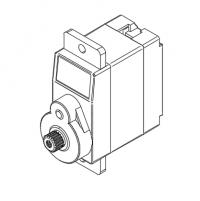
Due to the above reasons, before installing the servo rocker arm, it is necessary to use the driver board of the robot to control the servo to rotate to the middle position of its motion range (180°), and then install the servo rocker arm according to the specified angle. For the specific method and installation angle, please refer to the product WIKI assembly tutorial. The tutorial also includes the servo calibration method. The following describes how to determine whether the product is properly assembled and calibrated, which is convenient for quickly locating the problem.
- Assemble and calibrate the servo according to the tutorial.
- Turn on.
- Use your mobile phone to search for the WIFI hotspot name WAVESHARE Robot and enter the password 1234567890 to connect to the hotspot.
Generally. after the mobile phone is connected to the hotspot, it will prompt that it is not connected to the Internet due to the failure of Ping to the Internet server. The mobile phone may automatically disconnect the hotspot. After reconnecting the hotspot, it will not be automatically disconnected in the future.
- Open the browser on the mobile phone (Google Chrome is recommended, other browsers may have button compatibility issues), and visit page 192.168.4.1.
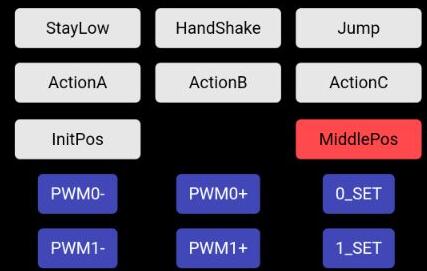
- The content of the page is as follows. There are two buttons on the page: InitPos and MiddlePos. The former is the middle position of the servo angle during assembly (same as the assembly mode), and the latter is the position of the servo after calibration. After pressing the button, all servos will rotate to the corresponding angle.
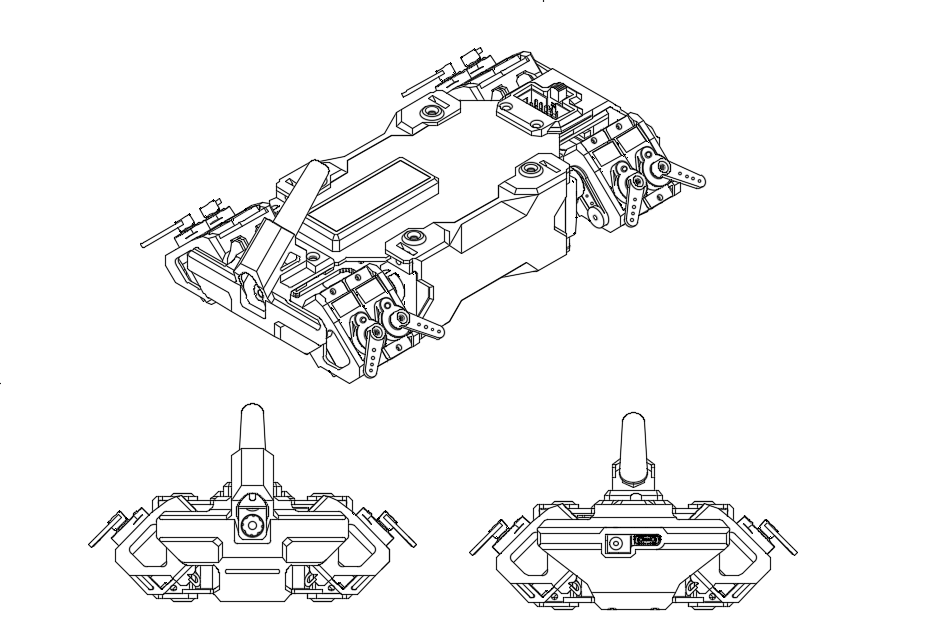
- After pressing the InitPos button, the servo swing angle is as follows. Due to the mechanical structure, an error within ±10° is allowed here (for this reason, the servo needs to be calibrated). If the error is too large, you need to re-install the corresponding servo rocker arm according to the assembly tutorial.
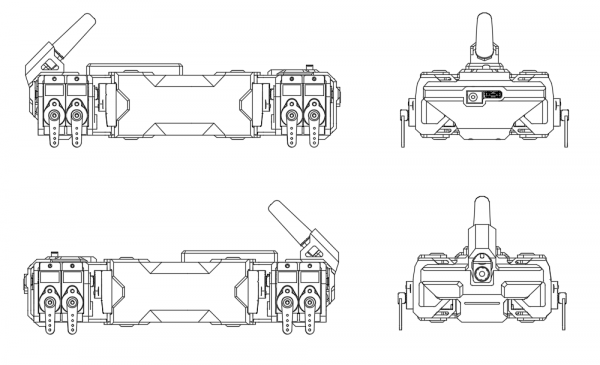
- After pressing the MiddlePos button, the servo swing angle is as follows. Since this position is the position after software calibration, the error needs to be as small as possible. If the error is larger than the picture, the servo needs to be re-calibrated.
TAG:
Pi5 Fan
Raspberry Pi Pico
Raspberry Pi Audio
Computer USB Monitor Screen
ESP32 Thermal imaging camera
Install Espressif IDF Plugin Tutorial User Guide
DeepSeek AI Voice Chat Robot ESP32 S3 Camera Object Recognition Development Board N16R8 For Xiaozhi Dual microphone interruption
Raspberry Pi USB Global Shutter Camera 1MP OV9281 120fps Black/White 120fps also For Jeston RDK
Jetson Orin 4G/3G/2G expansion board GNSS GPS SIM7600G-H-M.2
Raspberry Pi 5inch Display
Spotpear
Adjustable Focus
Magnetic Encoder Servo Motor 45KG.CM 24V 360° RS485 High Precision And Large Torque
ESP32 1.9inch LCD
FT232RNL USB TO TTL Industrial UART (C) User Guide
Intel 11th
ESP32-S3 AI 3.97-inch e-Paper Ink Screen 3.97inch Display AIoT Development Board Deepseek
Raspberry Pi 5 TTL
and Audio Speaker
Raspberry Pi 5 Audio Jack
TAG:
PI5 Case
ESP32-S3FH4R2
DeepSeek AI Voice Chat Camera Robot BOX ESP32-S3 Development Board 2 inch LCD N16R8 Touchscreen Display Camera
Raspberry Pi 5 Silver-Shadow Case
DeepSeek AI Voice Chat ESP32 S3 Development Board 1.8 inch AMOLED Display 368×448 1.8inch TouchScreen Programmable Watch
Raspberry Pi USB Camera 8MP IMX415 Wide Angle Dual Microphones USB 2.0 For Jeston RDK
ESP32 C3 Round LCD Electronic EYE 0.71 inch Display Watch Screen GC9D01 160x160
2.66inch E-Paper E-ink G Screen Display 360x184 Red/Yellow/Black/White SPI Communication SpotPear
Raspberry Pi 5 PCIe Gigabit Ethernet RJ45 RTL8111H M.2_M_KEY 2230/2242/2260/2280 NVMe SSD
1.28 inch Round Rotary LCD Smart Screen 1.28inch Knob Display 240x240 Option Touch/No-Touch
Raspberry Pi Pico 2 RP2350 0.85inch LCD Display Development Board RGB Lighting 128×128
Pi5 Active Cooler
Workstation electronic Nameplate
X1004 Raspberry Pi 5 PCIe M.2 NVMe Dual SSD Pi5 Double 2280
Industrial USB TO RS485
Milk-V Duo 64MB
Raspberry Pi 5 Camera Cable
Raspberry Pi Camera Case
11.6 inch LCD In-Cell Type C HDMI Capacitive Touchscreen Display Raspberry Pi Jetson Nano mini PC 1768x828
Mini TOF Time-of-Flight Laser Ranging Radar Sensor Compatible UART with Arduino Raspberry Pi ESP32 and Pico