




- sales/support
Google Chat:---
- sales
+86-0755-88291180
- sales01
sales@spotpear.com
- sales02
dragon_manager@163.com
- support
tech-support@spotpear.com
- CEO-Complaints
zhoujie@spotpear.com
- Only Tech-Support
WhatsApp:13246739196
- Purchase/Shipping/Refund
WhatsApp:13424403025
- HOME
- >
- ARTICLES
- >
- Common Moudle
- >
- Power
RS485 Control Tutorial
RS485 Control
Connect the ESP32-S3-ETH-8DI-8RO device using RS485, and send data to ESP32-S3-ETH-8DI-8RO to control the opening and closing of each relay. Communication is performed at a default baud rate of 9600.
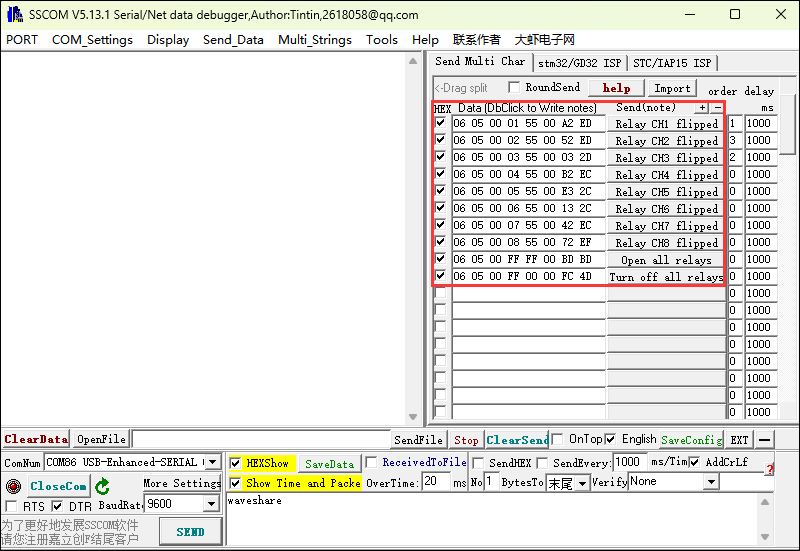
Operation Command Command Function 06 05 00 01 55 00 A2 ED Switch the state of CH1 relay 06 05 00 02 55 00 52 ED Switch the state of CH2 relay 06 05 00 03 55 00 03 2D Switch the state of CH3 relay 06 05 00 04 55 00 B2 EC Switch the state of CH4 relay 06 05 00 05 55 00 E3 2C Switch the state of CH5 relay 06 05 00 06 55 00 13 2C Switch the state of CH6 relay 06 05 00 07 55 00 42 EC Switch the state of CH7 relay 06 05 00 08 55 00 72 EF Switch the state of CH8 relay 06 05 00 FF FF 00 BD BD Turn on all relays 06 05 00 FF 00 00 FC 4D Turn off all relays
Hardware Connection
Here we use the example of USB TO RS232/485 Converter for demonstration
ESP32-S3-Relay-6CH USB-TO-RS232-485 RS485 - A+ Tx B - A+ RS485 - B- Rx B - B-
Software Operation
- Use SSCOM to send data
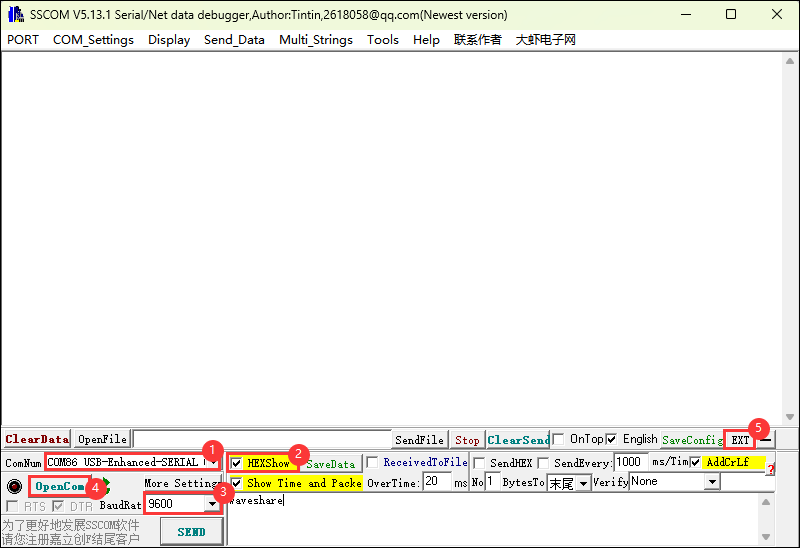
- Open the SSCOM software and select the COM port corresponding to the Port B connected above
- Open the serial port and use the Send Multi Char function to quickly send commands
- You can control the relays with the following commands
TAG:
2.13Inch E-Ink
1.54inch OLED Display
DeepSeek AI Voice Chat ESP32 S3 Development Board 1.85 inch Round LCD 1.85inch Display QMI8658 /MIC /SD /MP3 Audio LVGL For Arduino
STM32 1.54inch OLED
Raspberry Pi Pico 10.1inch DVI LCD
ESP32 Display
Raspberry Pi5 PCIe TO M.2 MINI Support Gen2 and Gen3 SSD Compatible 2230 2242
Gripper Serial Robotic Arm Gripper Mechanical claw Serial Bus Servo ST3215/CF35-12
Raspberry Pi PICO
SpotPear
UART
HDMI to LVDS
Raspberry Pi DSI
JETSON NANO B01
Raspberry Pi 5 Official Original PCIe to M.2 HAT+ Compact Expansion Board NVMe SSD
ESP32-C5 Dual-Band WiFi 6 Development Board 240MHz ESP32-C5-MINI-1
Serial UART Bus Servo CF35-12 TTL 35KG.CM Magnetic-Encoder High precision and Large torque
Raspberry Pi 5 Camera
Raspberry Pi 5 PCIe to M.2 SSD
SpotPear
TAG:
Raspberry Pi Power
Raspberry Pi Autofocus Camera
DeepSeek Xmini-C3 Voice Chat Robot ESP32 C3
Raspberry Pi 5 RTC charge
UART To WiFi
SpeedyBee F405 V4 BLS 55A FC ESC Stack Flight Controller DJI FPV Drone
LuckFox
UART
Power Manager Module
Raspber Pi 5 5V5A Power
PC USB Monitor Screen
Raspberry Pi 5 PCIe USB HUB 3.2 Gen1 HAT+ High Speed Pi5
Core3566002032
ESP32-S3FH4R2 Tiny Mini WIFI Bluetooth Stamp Board
Pi5 Active Cooler
Raspberry Pi 3.5 inch LCD G Display Resistive TouchScreen 60fps ST7796 320x480 Also For Arduino/Pico2/ESP32/RP2040/RP2350
R7FA4 Plus A Board Based on R7FA4M1AB3CFM Compatible with Arduino UNO R44 Minima
Computer USB Monitor Screen
ESP32 S3 Development Board 1.9 inch LCD Capacitive Touch Screen 1.9inch Display 170×320 N16R8
Sipeed Lichee Nano LicheePi F1C100s LicheePi