




- sales/support
Google Chat:---
- sales
+86-0755-88291180
- sales01
sales@spotpear.com
- sales02
dragon_manager@163.com
- support
tech-support@spotpear.com
- CEO-Complaints
zhoujie@spotpear.com
- Only Tech-Support
WhatsApp:13246739196
- Purchase/Shipping/Refund
WhatsApp:13424403025
- HOME
- >
- ARTICLES
- >
- Common Moudle
- >
- LCD
32x32 Chinese font modulo description
32x32 Chinese Chinese font modulo description
- The size settings are as shown below:
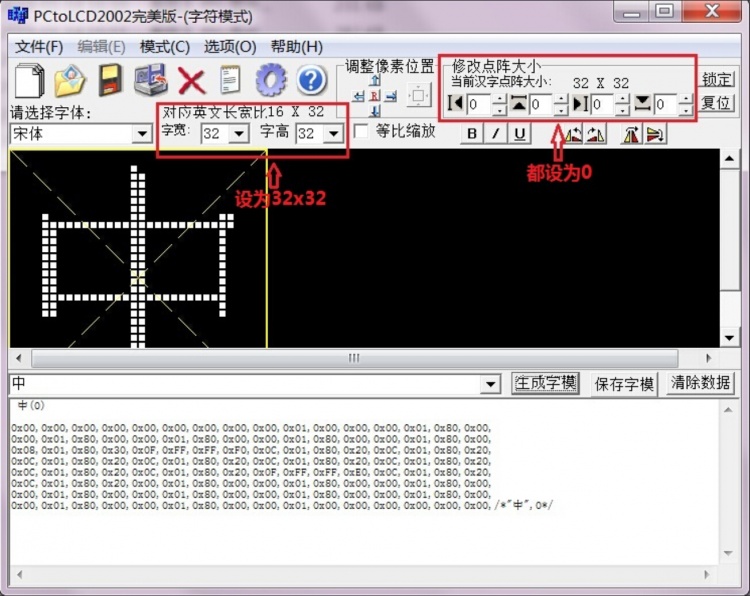
- After the modulo is successful, you need to define the following structure array to store the modulo data (the definition of structure is in the Chinese_and_English_display_modulo_settings):
const typFNT_GB32 tfont32[]=
{
  "中",0x00,0x00,0x00,0x00,0x00,0x00,0x00,0x00,0x00,0x01,0x00,0x00,0x00,0x01,0x80,0x00,
  0x00,0x01,0x80,0x00,0x00,0x01,0x80,0x00,0x00,0x01,0x80,0x00,0x00,0x01,0x80,0x00,
  0x08,0x01,0x80,0x30,0x0F,0xFF,0xFF,0xF0,0x0C,0x01,0x80,0x20,0x0C,0x01,0x80,0x20,
  0x0C,0x01,0x80,0x20,0x0C,0x01,0x80,0x20,0x0C,0x01,0x80,0x20,0x0C,0x01,0x80,0x20,
  0x0C,0x01,0x80,0x20,0x0C,0x01,0x80,0x20,0x0F,0xFF,0xFF,0xE0,0x0C,0x01,0x80,0x20,
  0x0C,0x01,0x80,0x20,0x00,0x01,0x80,0x00,0x00,0x01,0x80,0x00,0x00,0x01,0x80,0x00,
  0x00,0x01,0x80,0x00,0x00,0x01,0x80,0x00,0x00,0x01,0x80,0x00,0x00,0x01,0x80,0x00,
  0x00,0x01,0x80,0x00,0x00,0x01,0x80,0x00,0x00,0x01,0x00,0x00,0x00,0x00,0x00,0x00,
};
- The function is defined as follows:
void GUI_DrawFont32(u16 x, u16 y, u16 fc, u16 bc, u8 *s,u8 mode)
{
    u8 i,j;
    u16 k;
    u16 HZnum;
    u16 x0=x;
    HZnum=sizeof(tfont32)/sizeof(typFNT_GB32);	//Automatic statistics of the number of Chinese characters
    for (k=0;k<HZnum;k++)
    {
	 if ((tfont32[k].Index[0]==*(s))&&(tfont32[k].Index[1]==*(s+1)))
	 {
               LCD_SetWindows(x,y,x+32-1,y+32-1);
	       for(i=0;i<32*4;i++)
	       {
		     for(j=0;j<8;j++)
	             {
			   if(!mode) //Non-overlay mode: The font has a background color, which will overwrite the original display
			   {
				if(tfont32[k].Msk[i]&(0x80>>j))
                                {
				      Lcd_WriteData_16Bit(fc);
                                }
				else
                                {
                                      Lcd_WriteData_16Bit(bc);
				}
                           }
			   else //Overlay mode: the font does not have a background color, and is directly superimposed and displayed on the original display content
			   {
				POINT_COLOR=fc;
			        if(tfont32[k].Msk[i]&(0x80>>j))
                                {
                                      LCD_DrawPoint(x,y);// Draw a point
				}
		                x++;
				if((x-x0)==32)
				{
				      x=x0;
				      y++;
				      break;
				}
			   }
		      }
		}
	  }
	  continue;  //Find the corresponding dot matrix font to exit immediately, to prevent the impact of multiple Chinese characters repeated modulo
     }
     LCD_SetWindows(0,0,lcddev.width-1,lcddev.height-1);// Restore window to full screen
}
TAG:
Raspberry Pi Pico 2 RP2350 1.47 inch LCD B Display Development board RP2350A 1.47inch Screen RGB color
Raspberry Pi Pico HDMI
Raspberry Pi Pico 2 RP2350A 1.54inch TouchScreen 1.54 inch LCD Display Development Board 240×240
Spotpear
Raspberry Pi Autofocus Camera
Raspberry Pi 5 5V5A Power
Industrial Modbus RTU Dual Ethernet RJ45 To 8ch POE ETH Relay (C) PoE Power over Ethernet
0.85inch Screen
Raspberry Pi
STM32 downloader
LuckFox Pico max
Jetson Orin 4G/3G/2G expansion board GNSS GPS SIM7600G-H-M.2
USB TO M.2 Key B 5G DONGLE For SIM8202/SIM8262/RM520/RM530
Industrial Modbus RTU RS485 8-ch 30A High Current Relay Module (E) With Digital Input
Programmable Keyboard
RP2040-Keyboard-3
Raspberry Pi CM4
Black
PoE Power Supply
Raspberry Pi 5 PCIE to MiniPCIe For wireless network WIFI Card USB Bluetooth

TAG:
Raspberry Pi Pico 2 RP2350 1.75-inch AMOLED 1.75inch Round TouchScreen Display QMI8658 6-axis GPS
MCU interface Expansion Board Gigabit Ethernet port CAN port IMU For D-Robotics RDK S100
Industrial USB Gen1 HUB 4U 7~36V DC power port For Multi Systems
RDK X5 Acrylic Case Black chassis heat dissipation holes
Raspberry Pi Pico 2 RP2350 Zero
Raspberry Pi 5 - 2GB RAM
Raspberry Pi screen
Milk V Duo
VisionFive2 4GB 8GB StarFive RISC V Computer JH7110 Integrated 3D GPU
ESP32-C6 1.64inch AMOLED Display Development Board 280×456 1.64 inch TouchScreen
ESP32 S3 4inch LCD 480x480 Captive TouchScreen Display LVGL HMI Sensor CAN I2C RS485 TVBOX Development Board
IMX335 2K Video Recording USB 2.0 For Jeston RDK
Attitude Sensor
Raspberry Pi 5 PCIe WIFI7
Raspber Pi 5 Power
Serial UART Magnetic Encoder Bus Servo TTL ST3235 30KG.CM High Precision Large Torque
Speaker Buzzer Luckfox-Pico-Ultra
Raspberry Pi IR Thermal Imagi
Raspberry Pi 320×1480
2.15 inch e Paper HAT+ B E Ink 296×160 Screen Display Arduino Raspberry Pi Jetson Nano STM32