




- sales/support
Google Chat:---
- sales
+86-0755-88291180
- sales01
sales@spotpear.com
- sales02
dragon_manager@163.com
- support
tech-support@spotpear.com
- CEO-Complaints
zhoujie@spotpear.com
- Only Tech-Support
WhatsApp:13246739196
- Purchase/Shipping/Refund
WhatsApp:13424403025
- HOME
- >
- ARTICLES
- >
- Common Moudle
- >
- LCD
24x24 Chinese font modulo description
24x24 Chinese Chinese font modulo description
- The size settings are as shown below:
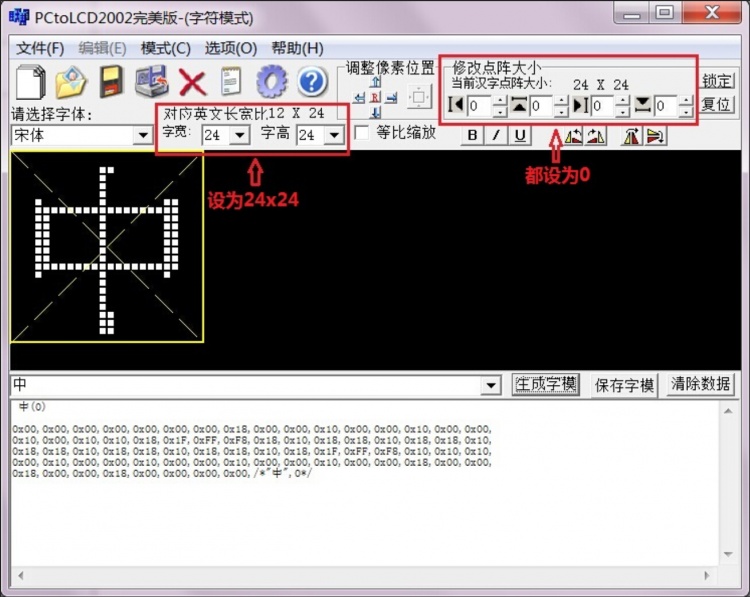
- After the modulo is successful, you need to define the following structure array to store the modulo data (the definition of structure is in the Chinese_and_English_display_modulo_settings):
const typFNT_GB24 tfont24[]=
{
  "中",0x00,0x00,0x00,0x00,0x00,0x00,0x00,0x18,0x00,0x00,0x10,0x00,0x00,0x10,0x00,0x00,
  0x10,0x00,0x10,0x10,0x18,0x1F,0xFF,0xF8,0x18,0x10,0x18,0x18,0x10,0x18,0x18,0x10,
  0x18,0x18,0x10,0x18,0x18,0x10,0x18,0x18,0x10,0x18,0x1F,0xFF,0xF8,0x10,0x10,0x10,
  0x00,0x10,0x00,0x00,0x10,0x00,0x00,0x10,0x00,0x00,0x10,0x00,0x00,0x18,0x00,0x00,
  0x18,0x00,0x00,0x18,0x00,0x00,0x00,0x00,
};
- The function is defined as follows:
void GUI_DrawFont24(u16 x, u16 y, u16 fc, u16 bc, u8 *s,u8 mode)
{
    u8 i,j;
    u16 k;
    u16 HZnum;
    u16 x0=x;
    HZnum=sizeof(tfont24)/sizeof(typFNT_GB24);	//Automatic statistics of the number of Chinese characters
    for (k=0;k<HZnum;k++)
    {
        if((tfont24[k].Index[0]==*(s))&&(tfont24[k].Index[1]==*(s+1)))
        {
             LCD_SetWindows(x,y,x+24-1,y+24-1);
	     for(i=0;i<24*3;i++)
	     {
		  for(j=0;j<8;j++)
		  {
			if(!mode) //Non-overlay mode: The font has a background color, which will overwrite the original display
			{
                              if(tfont24[k].Msk[i]&(0x80>>j))
                              {
                                   Lcd_WriteData_16Bit(fc);
			      }
                              else
                              {
                                   Lcd_WriteData_16Bit(bc);
			      }
                        }
		        else //Overlay mode: the font does not have a background color, and is directly superimposed and displayed on the original display content
		        {
			      POINT_COLOR=fc;
			      if(tfont24[k].Msk[i]&(0x80>>j))
                              {
                                   LCD_DrawPoint(x,y);// Draw a point
			      }
                              x++;
			      if((x-x0)==24)
			      {
				   x=x0;
				   y++;
				   break;
			      }
		         }
		   }
	      }
	 }
	 continue;  //Find the corresponding dot matrix font to exit immediately, to prevent the impact of multiple Chinese characters repeated modulo
    }
    LCD_SetWindows(0,0,lcddev.width-1,lcddev.height-1);// Restore window to full screen
}
TAG:
7inch Monitor LCD
DeepSeek XiaoZhi AI Chat Robot ESP32-S3 1.54 inch LCD N16R8 MUMA Development Board Display Screen Wifi Weather Station TimeClock
Sipeed SLogic 4IN1 USB Logic Analyzer 80M / DAPLink / CKLink Debugger Tool / UART Module
CAN FD Analyzer
Luckfox
WiFi6 Development Board
ESP32-S3 1.28inch Round LCD
ESP32 C3
2.13inch e Paper HAT+ Black-White 250x122 E-Ink For Raspberry Pi /Jetson Nano /Sunrise X3 Pi /Pwnago
Raspberry Pi 5/4B easy Adapter Micro HDMI to HDMI 4K All Ports To Pi's USB Side
ESP32 IR Thermal Imaging Camera
Serial UART Bus Servo ST3025 TTL 40KG.CM Magnetic Encoder 360° High Precision And Large Torque
Code
AI Board
ESP32-C6 WiFi 6 Development Board ESP32-C6-MINI-1Support WiFi6 Bluetooth5 Zigbee Thread
Raspberry Pi 3.97 inch e-Paper link BW 800x480 For Arduino / Jetson / STM32 /ESP32
ESP32 S3 Development Board 1.64 inch AMOLED Display 1.64inch TouchScreen For Arduino LVGL With SD-Port/ QMI8658C 6-Axis Sensor
1.3inch LCD RP2040-PiZero Game ST7789 Raspberry Pi Pico LCD Display Screen
360°
Raspberry Pi USB Camera 5MP OS05A10 Distortion-Free USB 2.0 For Jeston RDK

TAG:
NVIDIA Jetson TX2 NX Module
Mini TV
Raspberry Pi Zero 4G CAT1 LTE USB HUB Air780e Expansion Board Networking Module LTE Ethernet
ESP32-P4 AI Development Board 7/8/10.1inch HMI Touch Screen All-in-One Compatible with Deepseek
Raspberry Pi 5 PCIe M.2 5G 4G 3G SIM8262E-M2
Raspberry Pi HQ High Quality Camera 12.3MP IMX477 Sensor C CS Lenses
DeepSeek AI Chat Box ESP32-S3 1.54 inch LCD N16R8 Development Board Display Screen Wifi Weather Station TimeClock
Raspberry Pi PICO Long-Range Communication
Raspberry Pi 5 USB PD Adapter
SP3232EEN
Raspberry Pi Pico 2 RP2350/RP2040 W5100S-EVB-Pico W6300-EVB-Pico2 Ethernet Development Board ETH RJ45
Raspberry Pi Display
RP2040
SpotPear
Raspberry Pi 5 UART
Raspberry Pi 5 Camera
Bluetooth/WiFi
Raspberry Pi 5 Terminal
Raspberry Pi 5 Serial
Horizon Robotics RDK Ultra D-Robotics Sunrise