




In the article, you provide a good overview of the modules themselves and their general programming. But it's completely unclear how the modules communicate with each other and how to program this communication. For example, there's hardware communication between the ASRPRO and the LCD-ESP32, but how do you make the eyes change their expression immediately after recognizing a phrase? How do the eyes from the MCU-ESP32 even change? What source code is currently being loaded into the device: the regular Movecall Moji or a modified one?
- sales/support
Google Chat:---
- sales
+86-0755-88291180
- sales01
sales@spotpear.com
- sales02
dragon_manager@163.com
- support
tech-support@spotpear.com
- CEO-Complaints
zhoujie@spotpear.com
- Only Tech-Support
WhatsApp:13246739196
- Purchase/Shipping/Refund
WhatsApp:13424403025
Examples of module interactions
2026-04-10 21:36:50 Ask
8answers

SpotPearGuest57d4d
- Answer time:
His workflow is like this
The ESP32 controller recognizes GPIO levels. Different levels will display different video expressions
The demo we provide for the voice module has an example. Tell you which voices correspond to which levels
You don't need to worry about level output recognition. Just need to modify the voice wake-up word
The level recognition has been confirmed on ESP32
If you need to confirm which level corresponds to which voice and video
You can refer to our demo of voice wake-up words
Like0
report
SpotPearGuest14470
- Answer time:
Yes, I already understood from the schematic (иге with difficulty) that it won't be possible to implement the AI-ESP32 eye expression changes. However, the page https://spotpear.com/wiki/ESP32-S3-AI-BOX-deepseek-xiaozhi-doubao-0.71inch-LCD-Electronic-Eye-Toy-Doll-Robot.html contains code for the LCD-ESP, but not for the ASRPRO you're using. Only screenshots of the Tianwen Block control program are available. Could you please add or share this code with me?
Like0
report
SpotPearGuest57d4d
- Answer time:
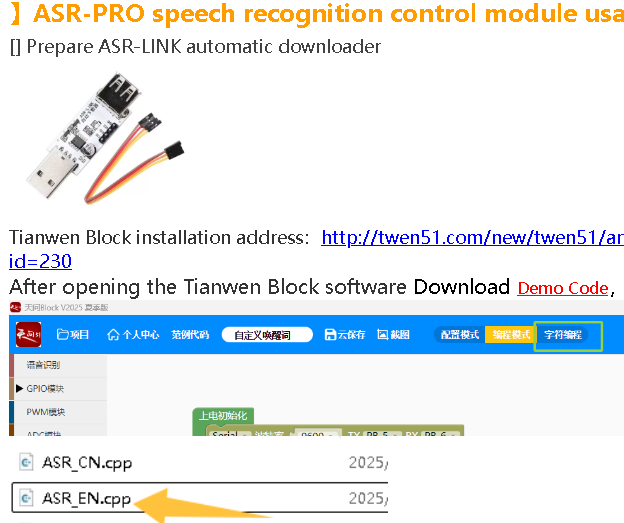
Like1
report
SpotPearGuest14470
- Answer time:
Thank you so much for the example and instructions!
I have a small question. In the diagram, the ASRPRO is connected to the AI-ESP32 via PA4. I thought this was controlled via a wake-up word to wake the AI-ESP32. But there are no wake-up words in the code example. I can't figure out if this is how I can wake the AI-ESP32 and remove wakenet from the Xiaozhi code?
Like0
report
SpotPearGuest57d4d
- Answer time:
updated again,please check
-》】ASR-PRO speech recognition control module usage
Like0
report
SpotPearGuest57d4d
- Answer time:
It is divided into two parts
The wake-up words such as【nihao! Xiaozhi】and 【Hi! ESP】are controlled through AI-ESP32.
Xiaozhi account backend supports customers to modify wake-up words themselves, refer to the tutorial
If you want to modify the facial expressions of voice controlled eyes, you need to modify the ASR module
Like0
report
SpotPearGuest14470
- Answer time:
Fortunately, it turned out that you were wrong. There is indeed a connection to pin PA4 on the Xiaozhi ESP32-S3, and I was able to utilize it.
Moreover, the Movecall Moji firmware I'm using already assigns the BOOT button to pin GP0 by default.
Now I can use *any* word (English or Chinese) to wake up the Xiaozhi device.
It's strange that the developers don't advertise this feature; it elevates the device above similar products and allows for the creation of a truly useful gadget.
Instead of choosing from the presets like Alexa, Jarvis, or Printer, you can add your own wake words and free up ESP32-S3 memory—previously used by WakeNet—for your own programs.
The device's only downside is the lack of a link between the eye controller and the speech function; otherwise, one could implement features like displaying emoji-style emotions as video files in the eyes that react to the context of the response.
A quick warning for anyone planning to follow my path and implement their own wake words:
You can't simply use *any* word from a language other than English or Chinese. Transliteration won't work either!
The only option is to use a phrase made of English (or Chinese) words that sounds similar. For example, "Peace Duke" or "Yor bunny wrote" (Russian speakers will get the joke).
An added challenge is that the ASRPRO chip is quite precise and requires accurate pronunciation, so you may have to pronounce certain words with a very distinct English accent.
I won't be posting the code; the key isn't the code itself, but the configuration nuances involved in setting up custom wake words. I've compiled the issues I encountered—and the solutions I found on various forums—into a brief guide (writing from memory):
1. Make sure you've reviewed the device instructions on this site, examined all the screenshots, downloaded the necessary files, and installed Tianwen Block. You won't be able to change the interface language from Chinese; I used Google Lens on my phone to understand the menus.
2. The example on the site uses specific command words to change facial expressions, but there are also "wake-up" words.
You need to modify the example as follows:
define pin 4,
add code to the `case` branch to send a signal to pin 4 and the "joy" pin based on the wake-up word IDs,
add your own words to the special comments block: `// {ID:100, cmd "Chinese characters for wake—check the Tianwen Block examples", ASR:"Your word", ASRTO:""}`
3. You need to generate a model for your words using the "Generate Model" button (located to the left of the compile/upload button labeled "2M").
Registration is required for this. You can sign up with just a username and password if you don't have a Chinese phone number, but you won't be allowed to generate the model.
To get access, email info@twen51.com with your username, order receipt, and a close-up photo of the device showing the ASR chip. You should receive a reply and be registered within about a day, after which the "Generate Model" button will work.
4. If generation stops at 76–78%, it means your words are too complex or obscure—i.e., they are missing from the word database—so you need to rephrase them using more common words.
5. To flash the device, solder the wires as shown in the instructions, but do not connect the VCC pin (at least not when using a USB-to-FTDI adapter). To initiate flashing, press the onboard button several times to load the bootloader, followed by the compiled program itself.
6. If the bootloader freezes and displays garbled characters instead of Chinese characters, you need to change your Windows system locale setting for non-Unicode programs from your current locale to Chinese.
After restarting your computer, the bootloader will stop freezing and will be able to display compilation errors and proceed with the upload.
That's basically it; you can now use the ESP32-S3 as desired. You can simply upload the standard Movecall Moji firmware, though note that it only works up to version 2.1.0; newer versions lack audio support.
Like0
report
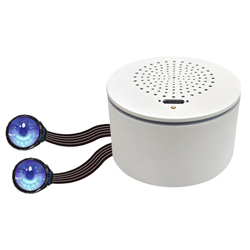
Price:
$9.9-24.9
Part Number:
AI-BOX-Dual-Eye-0.71-Recog
Brand:
SpotPear