




- sales/support
Google Chat:---
- sales
+86-0755-88291180
- sales01
sales@spotpear.com
- sales02
dragon_manager@163.com
- support
tech-support@spotpear.com
- CEO-Complaints
zhoujie@spotpear.com
- Only Tech-Support
WhatsApp:13246739196
- Purchase/Shipping/Refund
WhatsApp:13424403025
- HOME
- >
- ARTICLES
- >
- Common Moudle
- >
- Power
Modbus POE ETH IO 8CH User Guide
Product Parameters
| Parameter | Specification |
|---|---|
| Supply Voltage | DC 7~36 V |
| Power Supply Methods | PoE Ethernet port, DC 5.5*2.1 power jack, or screw terminal (7 ~ 36 V) |
| Communication Interface | PoE Ethernet port, supporting IEEE 802.3af standard |
| Digital Input | 8DI, 5 ~ 36 V, dry contact/wet contact (NPN or PNP type), built-in bidirectional optocoupler |
| Digital Output | 8DO, 5 ~ 40 V, open-drain output, output load 500 mA/channel (MAX) |
| Modbus Protocol | Modbus RTU protocol or Modbus TCP protocol |
LED Indicator Descriptions
| LED Indicator | Status Description |
|---|---|
| RUN LED | Ethernet port running indicator. After the Ethernet port is working normally, it outputs a square wave with a period of 2 seconds |
| STA LED | MCU indicator. Flashes when the MCU is operating normally |
| TXD LED | Transmit indicator, lights up when transmitting data |
| RXD LED | Receive indicator, lights up when receiving data |
| Left Port Green LED | Illuminates when Ethernet port 1 is connected to an Ethernet network |
| Right Port Green LED | Illuminates when Ethernet port 2 is connected to an Ethernet network |
| Left Port Yellow LED | Illuminates when a TCP connection is established. Can be used to check if a communication link is established between the module and the host software |
| Right Port Yellow LED | Data activity LED. The state of this yellow LED changes when data is being transmitted over the Ethernet port, useful for determining if data transfer is occurring |
Basic Functions
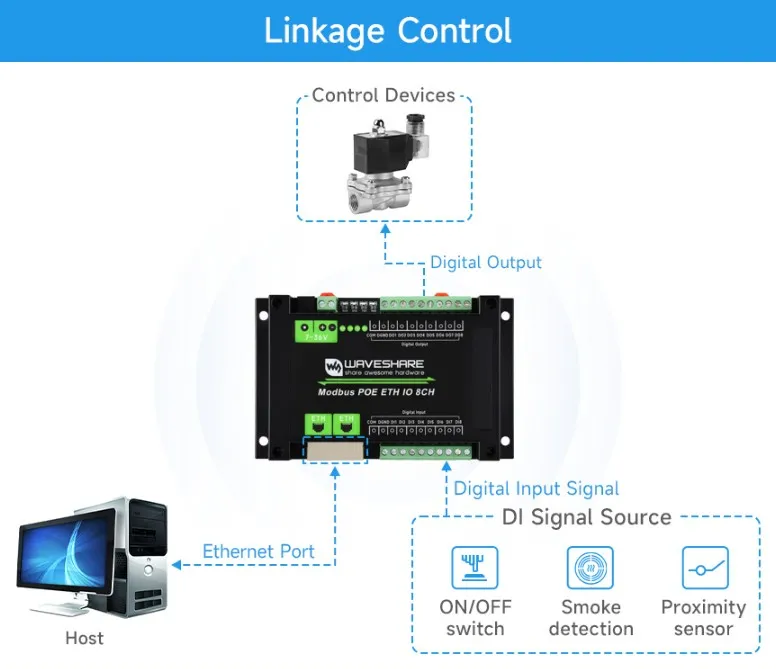
Supports reading switch inputs by sending Modbus RTU protocol commands via Ethernet, thereby controlling the digital outputs based on the input states
Wiring Instructions
Ethernet Port Wiring
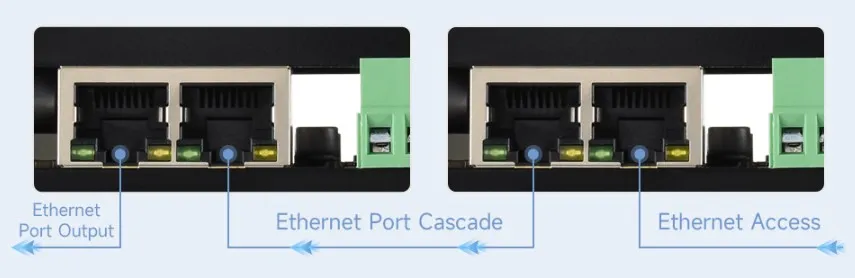
Connect the module to the local network using an Ethernet cable. Power the module via the 7~36V power terminal or via PoE. Both Ethernet ports have the same functionality and can be used for network communication and cascading.
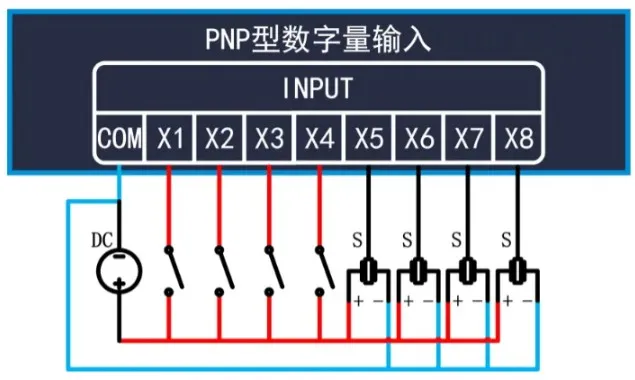
Digital Input Wiring
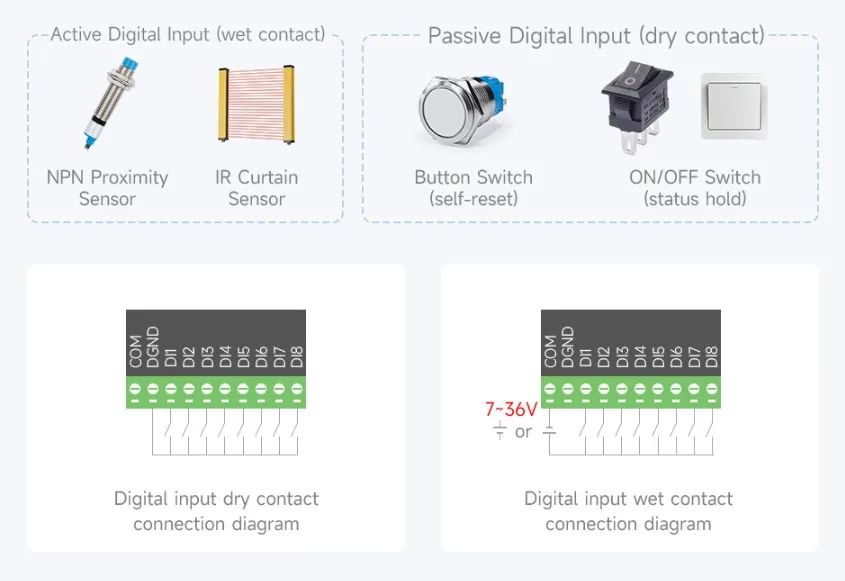
DI1-DI8 are the 8-channel signal input terminals. DGND is the common ground for the signal terminals. DICOM is the common terminal for input signals; it can be left floating, connected to the positive power supply, or connected to the negative power supply. Power can be drawn directly from the main supply or from an independent power source.
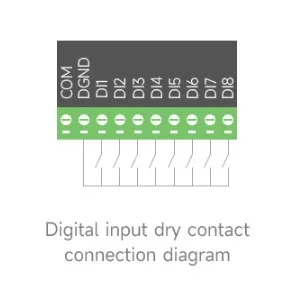
DICOM not connected (floating): Dry contact (passive) input
DICOM connected to positive power supply: Low-level trigger, NPN-type wet contact (active) input, voltage 5V-30V DC
DICOM connected to negative power supply: High-level trigger, PNP-type wet contact (active) input
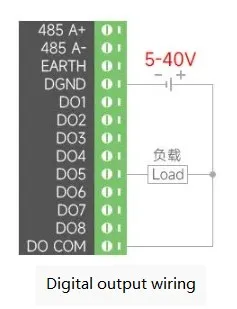
Digital Output Wiring
The output uses NPN Darlington transistors. DOCOM is the common terminal for the freewheeling diodes and should be connected to the positive terminal of the output power supply. The wiring diagram is as follows:
Module Parameter Configuration
Before communication, the module parameters need to be configured, such as IP address, serial port format, Modbus protocol, etc. The following two configuration methods are supported:
| Configuration Method | Advantages | Disadvantages |
|---|---|---|
| Vircom Software | More configurable parameters, no prior knowledge of IP address required | Software installation required |
| Web Browser | No software installation required | Requires prior knowledge of the device IP address, fewer configurable parameters |
For first-time configuration, using the Vircom software method is recommended.
- Either configuration method can be used; it is recommended to use the Vircom software method for the initial test.
- For the first configuration, it is recommended to modify only the IP address and leave other parameters at their defaults; modifying serial port parameters will result in communication failure.
- The module supports both Modbus RTU and Modbus TCP protocols. Switching is possible in "Advanced Options → Conversion Protocol", default is "None" (i.e., Modbus RTU protocol). It is not recommended to modify during the first configuration.
- If selecting the Modbus TCP protocol, configuration must be done using the Vircom software, and the gateway type must be set to "Non-storing Modbus Gateway", otherwise communication will be abnormal.
Vircom Software Configuration
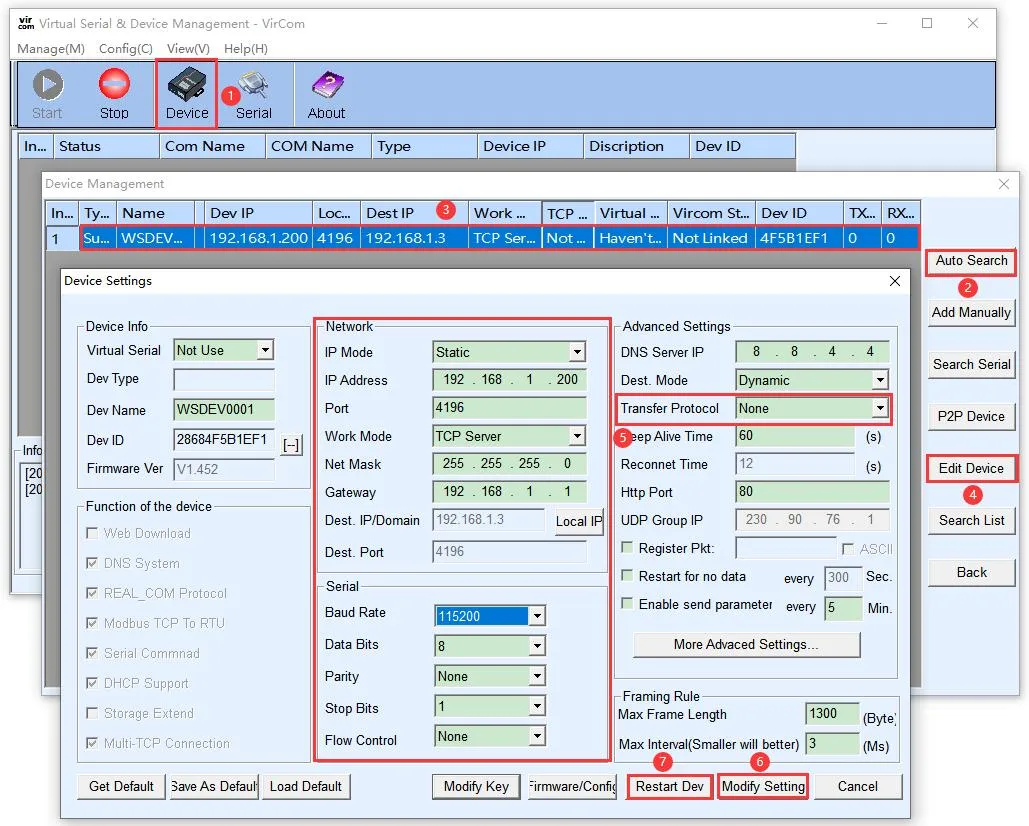
Connect the module hardware properly and connect it to the network. Run the Vircom software (the computer running Vircom must be on the same local network as the module).
The operation is as follows:
Click
Device ManagementClick
Auto Search, the software will automatically discover devices on the local network.Select the device, then click
Edit Deviceor simply double-click the discovered device.Set the device operating parameters:
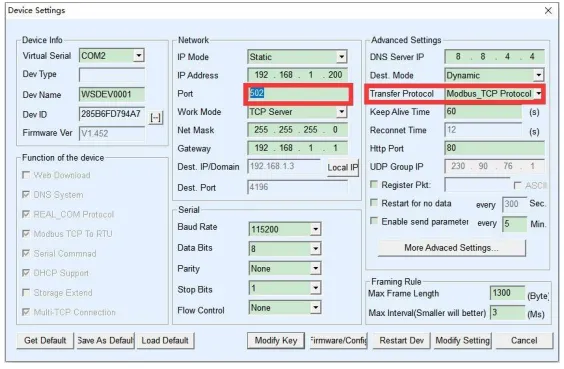
Change the "IP Mode" to static address allocation, set the IP address. Ensure the entered static IP address is not used by another device and is on the same local network as the computer.
The operating mode is TCP Server. The serial port setting defaults to 115200 and cannot be modified.
In the "Conversion Protocol" within "Advanced Options", the default is "None", meaning the default use is the Modbus RTU protocol; if "Modbus_TCP Protocol" is selected, communication will use the Modbus TCP protocol.
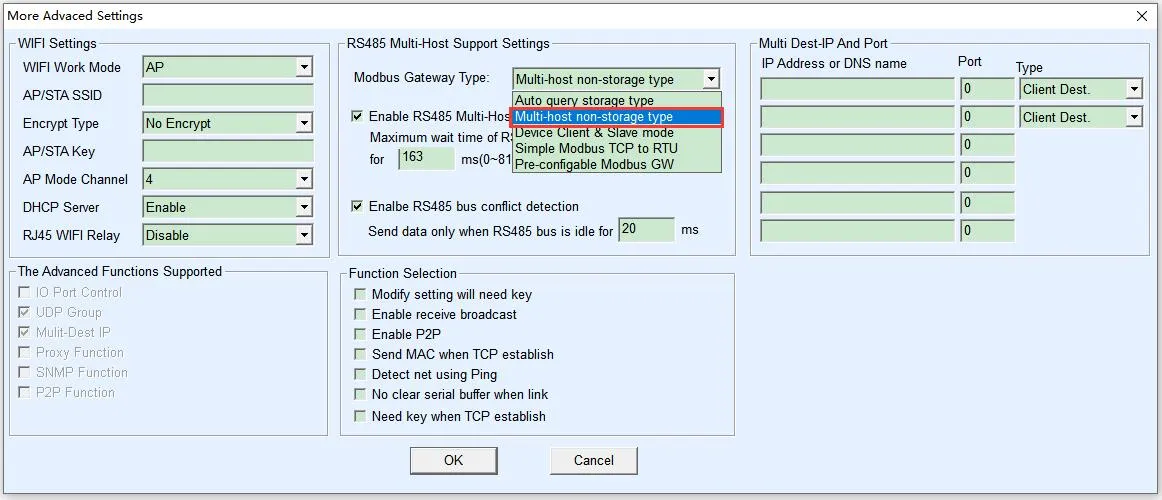
Click "More Advanced Settings" and select the Modbus gateway type as "Non-storing Modbus Gateway".
After setting, click
Modify SettingClick
Restart Device, wait for the module to reboot for the new settings to take effect.Note: For the first configuration, it is recommended to modify only the IP address and not change other parameters.
See the figure below for details:
 NOTES:
The default Modbus gateway type is "Storing", which automatically sends query commands multiple times, potentially causing the main control chip to be unable to respond in time. Be sure to set it to Non-storing Modbus Gateway.
Protocol Setting
Note: For the first configuration, it is recommended to use the default Modbus RTU protocol and not change it.
Although the module transmits data via the Ethernet port, it supports two Modbus protocols: Modbus RTU and Modbus TCP. The default data transmission is transparent, meaning the Modbus RTU protocol is used by default.
Modbus TCP Protocol Settings
In the "Transfer Protocol" within "Advanced Settings", you can set it to "Modbus TCP protocol". In this case, the Modbus RTU protocol of the microcontroller will be converted to the Modbus TCP protocol and transmitted through the network port.
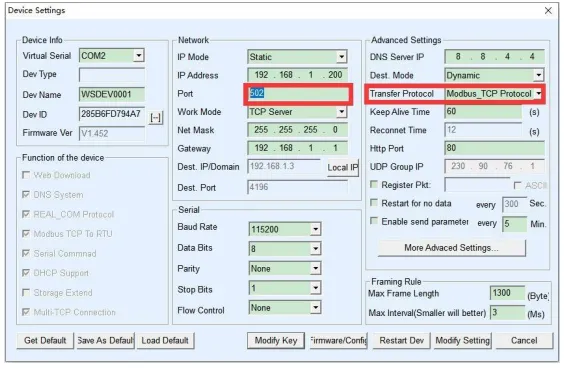
In this case, the device port automatically changes to 502. At this point, the device port automatically changes to 502. Users can then connect to port 502 of the serial port server's IP using a Modbus TCP tool.
Click "More Advanced Settings" and select the Modbus gateway type as "Non-storing Modbus Gateway".
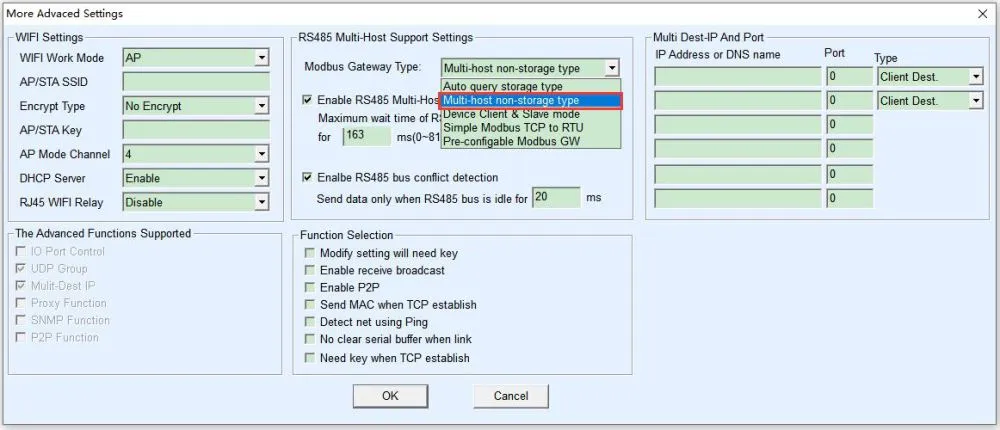
Modbus RTU Protocol Settings
In the "Transfer Protocol" within "Advanced Settings", you can set it to "None" to revert to using the Modbus RTU protocol.
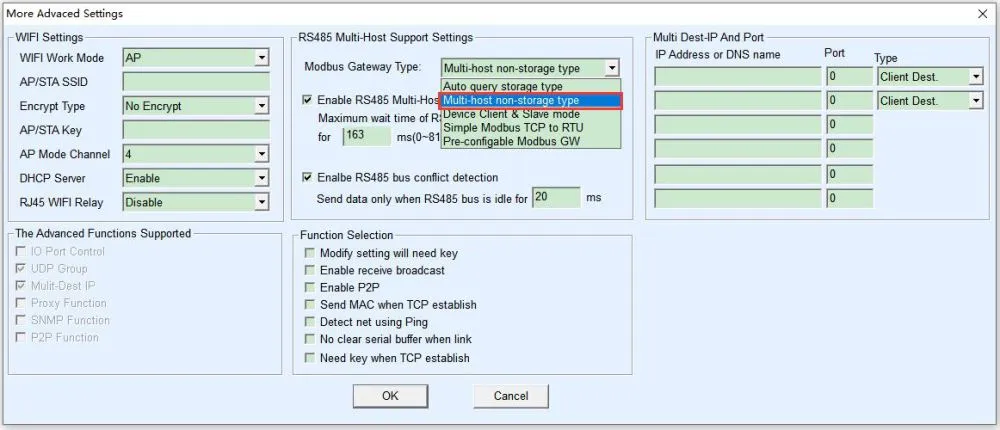
Click "More Advanced Settings" and select the Modbus gateway type as "Non-storing Modbus Gateway".
Note: The default Modbus gateway type is the storing type, which automatically sends query commands multiple times. This may overwhelm the main control chip and cause it to fail to respond. Therefore, it needs to be set to the Non-storing Modbus Gateway.
Virtual Serial Port Setting
The module transmits data through a network port (TCP/UDP protocol). In order to enable users to use the PoE port communication even with developed serial port software, a virtual serial port needs to be added. If not needed, this part can be skipped.
- First, install the virtual serial port driver Virtual-serial-port
- Vircom and the user program run on the same computer.
- Vircom virtualizes a COM port, maps this COM port to the Ethernet port, and connects it to the serial port server. When the user program communicates using the COM port, it can be sent to the user's serial device via the Vircom serial port server.
The following steps demonstrate this operation:
- Click on "Serial" on the Vircom main interface, then click "Add" and select to add COM2 (COM2 must be a COM port that did not originally exist on the computer).
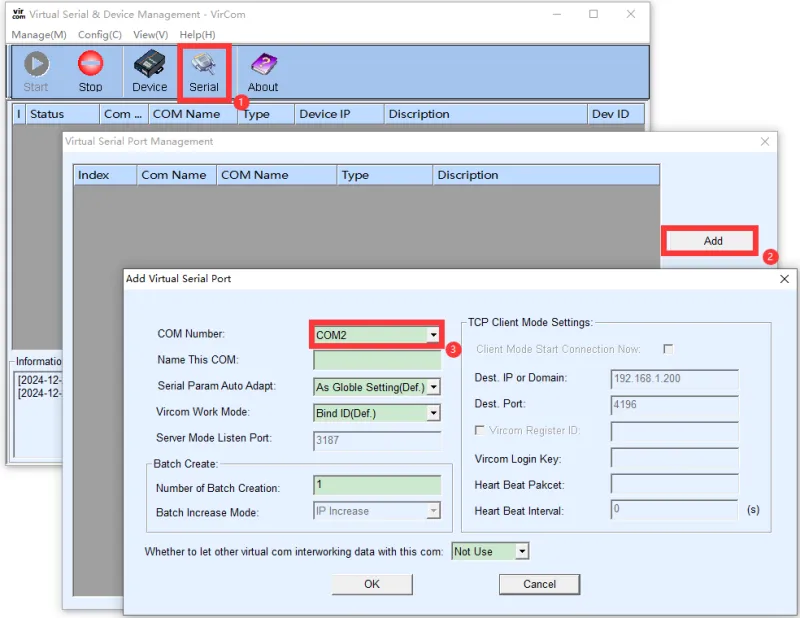
Then enter the device management and double-click the device that needs to be bound to COM2. As shown in the diagram, select COM2 from the Virtual Serial Port list in the top left corner. Then click on "Modify Setting" and then click on "Restart Device".
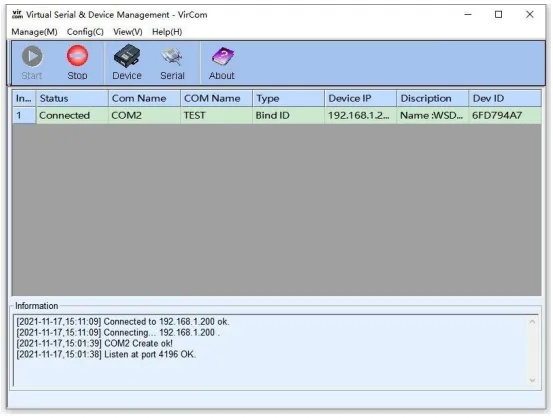
Return to the Vircom main interface. It can be seen that COM2 has been connected to the device whose IP is 192.168.1.200. At this point, you can use the virtual serial port COM2 instead of the Ethernet port for communication.
WEB Browser Configuration
The WEB method does not require installing any software and can be configured in any computer's browser, but the following conditions must be met:
- The computer and the serial port server are on the same IP segment
- The IP address of the serial port server is known in advance
Operation steps:
Enter the serial port server's IP address in the browser, for example, http://192.168.1.200 to open the following webpage
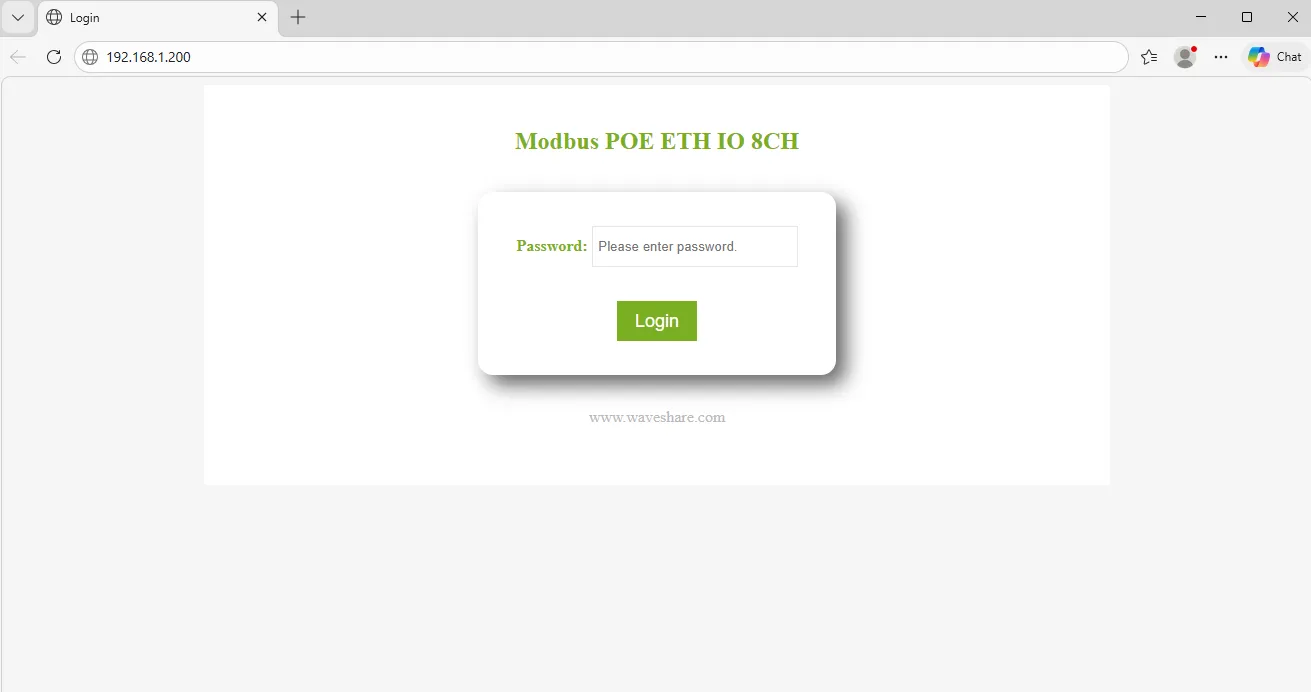
Enter the password in the Password field: The factory default has no login password set or the login password is 123456. If no password is set, you can enter any password and click the Login button. After logging in, you can set a password in the "Modify Web Login Key" section to take effect:
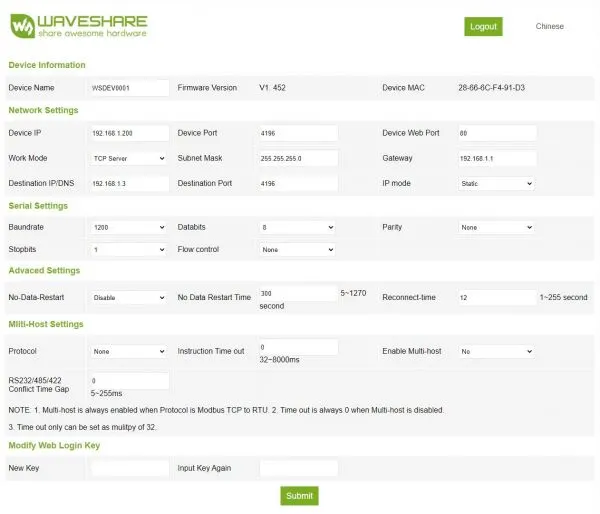
The serial server parameters can be modified on the web page that appears.
After modifying the parameters, click the "Submit" button.
Note: The system has the webpage configuration feature added by default at the factory. If the configuration interface page files are overwritten, causing the webpage to become inaccessible, you need to re-download the webpage files.
Please refer to RS485 TO ETH (B) User Manual
Software Test
The demonstration introduces the operation methods of the following two software tools. The SSCOM serial port debugging assistant is more convenient to operate, requires no installation, and displays complete commands for easier analysis. The disadvantage is that the data is not intuitive. The Modbus Poll software operates directly on registers, making data display easier to observe. The disadvantage is that commands are not completely displayed, and familiarity with Modbus register operations is required. You can choose either method for testing. It is recommended to use the SSCOM Serial Port Debug Assistant for the first test.
SSCOM Serial Port Debugging Assistant
Modbus RTU Commands
Note: The module is configured with Modbus RTU commands by default.
- Open the serial port debugging assistant window.
- Select TCPClient for the port number.
- Modify the remote IP and port number according to the Vircom settings above.
- Click the "Connect" button to connect to the TCP server.
- After successful connection, the Ethernet port green LED will light up.
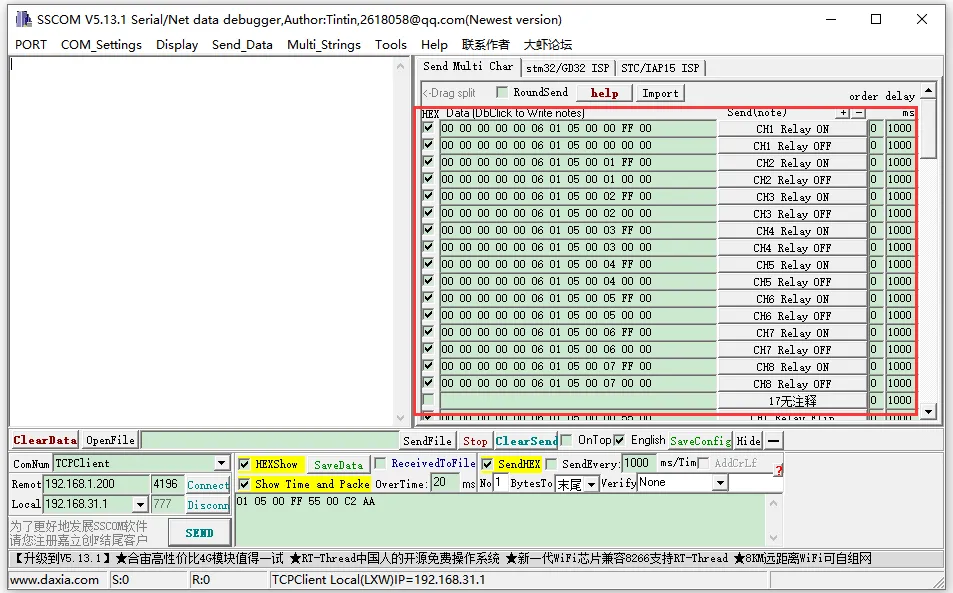
- Click to open the Send Multi-Char window. The default displayed commands are Modbus RTU commands. Click the corresponding function to send the corresponding command.
- If you use the custom input box below to send the commands, you need to set Verify as ModbusCRC16.
Modbus TCP Commands
Note: If you want to use Modbus TCP commands, you need to change the commands.
Click on the Import ini button in the Send Multi-Char column.
Select the modbus tcp.ini file to import the Modbus TCP command.
Note: If an error popup says "A component named HEX0 already exists", you need to close and reopen the software. The software will reload the file and refresh the button.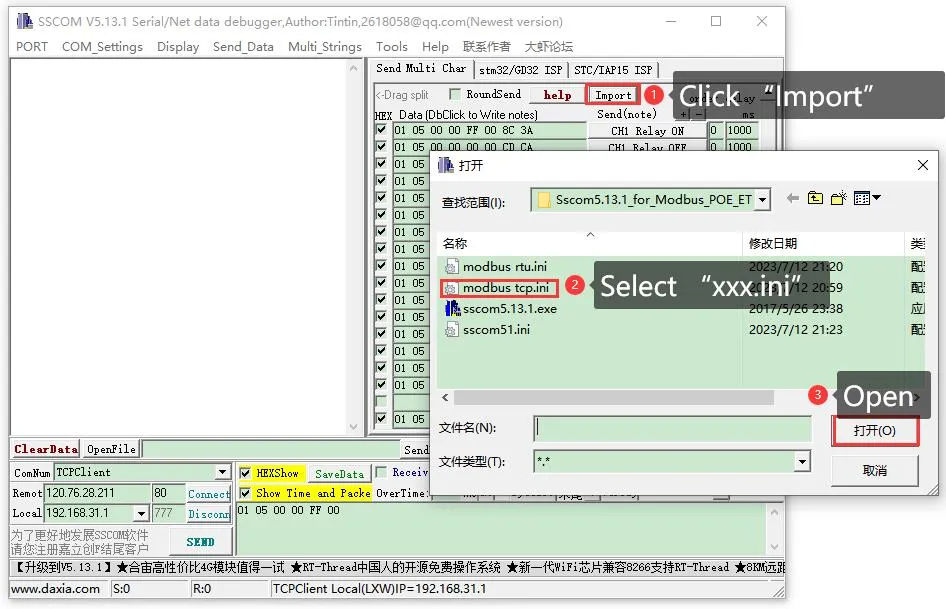
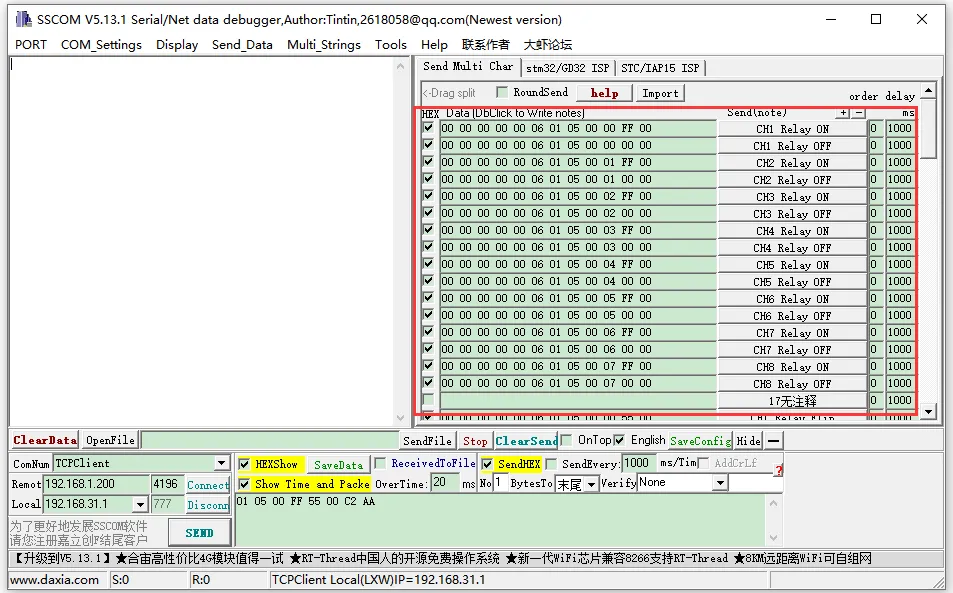
After successful import, the display will look as follows. Click the corresponding function to send the corresponding command. Note: Modbus TCP does not require CRC check. Select None for checksum. Select None for Verify.
For more detailed Modbus commands, please refer to the Development Protocol.
Modbus Poll Software
Reading Configuration
- If the serial port software is inconvenient for observing data, you can choose the Modbus Poll software to read data. Download and install the Modbus Poll software.
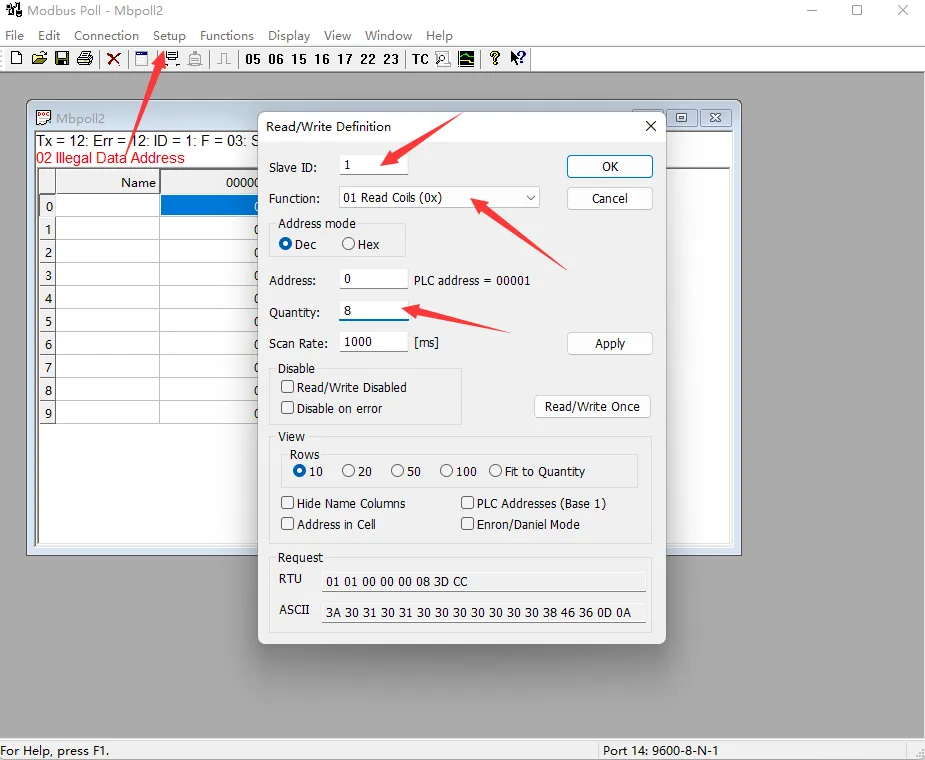
- Select Setup -> Read/Write Definition. Select the actual device address for Slave ID, 01 Read Coils for Function, and 8 channels for Quantity. Click OK to confirm.
Protocol Selection and Connection Configuration
- Connection Configuration
- When using the Modbus RTU protocol: Select Connection -> Connect Setup. Select Modbus RTU/ASCII Over TCP/IP for Connection, select RTU for Mode, and enter the correct IP address and port number. Click OK to connect.
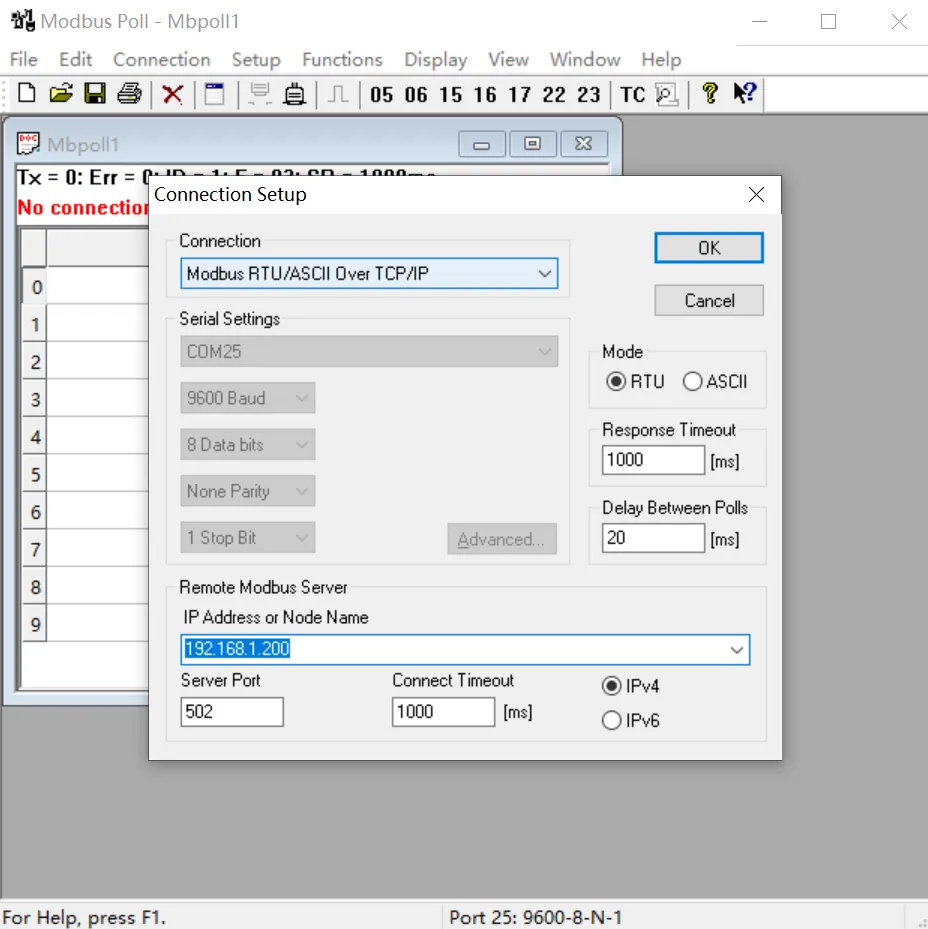
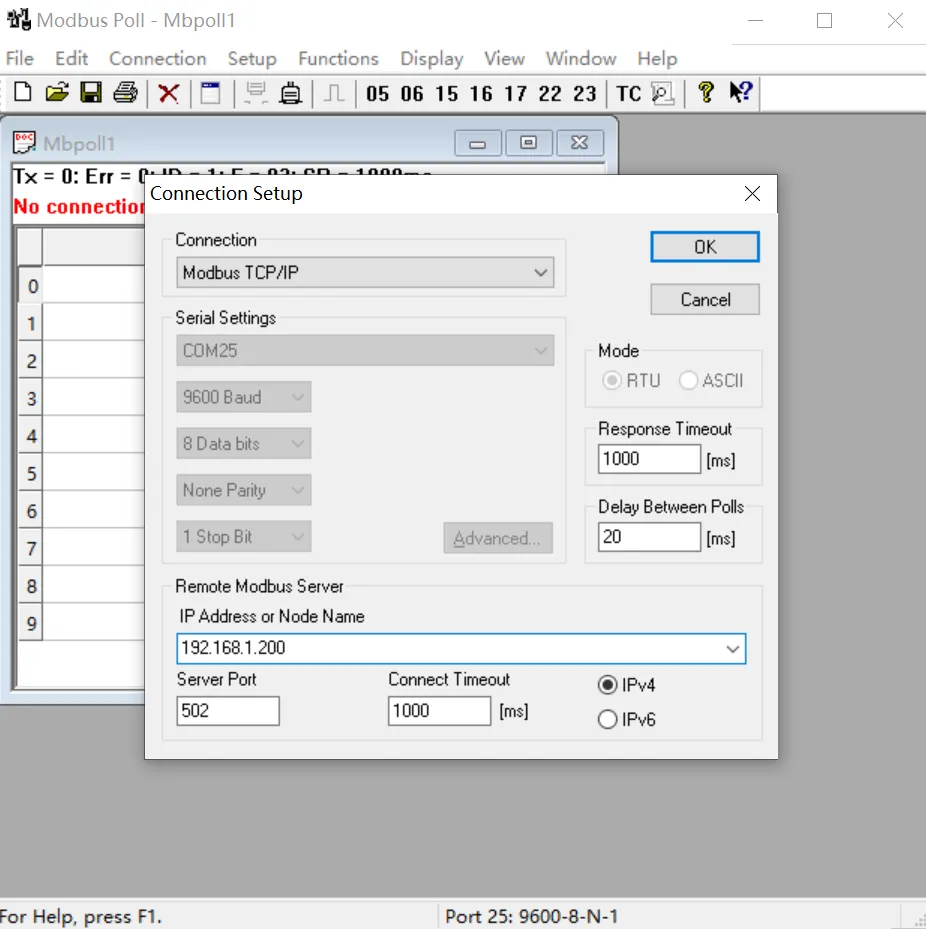
- When using the Modbus TCP protocol: Select Connection -> Connect Setup. Select Modbus TCP/IP for Connection, and enter the correct IP address and port number. Click OK to connect.
- When using the Modbus RTU protocol: Select Connection -> Connect Setup. Select Modbus RTU/ASCII Over TCP/IP for Connection, select RTU for Mode, and enter the correct IP address and port number. Click OK to connect.
Output Control and Input Reading
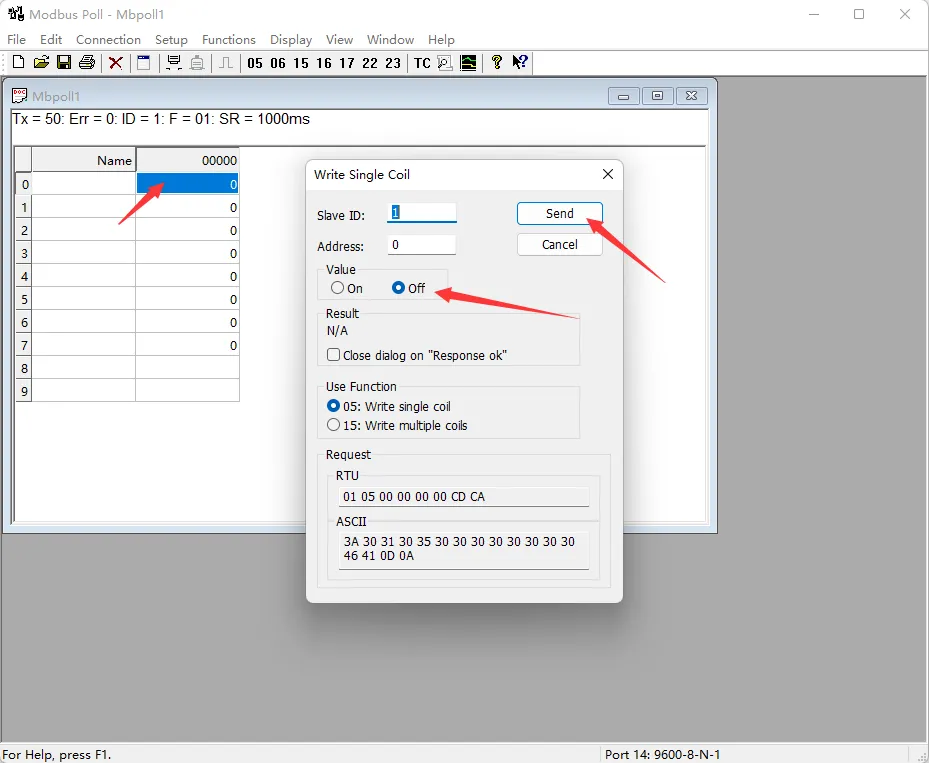
- After successful connection, you can view the current output channel status. Select the corresponding channel, double-click the status value to pop up the sending page. Choose On or Off, then click Send to control the corresponding output channel's on/off status.
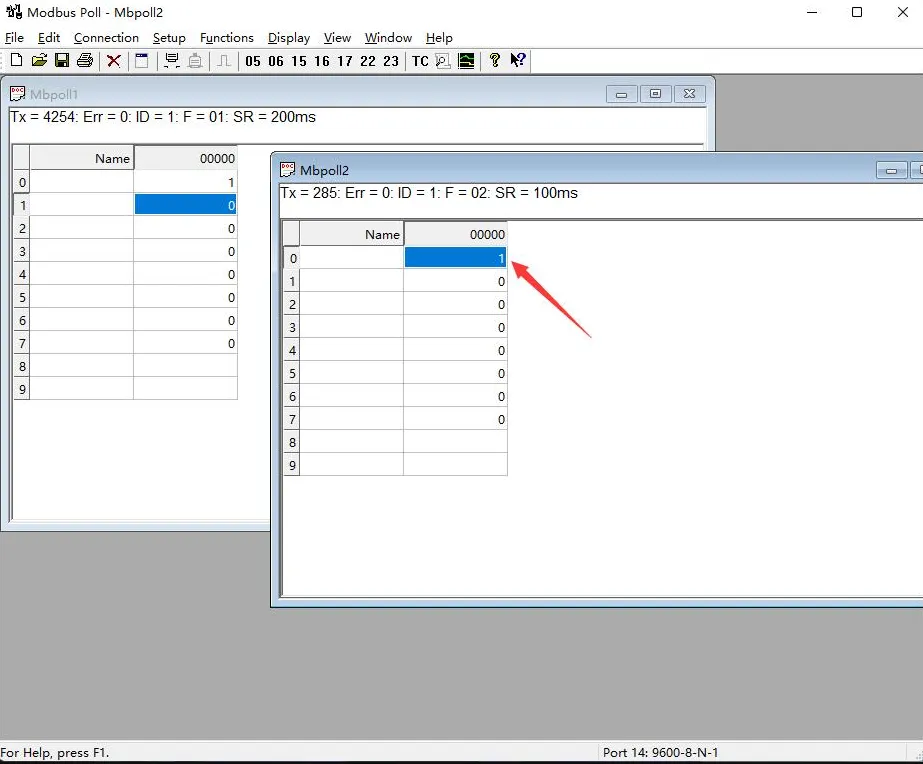
- Choose File -> New to create a new window. Select Setup -> Read/Write Definition, choose the actual device address for Slave ID, select 02 for Function, set Address to 0, set Quantity to 8 channels, and change the Scan Rate to 100ms. Click OK to confirm.
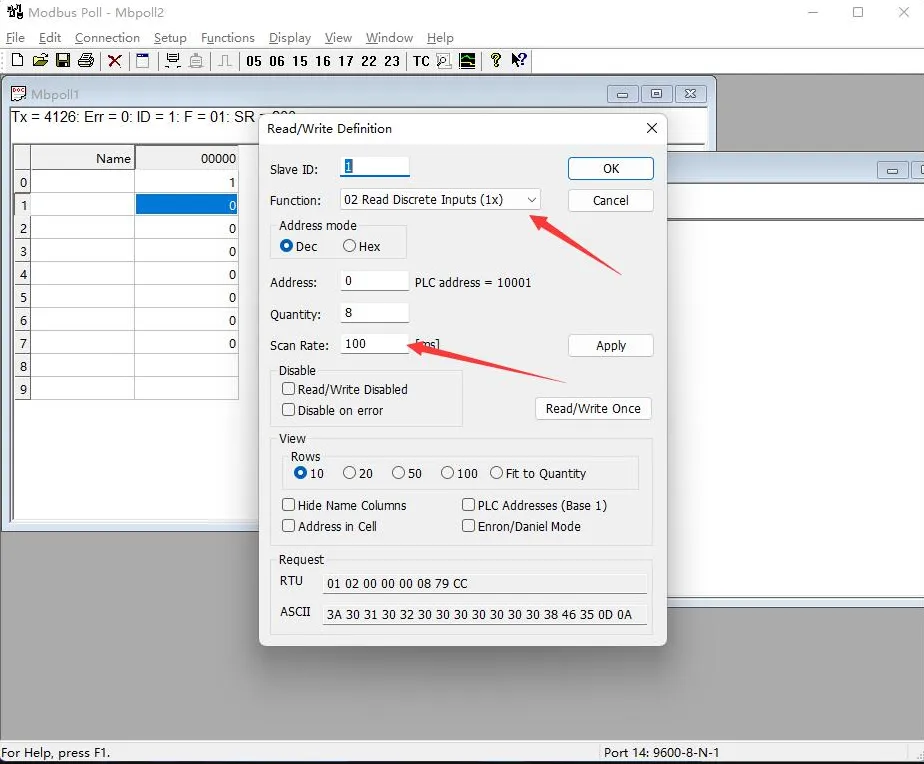
- The newly created window 2 can display the current input status. Changing the input interface level will also change the corresponding value.
Secondary Development Protocol
Function Code Introduction
| Function Code | Description | |
|---|---|---|
| 01 | Read Coil Status | Read relay status |
| 02 | Read Discrete Input Status | Read input status |
| 03 | Read Holding Registers | Read address and version |
| 05 | Write Single Coil | Control single relay |
| 06 | Write Single Register | Set baud rate and address |
| 0F | Write Multiple Coils | Write relay status |
| 10 | Write Multiple Registers | Set multiple registers |
Register Address Description
| Address (HEX) | Address Storage Content | Register Value | Access | Modbus Function Code |
|---|---|---|---|---|
| 0x0000 ~ 0x0007 | Relay address for channel 1~8 | 0xFF00: Relay ON; 0x0000: Relay OFF; 0x5500: Relay Toggle; | Read/Write | 0x01, 0x05, 0x0F |
| 0x00FF | Operate all relays | 0xFF00: All relays ON; 0x0000: All relays OFF; 0x5500: All relays Toggle; | Write | 0x05 |
| 0x0100 ~ 0x0107 | Relay toggle address for channel 1~8 | 0xFF00: Relay Toggle; 0x0000: Relay unchanged; | Write | 0x05, 0x0F |
| 0x01FF | Operate all relays toggle | 0xFF00: All relays Toggle; 0x0000: All relays unchanged; | Write | 0x05 |
| 0x0200 ~ 0x0207 | Relay momentary ON for channel 1~8 | Delay time = data * 100 ms Value: 0x0007, Delay: 7 * 100 ms = 700 ms | Write | 0x05 |
| 0x0400 ~ 0x0407 | Relay momentary OFF for channel 1~8 | Delay time = data * 100 ms Value: 0x0007, Delay: 7 * 100 ms = 700 ms | Write | 0x05 |
| 0x10000 ~ 0x10007 | Input address for channel 1~8 | Indicates the status of input channels 1~8 | Read | 0x02 |
| 0x41000 ~ 0x41007 | Relay control mode for channel 1~8 | 0x0000 ~ 0x0003 Four control modes | Read/Write | 0x03, 0x06, 0x10 |
| 0x44000 | Device address | Stores the Modbus address directly Device address: 0x0001 | Read | 0x03 |
| 0x48000 | Software version | Convert to decimal and move the decimal point two places to the left to indicate the software version 0x0064 = 100 = V1.00 | Read | 0x03 |
Command Operation Introduction
Control a Single Relay
Transmission Code: 01 05 00 00 FF 00 8C 3A
| Field | Description | Notes |
|---|---|---|
| 01 | Device address | Fixed 0x01 |
| 05 | Command 05 | Relay control command |
| 00 00 | Address | Register address of the relay to control, 0x0000 - 0x0007 |
| FF 00 | Command | 0xFF00: Relay ON; 0x0000: Relay OFF; 0x5500: Relay Toggle; |
| 8C 3A | CRC16 | CRC16 checksum of the first 6 bytes of data |
Return Code: 01 05 00 00 FF 00 8C 3A
| Field | Description | Notes |
|---|---|---|
| 01 | Device address | Fixed 0x01 |
| 05 | Command 05 | Relay control command |
| 00 00 | Address | Register address of the relay to control, 0x0000 - 0x0007 |
| FF 00 | Command | 0xFF00: Relay ON; 0x0000: Relay OFF; 0x5500: Relay Toggle; |
| 8C 3A | CRC16 | CRC16 checksum of the first 6 bytes of data |
Example: Device with address 1:
Relay 0 on: 01 05 00 00 FF 00 8C 3A
Relay 0 off: 01 05 00 00 00 00 CD CA
Relay 1 on: 01 05 00 01 FF 00 DD FA
Relay 1 off: 01 05 00 01 00 00 9C 0A
Relay 2 on: 01 05 00 02 FF 00 2D FA
Relay 2 off: 01 05 00 02 00 00 6C 0A
Relay 3 on: 01 05 00 03 FF 00 7C 3A
Relay 3 off: 01 05 00 03 00 00 3D CA
Relay 0 toggle: 01 05 00 00 55 00 F2 9A
Relay 1 toggle: 01 05 00 01 55 00 A3 5A
Relay 2 toggle: 01 05 00 02 55 00 53 5A
Relay 3 toggle: 01 05 00 03 55 00 02 9A
Control All Relays
Transmission Code: 01 05 00 FF FF 00 BC 0A
| Field | Description | Notes |
|---|---|---|
| 01 | Device address | Fixed 0x01 |
| 05 | Command 05 | Relay control command |
| 00 FF | Address | Fixed 0x00FF |
| FF 00 | Command | 0xFF00: All relays ON; 0x0000: All relays OFF; 0x5500: All relays Toggle; |
| BC 0A | CRC16 | CRC16 checksum of the first 6 bytes of data |
Return Code: 01 05 00 FF FF 00 BC 0A
| Field | Description | Notes |
|---|---|---|
| 01 | Device address | Fixed 0x01 |
| 05 | Command 05 | Relay control command |
| 00 FF | Address | Fixed 0x00FF |
| FF 00 | Command | 0xFF00: All relays ON; 0x0000: All relays OFF; 0x5500: All relays Toggle; |
| BC 0A | CRC16 | CRC16 checksum of the first 6 bytes of data |
Example: Device with address 1:
All relays on: 01 05 00 FF FF 00 BC 0A
All relays off: 01 05 00 FF 00 00 FD FA
All relays toggle: 01 05 00 FF 55 00 C2 AA
Read Relay Status
Transmission Code: 01 01 00 00 00 08 3D CC
| Field | Description | Notes |
|---|---|---|
| 01 | Device address | Fixed 0x01 |
| 01 | Command 01 | Query relay status command |
| 00 00 | Starting address | Relay start address, 0x0000 - 0x0007 |
| 00 08 | Number of relays | Cannot exceed the maximum number of relays |
| 3D CC | CRC16 | CRC16 checksum of the first 6 bytes of data |
Return Code: 01 01 01 00 51 88
| Field | Description | Notes |
|---|---|---|
| 01 | Device address | Fixed 0x01 |
| 01 | Command 01 | Query relay status command |
| 01 | Byte count | Total number of bytes in the returned status information |
| 00 | Queried status | Returned relay status Bit0: Starting relay status; Bit1: Next relay status, and so on. High unused bits are zero |
| 51 88 | CRC16 | CRC16 checksum of the first 4 bytes of data |
Example: Device with address 1
Transmission : 01 01 00 00 00 08 3D CC        //Query all relays
Return Code: 01 01 01 00 51 88                //All relays off
Transmission : 01 01 00 02 00 01 5C 0A        //Query relays 2
Return Code: 01 01 01 01 90 48                //Relay 1 on
Transmission : 01 01 00 01 00 03 2D CB        //Query relays 1, 2, 3 status
Return Code: 01 01 01 05 91 8B                //Relays 1 and 3 are on, relay 2 is off
Write Relay Status
Transmission Code: 01 0F 00 00 00 08 01 FF BE D5
| Field | Description | Notes |
|---|---|---|
| 01 | Device address | Fixed 0x01 |
| 0F | Command 0F | Write relay status command |
| 00 00 | Relay start address | Register address of the relay to control, 0x0000 - 0x0007 |
| 00 08 | Number of relays | Number of relays to operate, cannot exceed the maximum number of relays |
| 01 | Byte count | Number of status bytes |
| FF | Relay status | Bit0: Starting relay status; Bit1: Next relay status, and so on. High unused bits are zero |
| BE D5 | CRC16 | CRC16 checksum of the first 6 bytes of data |
Return Code: 01 0F 00 00 00 08 54 0D
| Field | Description | Notes |
|---|---|---|
| 01 | Device address | Fixed 0x01 |
| 0F | Command 0F | Write relay status command |
| 00 00 | Address | Relay start address |
| 00 08 | Number of relays | Number of relays written |
| 54 0D | CRC16 | CRC16 checksum of the first 6 bytes of data |
Example: Device with address 1
All relays on: 01 0F 00 00 00 08 01 FF BE D5
All relays off: 01 0F 00 00 00 08 01 00 FE 95
0-1 on; 3-7 off: 01 0F 00 00 00 08 01 03 BE 94
Relays 1, 2, and 3 on: 01 0F 00 01 00 03 01 07 F3 55
Relay Momentary ON/OFF Command
Transmission Code: 01 05 02 00 00 07 8D B0
| Field | Description | Notes |
|---|---|---|
| 01 | Device address | Fixed 0x01 |
| 05 | Command 05 | Single control command |
| 02 | Command | 02 for momentary ON, 04 for momentary OFF |
| 00 | Relay address | Relay address to control, 0x00 ~ 0x07 |
| 00 07 | Interval time | Delay time = data * 100 ms Value: 0x0007, Delay: 7 * 100 ms = 700 ms Maximum time for momentary ON/OFF is 0x7FFF |
| 8D B0 | CRC16 | CRC16 checksum of the first 6 bytes of data |
Return Code: 01 05 02 00 00 07 8D B0
| Field | Description | Notes |
|---|---|---|
| 01 | Device address | Fixed 0x01 |
| 05 | Command 05 | Single control command |
| 02 | Command | 02 for momentary ON, 04 for momentary OFF |
| 00 | Relay address | Relay address to control, 0x00 ~ 0x07 |
| 00 07 | Interval time | Delay time = data * 100 ms Value: 0x0007, Delay: 7 * 100 ms = 700 ms Maximum time for momentary ON/OFF is 0x7FFF |
| 8D B0 | CRC16 | CRC16 checksum of the first 6 bytes of data |
Example: Device with address 1
Relay 0 Momentary ON : 01 05 02 00 00 07 8D B0 //700MS = 7*100MS = 700MS
Relay 1 Momentary ON : 01 05 02 01 00 08 9C 74 //800MS
Relay 0 Momentary OFF : 01 05 04 00 00 05 0C F9 //500MS
Relay 1 Momentary OFF : 01 05 04 01 00 06 1D 38 //600MS
Read Input Status
Transmission Code: 01 02 00 00 00 08 79 CC
| Field | Description | Notes |
|---|---|---|
| 01 | Device address | Fixed 0x01 |
| 02 | Command 02 | Read input status command |
| 00 00 | Input start address | Input start address, 0x0000 - 0x0007 |
| 00 08 | Number of registers | Number of input channels to read, cannot exceed the maximum number of input channels |
| 79 CC | CRC16 | CRC16 checksum of the first 6 bytes of data |
Return Code: 01 02 01 00 A1 88
| Field | Description | Notes |
|---|---|---|
| 01 | Device address | Fixed 0x01 |
| 02 | Command 02 | Read input status command |
| 01 | Byte count | Total number of bytes in the returned status information |
| 00 | Queried status | Returned input status Bit0: Starting input channel status; Bit1: Next input channel status, and so on. High unused bits are zero |
| A1 88 | CRC16 | CRC16 checksum of the first 4 bytes of data |
Example: Device with address 1
Transmission Code: 01 02 00 00 00 08 79 CC    //Query all input channels
Return Code: 01 01 01 00 51 88                //Inputs are all untriggered
Transmission Code: 01 02 00 00 00 08 79 CC    //Query all input channels
Return Code: 01 02 01 41 61 B8                //Channels 1 and 7 input is triggered, and the rest of channels are not triggered
Transmission Code: 01 02 00 01 00 03 69 CB    //Query input channels 2, 3, and 4
Return Code: 01 02 01 03 E1 89                //Channels 2 and 3 input is triggered, and channel 4 is not triggered
Read Relay Control Mode
Transmission Code: 01 03 10 00 00 08 40 CC
| Field | Description | Notes |
|---|---|---|
| 01 | Device address | Fixed 0x01 |
| 03 | Command 03 | Read holding registers |
| 10 00 | Starting register address | 0x1000 - 0x1007 correspond to relay control mode for channels 1~8 |
| 00 08 | Number of registers | Number of registers to read, maximum 8 channels |
| 40 CC | CRC16 | CRC16 checksum of the first 6 bytes of data |
Return Code: 01 03 10 00 00 00 00 00 00 00 00 00 00 00 00 00 00 00 00 E4 59
| Field | Description | Notes |
|---|---|---|
| 01 | Device address | Fixed 0x01 |
| 03 | Command 03 | Read holding registers |
| 10 | Byte count | Total number of bytes in the returned status information |
| 00 00 ~ 00 00 | Control mode | Represents the control mode for relays 1 - 8. 0x0000 ~ 0x0003 indicate four control modes. 0x0000: Normal mode, relays are directly controlled by commands; 0x0001: Linkage mode, relay status follows the corresponding input channel status; 0x0002: Toggle mode, the relay status toggles once per pulse on the input channel; 0x0003: Edge trigger mode, the relay status toggles once per level change on the input channel. ⚠️ Note: Except for Linkage mode, relays in other modes can also be controlled simultaneously via commands. |
| E4 59 | CRC16 | CRC16 checksum of the first 6 bytes of data |
Example: Device with address 1
Read relay 1-8 control mode: 01 03 10 00 00 08 40 CC
Read relay 1 control mode: 01 03 10 00 00 01 80 CA
Read relay 2 control mode: 01 03 10 01 00 01 D1 0A
Read relay 3-5 control mode: 01 03 10 02 00 03 A0 CB
Set Single Relay Control Mode
Transmission Code: 01 06 10 00 00 01 4C CA
| Field | Description | Notes |
|---|---|---|
| 01 | Device address | Fixed 0x01 |
| 06 | Command 06 | Write single register command |
| 10 00 | Starting register address | 0x1000 - 0x1007 correspond to relay control mode for channels 1~8 |
| 00 01 | Control mode | Represents the control mode for relays 1 - 8. 0x0000 ~ 0x0003 indicate four control modes. 0x0000: Normal mode, relays are directly controlled by commands; 0x0001: Linkage mode, relay status follows the corresponding input channel status; 0x0002: Toggle mode, the relay status toggles once per pulse on the input channel; 0x0003: Edge trigger mode, the relay status toggles once per level change on the input channel. ⚠️ Note: Except for Linkage mode, relays in other modes can also be controlled simultaneously via commands. |
| 4C CA | CRC16 | CRC16 checksum of the first 6 bytes of data |
Return Code: 01 06 10 00 00 01 4C CA
| Field | Description | Notes |
|---|---|---|
| 01 | Device address | Fixed 0x01 |
| 06 | Command 06 | Write single register command |
| 10 00 | Starting register address | 0x1000 - 0x1007 correspond to relay control mode for channels 1~8 |
| 00 01 | Control mode | Relay control modes, 0x0000~0x0003 represent four control modes |
| 4C CA | CRC16 | CRC16 checksum of the first 6 bytes of data |
Example: Device with address 1:
Set relay 1 as Linkage mode: 01 06 10 00 00 01 4C CA
Set relay 2 as toggle mode: 01 06 10 01 00 02 5D 0B
Set Multiple Relay Control Mode
Transmission Code: 01 10 10 00 00 08 10 00 01 00 01 00 01 00 01 00 01 00 01 00 01 00 01 7C B1
| Field | Description | Notes |
|---|---|---|
| 01 | Device address | Fixed 0x01 |
| 10 | Write multiple registers | - |
| 10 00 | Starting register address | 0x1000 - 0x1007 correspond to relay control mode for channels 1~8 |
| 00 08 | Number of registers | Number of registers to set, up to 8 channels |
| 10 | Byte count | - |
| 00 01 ~ 00 01 | Control mode | Represents the control mode for relays 1 - 8. 0x0000 ~ 0x0003 indicate four control modes: 0x0000: Normal mode, relays are directly controlled by commands; 0x0001: Linkage mode, relay status follows the corresponding input channel status; 0x0002: Toggle mode, the relay status toggles once per pulse on the input channel; 0x0003: Edge trigger mode, the relay status toggles once per input state change on the input channel. ⚠️ Note: Except for Linkage mode, relays in other modes can also be controlled simultaneously via commands. |
| 7C B1 | CRC16 | CRC16 checksum of the first 6 bytes of data |
Return Code: 01 10 10 00 00 08 C5 0F
| Field | Description | Notes |
|---|---|---|
| 01 | Device address | Fixed 0x01 |
| 10 | Write multiple registers | - |
| 10 00 | Starting register address | 0x1000 - 0x1007 correspond to relay control mode for channels 1~8 |
| 00 08 | Number of registers | Number of registers to set, up to 8 channels |
| C5 0F | CRC16 | CRC16 checksum of the first 6 bytes of data |
Example: Device with address 1:
Set relays 1–8 as Normal mode: 01 10 10 00 00 08 10 00 00 00 00 00 00 00 00 00 00 00 00 00 00 00 00 0B 5C
Set relays 1–8 as Linkage mode: 01 10 10 00 00 08 10 00 01 00 01 00 01 00 01 00 01 00 01 00 01 00 01 7C B1
Set relays 3–5 as toggle mode: 01 06 00 01 00 02 5D 4B
Read Software Version Command
Transmission Code: 01 03 80 00 00 01 AD CA
| Field | Description | Notes |
|---|---|---|
| 01 | Device address | Fixed 0x01 |
| 03 | Command 03 | Read holding registers |
| 80 00 | Command register | 0x8000 for reading software version |
| 00 01 | Byte Count | Fixed 0x0001 |
| AD CA | CRC16 | CRC16 checksum of the first 6 bytes of data |
Return Code: 01 03 02 00 64 B9 AF
| Field | Description | Notes |
|---|---|---|
| 01 | Device address | Fixed 0x01 |
| 03 | Command 03 | Read holding registers |
| 02 | Byte count | Returned byte count |
| 00 64 | Software Version | Convert to decimal, then shift decimal point two places left for version 0x0064 = 100 = V1.00 |
| B9 AF | CRC16 | CRC16 checksum of the first 5 bytes of data |
Example: Device with address 1:
Transmission Code: 01 03 80 00 00 01 AD CA
Return Code: 01 03 02 00 C8 B9 D2       //0x00C8 = 200 =V2.00
Exception Function Codes
If the received command is incorrect or an exception occurs, the device will return an exception response. The exception response format is as follows:
Return Code: 01 85 03 02 91
| Field | Description | Notes |
|---|---|---|
| 01 | Device Address | 0x00 indicates broadcast address; 0x01-0xFF indicate device address |
| 85 | Exception Function Code | Exception function code = Request function code + 0x80 |
| 03 | Byte Count | Exception code |
| 02 91 | CRC16 | CRC16 checksum of the first 6 bytes of data |
The exception code is a single-byte value indicating the type of error. Several common exception codes defined by the Modbus protocol:
| Exception Code | Name | Description |
|---|---|---|
| 0x01 | Illegal Function | The requested function code is not supported |
| 0x02 | Illegal Data Address | The requested data address is incorrect |
| 0x03 | Illegal Data Value | The requested data value or operation cannot be performed |
| 0x04 | Server Failure | Server device failure |
| 0x05 | Acknowledge | Request received and processing |
| 0x06 | Device Busy | Device is busy and cannot execute the requested operation |
Modbus TCP Command Introduction
Here is a brief introduction to Modbus TCP and Modbus RTU protocol conversion using the above commands to open the first relay as an example.
Modbus RTU command: 01 05 00 00 FF 00 8C 3A
| Field | Description | Notes |
|---|---|---|
| 01 | Device address | Fixed 0x01 |
| 05 | Command 05 | Relay control command |
| 00 00 | Address | Register address of the relay to control, 0x00, i.e., the first relay |
| FF 00 | Command | 0xFF00: Relay ON |
| 8C 3A | CRC16 | CRC16 checksum of the first 6 bytes of data |
Modbus TCP command: 00 00 00 00 00 06 01 05 00 00 FF 00
| Field | Description | Notes |
|---|---|---|
| 00 00 | Message identifier | Can be 0x00 |
| 00 00 | Modbus identifier | Must be 0, indicating Modbus communication |
| 00 06 | Byte length | Indicates the total number of subsequent bytes; 6 bytes follow |
| 01 | Device address | Fixed 0x01 |
| 05 | Command 05 | Relay control command |
| 00 00 | Address | Register address of the relay to control, 0x00, i.e., the first relay |
| FF 00 | Command | 0xFF00: Relay ON |
By comparing the commands above, it can be seen that removing the CRC checksum from the Modbus RTU command and prefixing it with five 0x00 and one byte length converts it to the Modbus TCP protocol.
For example, if the server network port receives the Modbus TCP command 00 00 00 00 00 06 01 05 00 00 FF 00 (turn on the first relay), the master controller will receive the Modbus RTU command 01 05 00 00 FF 00 8C 3A.
Advanced Applications
Resources
1. Technical Manuals
- Technical Manuals:
2. Software Development Resources
- Debugging Tools:
Support
Monday-Friday (9:30-6:30) Saturday (9:30-5:30)
Email: services01@spotpear.com
[Tutorial Navigation]
- Product Parameters
- LED Indicator Descriptions
- Basic Functions
- Wiring Instructions
- Module Parameter Configuration
- Vircom Software Configuration
- WEB Browser Configuration
- Software Test
- Secondary Development Protocol
- Function Code Introduction
- Register Address Description
- Command Operation Introduction
- Control a Single Relay
- Control All Relays
- Read Relay Status
- Write Relay Status
- Relay Momentary ON/OFF Command
- Read Input Status
- Read Relay Control Mode
- Set Single Relay Control Mode
- Set Multiple Relay Control Mode
- Read Software Version Command
- Exception Function Codes
- Modbus TCP Command Introduction
- Advanced Applications
- Resources
- Support