




- sales/support
Google Chat:---
- sales
+86-0755-88291180
- sales01
sales@spotpear.com
- sales02
dragon_manager@163.com
- support
tech-support@spotpear.com
- CEO-Complaints
zhoujie@spotpear.com
- Only Tech-Support
WhatsApp:13246739196
- Purchase/Shipping/Refund
WhatsApp:13424403025
- HOME
- >
- ARTICLES
- >
- Common Moudle
- >
- LCD
Android SDK for NFC-Powered e-Paper
Import the .jar file
- Download the SDK
- Download the SDK and unzip it to get the .jar file
- NFC SDK
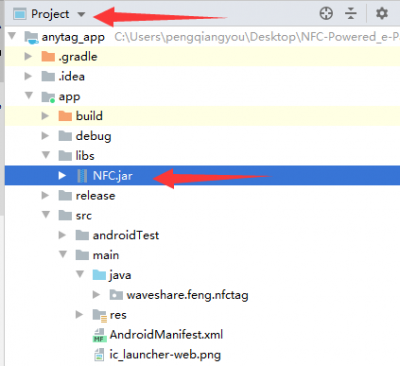
- Copy the Jar file to libs directory of your project.

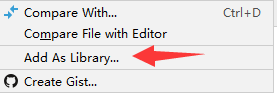
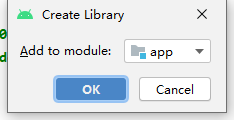
- Find the .jar file in your project, right-click it to add it as libraries.
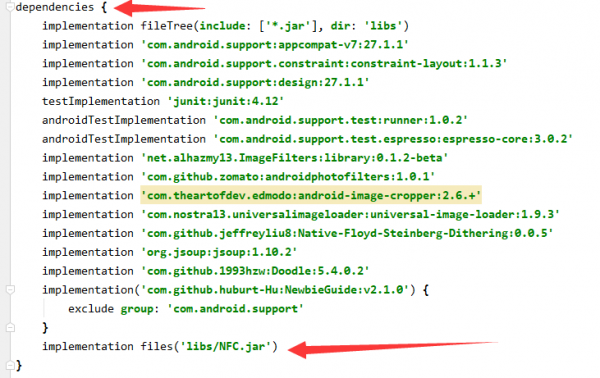
- After adding, the line will bee auto-added to build.gradle.:
Use guide
There are two functions provided, one is send function and any is status function.
Sent function
| Type | e-Paper |
|---|---|
| 1 | 2.13inch |
| 2 | 2.9inch |
| 3 | 4.2inch |
| 4 | 7.5inch |
| 5 | 7.5inch HD |
| 6 | 2.7inch |
| Type | e-Paper | width | height |
|---|---|---|---|
| 1 | 2.13inch | 250 | 122 |
| 2 | 2.9inch | 296 | 128 |
| 3 | 4.2inch | 400 | 300 |
| 4 | 7.5inch | 800 | 480 |
| 5 | 7.5inch HD | 880 | 528 |
| 6 | 2.7inch | 264 | 176 |
Status function
- int b()
- Return:
- 0-100:The current process of sending.
- -1:Failed
Examples
- 0-100:The current process of sending.
- -1:Failed
protected void onNewIntent(Intent intent) {//Recognized the NFC
    if (mWriteMode && NfcAdapter.ACTION_TAG_DISCOVERED.equals(intent.getAction())) {
        detectedTag = intent.getParcelableExtra(NfcAdapter.EXTRA_TAG);
        String[] tech = detectedTag.getTechList();//Get the descriptor
        if(tech[0].equals("android.nfc.tech.NfcA")) {//if the descriptor is correct
            Thread t = new Thread() {//Create an new thread
                @Override
                public void run() {
                    Boolean success = false;
                    NfcA tntag;//NFC tag

                    final a  a = new a();//Create a new instance.
                    a.a();//初始化发送函数

                    Thread thread = new Thread(new Runnable() {//Create thread
                        @Override
                        public void run() {
                            EPD_total_progress = 0;
                            while(EPD_total_progress != -1){
                                EPD_total_progress = a.b();//Read the process
                                if(EPD_total_progress == -1){
                                    break;
                                }
                                setStatusBody(getString(R.string.txing) + EPD_total_progress +"%");
                                if(EPD_total_progress == 100 ){
                                    break;
                                }
                                SystemClock.sleep(10);
                            }
                        }
                    });
                    thread.start();//start the thread
                    tntag = NfcA.get(detectedTag);//Get the tag instance.
                    try {
                        int whether_succeed = a.a(tntag,Size_Flag, bmp_send);//Send picture
                        if(whether_succeed == 1){
                            success = true;

                            runOnUiThread(new Runnable() {
                                @Override
                                public void run() {
                                    checkNFCpopwindow.dismiss(); //Tips

                                }
                            });
                            Success_Sound_Effects();

                        }else{
                            setStatusBody(getString(R.string.txfail));
                        }

                    } finally {
                        try {
                            if (success == false) {
                                setStatusBody(getString(R.string.txfail));
                                runOnUiThread(new Runnable() {
                                    @Override
                                    public void run() {
                                        checkNFCpopwindow.dismiss();
                                    }
                                });
                            }
                            tntag.close();
                        } catch (IOException e) {//handle exception error
                            e.printStackTrace();
                        }
                    }
                }
            };
            t.start();//Start thread
        }
    }
}
TAG:
Raspberry Pi 5 Audio
ESP32 S3 Development Board 2.8 inch Round LCD Display 480x480 QMI8658 Sensor / MIC / SD /MP3 Audio /Battery Port LVGL/HMI For Arduino
ESP32 C6 Development Board 1.47 inch LCD Display Screen ST7789 For Arduino WiFi6/LVGL/HMI Onborad SD-Port/RGB-LED
ESP32 C3 Mini
ESP32 C6 AI 1.54inch Development Board 1.54 inch TouchScreen Display DeepSeek
ESP32-C6 Development Board
Raspberry Pi 5
Raspberry Pi ST7789
Development Board
1.54inch OLED user guide
LuckFox Pico
Raspberry Pi
Luckfox Pico SPI LCD
Raspberry Pi 5 Audio Jack
Rasperry Pico 2 RP2350 7.3 inch e-Paper Ink Display E6 Full Color Electronic PhotoPainter 800x480 For Calendar/Quotes/Paintings/Posters
Arduino MLX90640
Raspberry Pi 3.5 inch DSI Display MIPI LCD (E) Capacitive TouchScreen 640x480
MPTPU Raspberry Pi 5 TPU AI Kit 2TOPS PCIe to TPU HAT Pi5 For Google Coral Edge TPU
Raspberry Pi 5 8 inch DSI LCD Captive TouchScreen MIPI Display 1280x800 Industrial One-Body Tablet PC With 5MP Front Camera
RS232 to RS485
TAG:
ESP32-S3 QMI8658A
NVIDIA Jetson Orin Nano/NX PoE Power over Ethernet RJ45 802.3af
Modbus
Raspberry Pi 5 Aluminum Metal Case
ESP32 Thermal imaging
ESP32 C3 LCD 1.3 inch Display Screen ST7789 240x240 3D Transparent Refractive Prism Mini TV Arduino
Raspberry Pi Pico 7inch DVI LCD
ESP32 C6 Development Board 1.28 inch LCD Display Screen 240x240 GC9A01A SD card slot
TTL To CAN Mini
Luckfox Lyra Plus RK3506G2
EchoEar 1.85 inch Round TouchScreen 1.85inch QSPI LCD 360*360 CST816T ST77916
Spotpear
Raspberry Pi 5
RJ45 Ethernet Extension Cable
ESP32-S3 Display
Raspberry Pi Camera
Sipeed Lichee Tang Nano 20K FPGA RISCV Retro-Game Linux GW2AR-18 GOAI Gowin
5.79inch e Paper Module B Red-Black-White display 792x272 Arduino Raspberry Pi Jetson STM32
Raspberry Pi 5 5V5A Power
Raspberry Pi Thermal imaging